I have bt midi guitar similar to jamstik that connects to apps like tonal energy. It never appears as a source, only as itself as a midi peddle in the articulation section if paired through TE, as network 1 through midimittr (not its name), never connects to guitar itself though it should apparantly. the sound is registered but no change of tuning is possible, no matter what I do its the same sound.
Any ideas as to why it doesnt appear as an audio device in the tracking section. Im keen to buy this as I need an app that can change tuning but cant make this work alone (which it is supposed to) or with TE (or other apps) and only ios audio are options as input device and the only option in input channel is the iPhone microphone, really frustrating.
Its both a standalone musical instrument with cable and Bluetooth midi out connections.
Im connecting via bt and it registers in apps where I can change output to piano etc heard through the phone,not the device.
It outputs Cc data which i can see
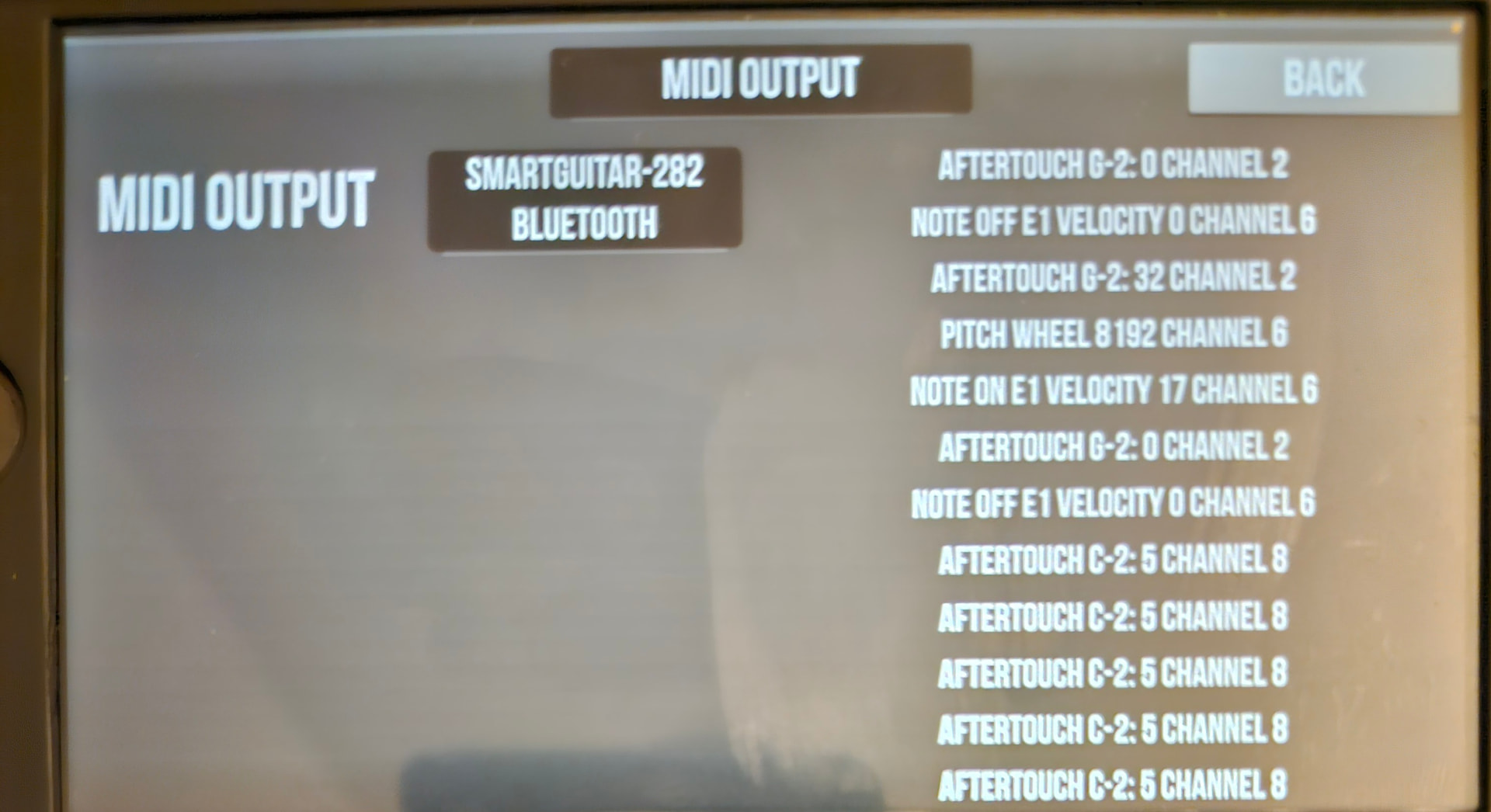
If paired with tonal energy app it appears as smart guitar 282 in midi pedal section of articulation. Midi out in midi fx section of midi machines its registered with outputs as per pic. But no ability to change tuning in tracking section. But it isnot seen anywhere else in the app.
Obviously I have to buy it to use with 3rd party apps but its supposed to see it alone and it doesn’t. Even with 3rd party apps its only seen as a midi pedal or in midi output. I cant see it as an input anywhere.
I could use this through the audio output jack as you would a conventional guitar but id like to see if i can do it via bt as a midi controller.
Except mg2 allows you to change tuning, its this feature im after.
I think youre right about note data, using midimittr alone the device appeared as a midi output device, still not as an input but no data was recorded when plucking and no sound, unless a third party app will allow this but i want to be sure before buying it, pairing with TE did not lead to it showing up in the input
i thought mg3 could now accept midi note data, for instance for use in keyswitching/articulation?
if your device sends midi on separate channels then alternate tunings should be easy to manage with free/standard midi tools, an app like mg3 is not required.
do you have a link to a page describing the device?
I think that we need to acknowledge the fact that transmission of note data over Bluetooth MIDI is not suitable for performance use due to the inherent latency of BT. And of course, if BT audio is even available from this particular device, it would not be practical to use it in a performance context. Please let me know if I’m missing the point.
BLE4.0, 44.1khz sampling, 32 bit is all the data I have. Obviously it pairs with any app that accepts midi and I can change sound to anything the app allows just not the tuning. It was based on the now defunct jamstik and it has some of its features but the original jamstik was tuned physically. This one isnt. Interestingly playing around with tuning settings on TE does lead to changes in tuning with low E moving to C, similarly other strings. Also I managed to change intonation on low E to a drop D but other tunings werent registered on the other strings. Its clear its possible but not consistent or controllable. I might have to resign myself to a DAW on pc but given i know nothing about using them id like to avoid this.
If you know of any ios apps that can change tuning id love to know. Tonal energy is supposed to but it doesn’t appear to retune each string in the way im looking for. Ive contacted them and waiting for a reply. MG2 is the only other listed I can find that does.
As far as latency is concerned theres none in practice, it sounds fine paired to an app through the phone.
i think midi note data over bluetooth is starting to be possible. the rob o reilly faq suggests using this with their guitars:
i totally agree that the latency inherent in bluetooth audio makes it unusable for music making purposes.
i wish i could help, sorry, i’m not a ios person. putting a midi monitor on instead of using sound generators may help you track down what the device is sending. i really don’t see any advantage to using mg2 in this scenario, only further complications.
Yes, it works fine for legacy MIDI 1.0, but once you start involving stuff like Pressure and CC74 envelopes (also from the ROR guitars) BLE is starting to show its limitations. Stuck notes being the most notable issues. Not all the time, and for everything, but even the occasional dropout of a note-off can cause a lot of problems.
Here I am using the WIDI master with the Eagan Matrix Micro, and also directly to an iPad.
Two questions, what software are you using on the iPad around 15.51 in the video above?
You previously did a video on mg2 connected by Bluetooth to your guitar, you used the breath control bt device in that video, using a wireless dongle on both ends of a black narrow body guitar. How did you get that setup to connect in mg2. My ble4.0 midi guitar is effectively the same and connects seamlessly to every app with midi Bluetooth except midi guitar 2
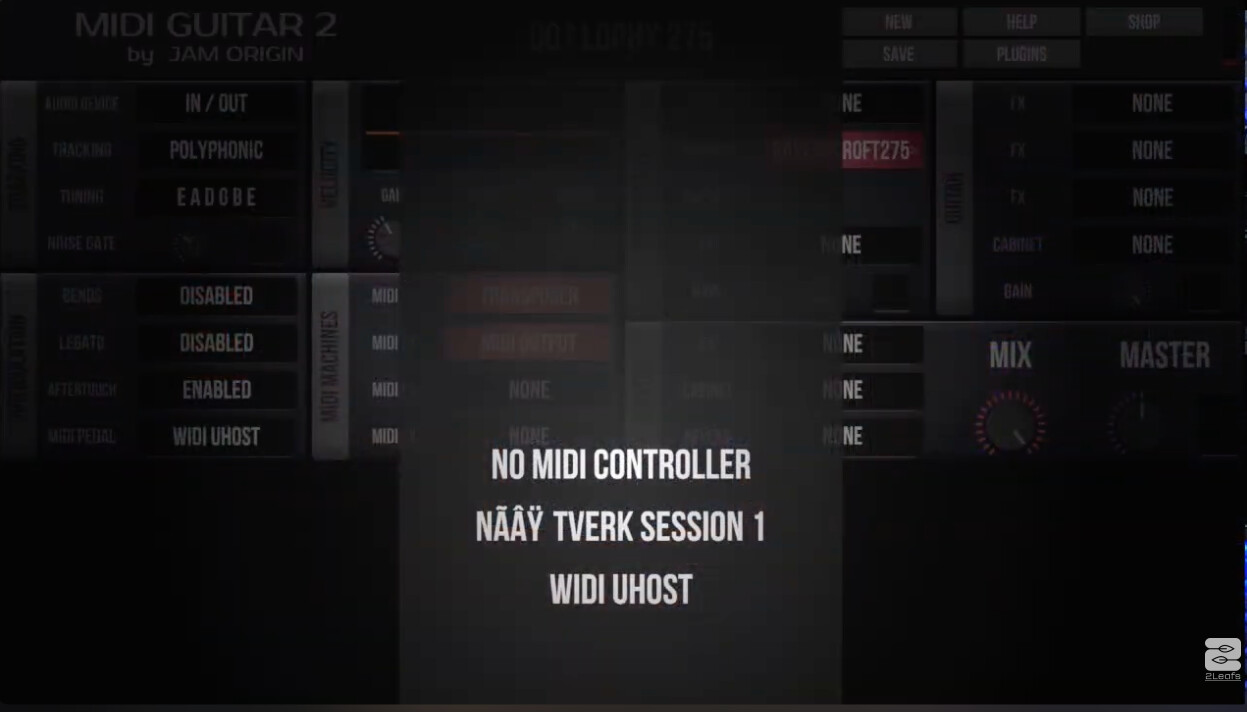
Q2 Answer: I most likely used the CME WIDI Uhost on both sides (the thing I use as a receiver in the video above). If you use those together with a power bank, you can configure them to work as Multi-device BLE receivers. And that WIDI Uhost does indeed appear as a option too choose from inside MIDI Guitar2 /MIDI Pedal list:
Upon further reading the thread I think I see what is going on here. You are probably mistaken about what MG2 actually is. MIDi Guitar 2 provide a real-time MIDI conversion of the AUDIO from your guitar, and it also work as a plugin-host for the third-party plug-in instruments you might own. It has a few MIDI Fx effects (with the MIDI machines), and it provides a way to use external MIDI CC controller devices such as expression pedals and breath controllers.
However, MIDI Guitar 2 is not a DAW, to which you can connect any kind of MIDI controller to play the instruments it is hosting.
This is correct. Any external MIDI device connected to MG2 will appear in the MIDI Pedal slot list (iOS).
If you look at the input section, it only reports AUDIO inputs.
Yes, if you want to use the Smart Guitar to play your MIDI instruments you have to go with the audio output jack. That is how I use it with my Jamstik or Aeroband, or even Rob O’Reilly guitar. I could however use the BLE connection from my WIDI Master/Rob O*Reilly guitar combo to connect to the iOS MG2 MIDI Pedal if I want to use the multiple CC controllers I have on that for stuff. But I would still have to use the magnetic PU audio out from that guitar for the audio out.
I would still be interested to know which guitar you are using though.
So unless you are not talking about BLE audio (which is way to slow to use for MIDI Guitar playing)
What im trying to do is have a setup where I can change tuning on the signal recieved in a midi app like tonal energy, its native app (based on jamstik) or whatever.
I play rocksmith on steam deck, (used with cable not bt) and some of the songs require alternate tunings. I can get round this using pandora mini which has a pitch control on the auxiliary in but its not ideal. Im also learning Arabic oud which has various tunings.
So id like to be able to change the tuning of each string on the fly digitally, rather than retune guitar or have multiple guitars/instruments tuned differently. Im new to this but it seems this should be exactly what digitised sound can do but ive only read full daws setup can do this and a) i dont understand them and b) im not interested in music production just the tuning to play, noodle etc.
Tonal energy, the native guitar app that comes with the machine,and even jamstik (original jamstik required physical retuning) control app can all change the sound, piano, trumpet whatever. But not the tuning, tonal energy allows manipulation not dissimilar to the pandora mini but not individual string retuning.
I was hoping mg2 could connect to tonal energy as a plug in (though i dont know how they would) then i can retune it in mg2 and play it using bt midi connection in the TE app. Ive had no problems with latency plsying through bt connected apps but im hardly an acomplished player so it probably isnt apparent. That was what I was thinking at the start and thats where im stuck.
Would midi guitar 3 solve this problem, if not can what ive suggested above be done and if so how?
This is not something you can do in either of MG2 or MG3 today. There might be a version of MG3 in the future where you can connect an external MIDI controller, and perhaps use the string retuning for fast recall of different patches. But we are not there today, and I am not sure that particular guitar/controller you have there would be a perfect fit anyway. I don’t see enough information about how it send out MIDI to be able to decisively say one way or another. But, for now, no. This will not work, I am afraid.
So as I understand it, the terminology is confusing, its a midi guitar not a midi controller even though it appears as a pedal in mg2. I can connect to tonal energy via bt LE and play sounds and change those sounds to piano or whatever but that doesn’t extend to changing tuning on the string?
A MIDI Guitar is a MIDI controller. But not all MIDI is the same.
In MIDI, notes and Control Change (CC) messages are two different kinds of instructions sent between instruments, controllers, and software. Think of them as playing events vs parameter changes.
You are sending out playing events with your MIDI Guitar, and that is also what is created by the MIDI Guitar 2 tracker when it turns the guitar audio into MIDI.
But the MIDI Pedal slot is dedicated to CC messages, and unless your MIDI guitar has a knob, button, ribbon or fader or something like this, on it, it will not do anything in MIDI Guitar 2. You can’t use the playing events (Note-on, Note-off, Pitch and Pitch Bend info) in the pedal slot. You can only use CC messages to control and change certain parameters in the plug-ins.
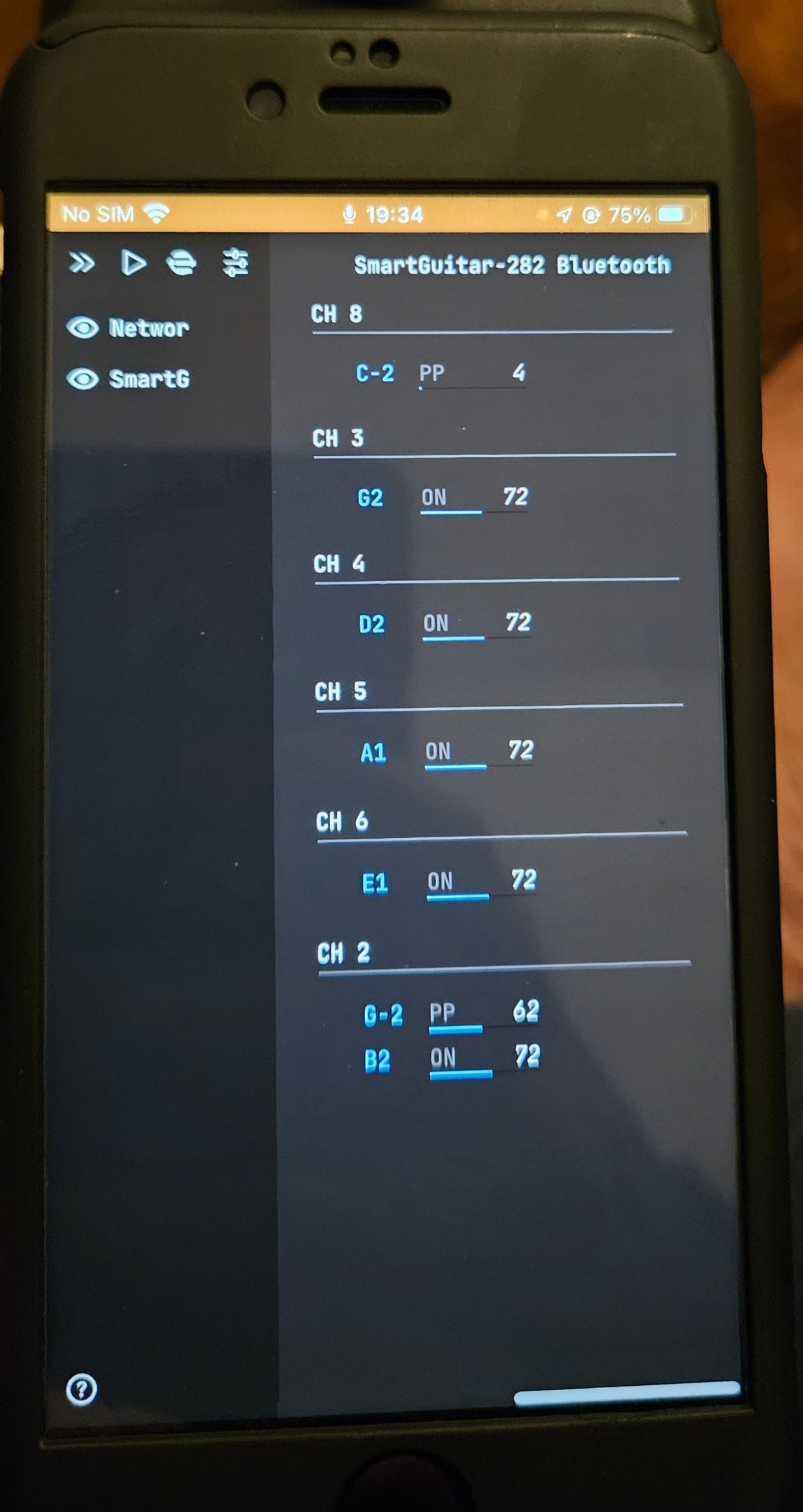
Your MIDI Guitar is already a MIDI controller in and of itself, just as MG2 together with a standard electric guitar would be. The output from your guitar as shown in ShowMIDI tells me it sends out notes on a per channel basis (which is good, if you want to be able to retune a particular string or set of strings). But it also seems to send out polypressure on two of these channels, and I am not sure what to make of this.
You can, in theory, use a template for six channels in any DAW, and isolate the string channels (just use the incoming MIDI from a channels 2,3,4,5,6.7 respectively on six different tracks) and then apply some sort of note transposing on the channels for the string you want to retune. This is most likely not hard to do in either Cubasis 3 or Logic Pro for iOS. But I don’t use those so I can’t give you any details on setting up, I’m afraid.
I thought I’d update you all on this idea that very nearly led me to ditch the quite basic bt midi guitar, a jamstik knockoff, i bought from aliexpress on a whim in the hope I could make it more versatile.
By searching again I discovered just one ios app called midiflow that allows for transposition of all notes per channel and mapping of individual notes to what ever I choose. Plus much more apparently.
The app is buggy, it freezes requiring restarts, and support is non existent based on my experience and their own forum…but it works. It requires careful attention to app activity, switching off midimittr app and velocity settings to avoid distorted sounds but amazingly it does work and latency is not an issue.
I have it output to audioquest synth 1 and tonal energy without any issues. Its all running on an iphone 6s, attached to the guitar, which I chose for its size and headphone jack for use with irig and MG2 which ill try once I get the irig. Though obviously it limits the apps I can download given max ios is 15.
There are so many advantages to midi in general and specifucally in guitar form i think they’ll become a much bigger thing for those familiar with them. Aeroband is one that got alot of stick initially but has amazing potential, though there are issues, and you can change its tuning directly on its app the key feature i wanted but still requires importing sounds for other instruments like oud.
Thanks again for everyone’s help, especially LofiLeif for explaining the different types of midi and pointing out each string on my controller had a seperate channel. I knew nothing about midi before I got this so im both surprised and happy with the outcome.
Link below