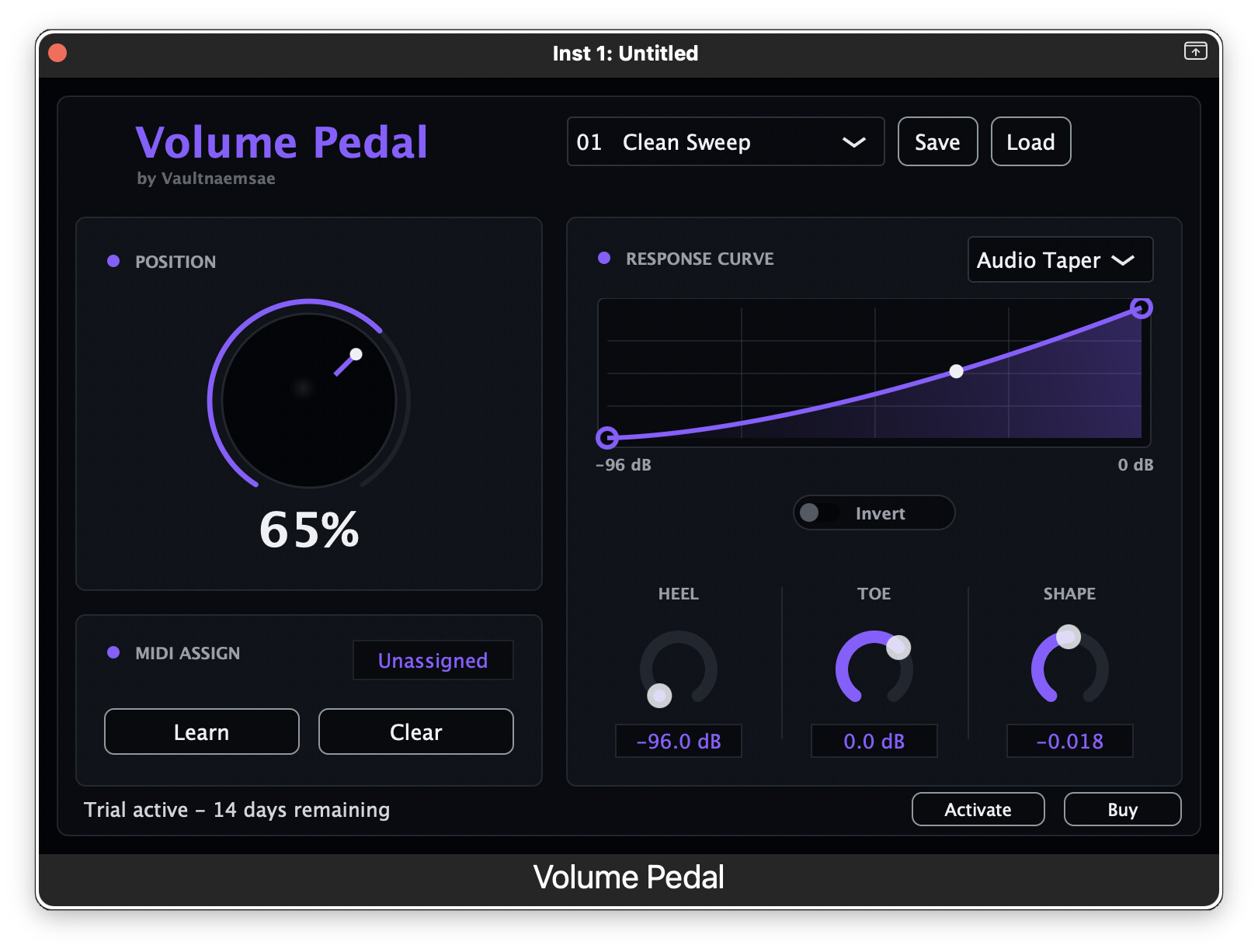
Oh, this is exciting. I’ve just had a brief few minutes for a first test, but I am ecstatic to say that this appears to completely fix the biggest problem I’ve had thus far with all the other methods I’ve tried, and that is artifacting. Eliminating the artifacting, alone, makes this worth its cost.
Apparently I got the new version 1.0.4 overnight, because that’s what I saw when I went to do the test this morning (I’m in Alaska, US). It threw me for a loop at first because it took me a minute to figure out what you’d done with the UI, rendering the different curve types as factory presets whereas before they’d been direct UI controls. No problem there, of course, but it did make me wonder about tapping in the UI for some basic help, or at least the splash screen you get when you open standalone.
(As to that, would you be interested in me, as a user disconnected from the design history and details, writing up some user doc for you? I would be very happy to do that.  )
)
Okay, stipulated that I think the basics here–the core things that add value–are fabulous, I do have some suggestions based on this first sit.
The ideas
Quick help direct from the plugin. I don’t think you need anything fancy here, like “tooltips” over each feature, but an obvious tappable element that brings up a basic help page (ideally an executive summary, scrollable to more detail) might go a long way, especially for people who may not know either about what they can get out of a volume pedal, or who may not know about plugin parameters, direct assignment, etc.
“HOST CONTROL” toast. This is a specific one. I like the fact that this quick toast appears when plugin control is in use–I think that’s really handy in a plugin that can accept both plugin parameter control and direct MIDI–but at least initially I did find it a bit visually distracting for it to size-adapt the whole Position control dial. Perhaps put that toast up along with the title of the Position container, analogous to where the “Reverse” control is in the Response container? (Also, just curious: is the Position parameter the only thing exposed to direct MIDI control, or are other elements as well?)
Widened controls for different expression pedals. I was able to test two different cheap expression pedals here–Behringer FCV100 in passive CV mode, and Zoom FP-02M–and was a little surprised at how differently they responded underfoot. (Kudos to this plugin for actually making those nuances noticeable in the first place–you’ve enabled a whole new region of subtlety here!) I started with the Zoom, and even with the slowest rise I could get with the Response controls, I found I had to be very “hard on the heel” to get a smooth start to the swell. Even reducing the Range’s “Min” value from -96 to -60, which improved it noticeably, I wanted to delay the rise more than the controls allow, so that the audible rise could happen in the middle of the pedal’s sweep, rather than so much right-off-the-heel. These are the settings I arrived at:
After that, I tried the Behringer pedal, which has a very different feel underfoot (being both much bigger physically and with a “longer rock” to its sweep) with the above settings, and that was glorious–much closer to what I would consider truly a perfect feel.
This was a useful discovery for me–clearly the two pedals must have a different sweep internally, somehow. I haven’t had a chance yet to test my other cheap pedal, the M-Audio EX-P, but I’ll probably have a chance to do that in the next few days as well.
At any rate, with the noticeable difference in just these two pedals, I’m sure that other makes will introduce still other behaviors and biases. Given that, I think it would be useful for the plugin to have Response control handles that–this nomenclature may not be perfect but I’m describing it in the context of the v1.0.4 UI–can be dragged in the X-axis as well as in the Y-axis. As it is, each handle has essentially a fixed X value, and at least in my specific desire to delay the rise, I found I wanted more available range in the Response control handles. (As I write this it occurs to me that you could also introduce a separate “response minimum” parameter, in which you can set the curve to begin responding only after a minimum incoming CC threshold value is reached. In that case the existing curve controls might remain as they are. Maybe?)
Now, that said, I found it very effective to use the Range “Min” control to bring up the floor to help bring the rise more “off the heel” (again, I brought it up from -96 to -60, which is still effectively inaudible (-60dB is the level at which I gate my dry input)) and together with both Response controls dragged all the way down, the result on the Behringer pedal is outstanding. I would think that the Zoom pedal could be brought to a similar place, if we could just delay that rise even more.
S-curves. I love the idea of an S-curve for a volume swell, since it can introduce additional nuance to the toe end of the pedal sweep. The above idea about expanding the “X-value” options in the Response controls would be even more noticeable with an S-curve, and I would love to see an S-curve with both a delayed rise and nuance on the top end.
Thank you!
I’ve got more testing to do obviously, but that was everything I saw in the first run with those two pedals, and I’m pretty tickled already. I think this is a great addition to the landscape, especially for those of us on iOS!
For those contemplating the plugin, I figured I’d also post this capture of the plugin parameter set, which fits neatly on one capture:
Note that the “Focus” parm is the right-side control handle in Response, and “Taper” is the left-side control handle. And there are several factory presets (variations in manipulating both the Response and the Range controls) to get you started. (Note in particular the “Rhythm to Lead” preset, which turns your volume pedal into a pedal-actuated boost, rather than the full volume sweep that I’ve focused on here.)
Anyway, off to other things for now, but that was a great beginning. Smooth VP response on iOS at last, with promising controls for picky nerds like me!