
Wow, what a powerful good sounding guitar software you guys created!! Many thanks.
I finally got around to get an USB expression pedal Crumar UP4, running it on CC4 and being amazed about the many devices (sweet spot, overdrive, delay…) it can connect to simultaneously.
So far it seems to be a purely life effect, that doesn’t record on the Logic Pro track of MG3.
What can I do?
Using the learn assignment of Logic I can connect the expression pedal to one of the 9 parameters of MG3, but that doesn’t connect to the CC4 and sound effects in MG3.
Tapping on CC4 in MG3 opens the learn CC mode , again I can’t make the connection to the pedal.
Ok, please tell us exactly how you are setting up, and what you are hoping for shoud happen. I have no problem using MG3 (as a AU plugin) inside of Logic, and connecting my expression pedal to control CC4, and also record that in Logic.
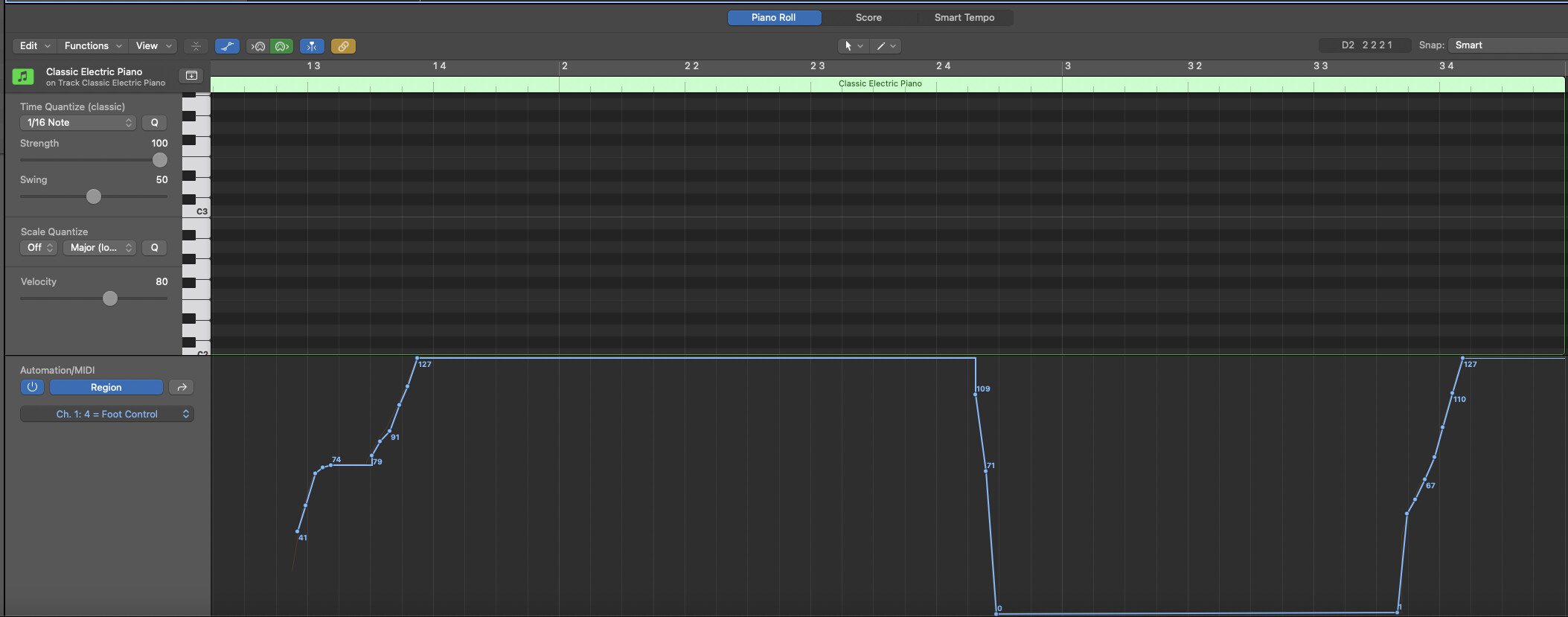
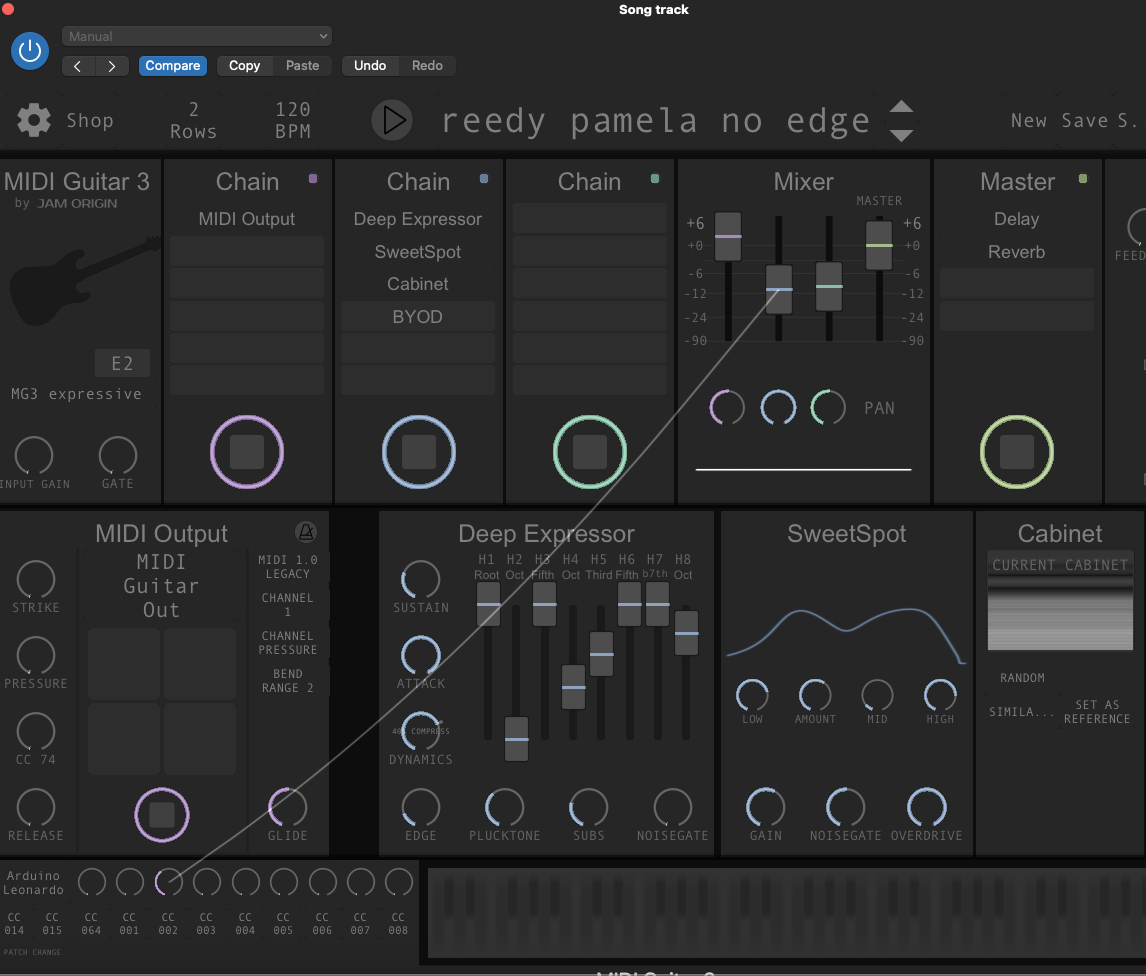
I am simply connecting my Pedal controller (set to send on CC1) from the MG3 patchbay to whatever I want to effect. In this case I wanted to send the CC4 out on the software track in Logic to confirm it works, so I just used the wire to connect to the “MIDI Guitar OUT” option (in The MIDI OUTPUT device).
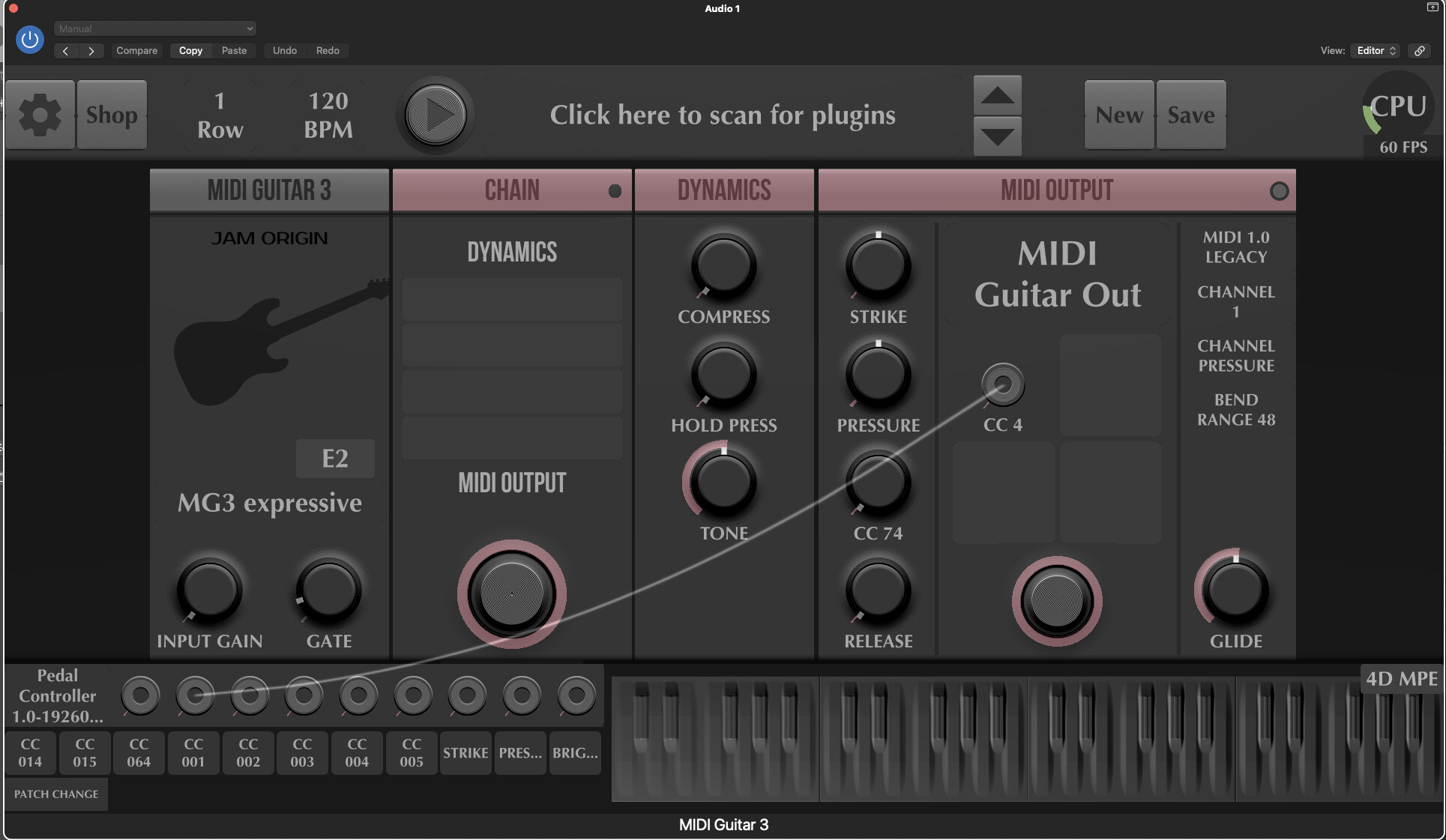
You seeem to want to control “sound effects”? Have you connected the wires to whatever you want to control to begin with?
Greetings from Kauai!
Thanks LoFileIF for getting back. I set my GMLab UP4 to control CC4, it only allows me program cc-7, CC-4 and CC-2 and CC-11 .
The pedal is plugged into my MAC USB port, and I was able to connect it to one of the 9 MG3 parameters. I use MG3 version .63 as plug in in Logic 11.1
I would like to control through a wire from CC4 to the module Sweet Spot, so I can enhance the overdrive in my guitar sound. I guess there is no direct overdrive module in MG3.
The pedal controls CC4 and with it the overdrive nicely, but I haven’t managed to record that live playing via an automation in Logic X.
Should I try to set my pedal to C7, CC-11 or CC-2 instead?
Thanks again for your help.
Does one of your amazing videos have instructions on this?
Hi @loislois
There is nothing wrong with your setup or CC choice. You can obviously use the dipswitches on your UP4, to have it send on either of CC:s 2,4,7,or11. These CCs are traditionally associated with Breath; Footcontroller, Volume and Expression, but that really doesn’t matter once you pick it out of the MG3 MIDI Patchbay. You can always remap the CCs when you connect to any third party synth or effect (by clicking on, and connect a wire to, one of the four boxes on the Synth/instrument module).
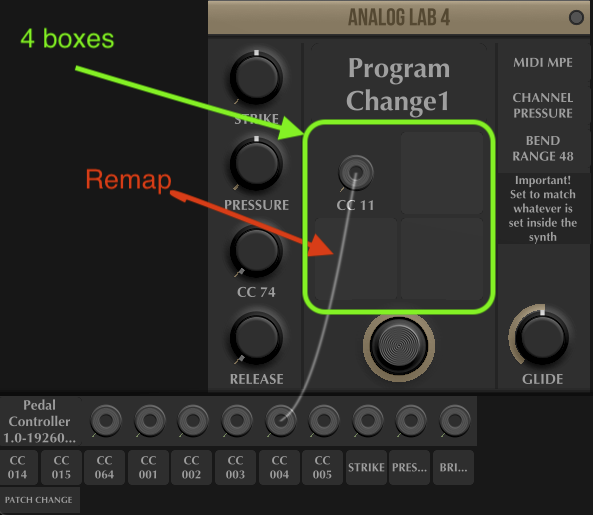
You can also connect a wire from your pedal to a couple of MG3:s own buttons and controls (Mixer levels and sustain button, etc.) and it doesn’t matter which CC you have it set to, But here is the problem for you:
MG3 in itself doesn’t allow for you to connect to every button or controller you see. The Sweetspot is one of those devices that you (for whatever reason) can’t connect to at this point. It will probably be resolved with a coming version in the end. But where and when, it is only @JamO who knows.
If you are just looking for a way to add an overdrive to your clean sound that you can control with your pedal, you can go for Chowdsp BYOD? (It is a free, and surprisingly competent little Build-you-own pedalboard plugin, check it out here:
https://chowdsp.com/products.html
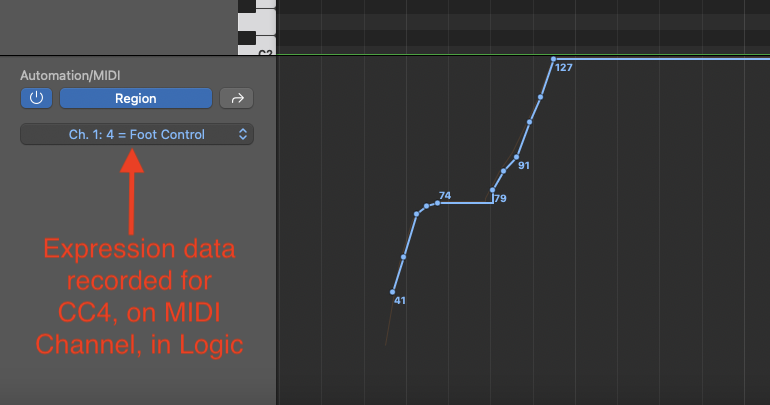
If you are looking to record the Expression pedal output into to Logic, look at my previous entry. Connet a wire from the pedal in the MIDI patch bay to the MIDI OUTPUT module and record. You will find the recorded data in the CC lane belonging to the Logic Instrument track you recorded. In my case I used CC4 both from the pedal and out from the MIDI OUTPUT module). So i find my recorded expression data here:
Hope this helps some! 
Thanks LoFiLeiF, this gave me a lot of exiting stuff to try. The [Chowdhury DSP - Products ]
site has amazing effects like c h o w matrix, unfortunately even the easier ones like BYOD are quite unreliable. I could not figure out if the BYOD should be added as effect to the MG3 track or be in its own MIDI track.
So far the best I could come up with was pulling a cable from the pedal control CC2 to the middle volume slider of the mixer, containing the sweet spot module. Having the sweet spot set on 100% overdrive kind of allows to add more or less distortion as you play.
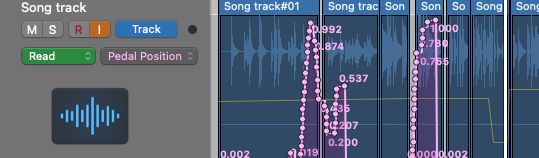
Still I haven’t been able to find automation for the pedal action, tried to use Logics “Learn assignments” or one of the 9 Parameters that MG3 has in the upper right editor.
I found a utube https://www.youtube.com/watch?v=Df63JwYEeyM describing how to use Logics pedalboard to record the action of the midi pedal.
But when switching from touch to read, these recordings don’t move the sound in MG3
What a mystery!!
Not at all. MG3 is an AUDIO FX in Logic. If you want external MIDI to affect the sound in MG3 you need to use the MIDI DEVICE module.
But I still don’t understand fully what you want to do? Are you trying to use a pedal automation curve to control the MIxer level?
ok thanks, Which Midi Device, out or in.
Yes I like to modulate via pedal anything in MG3 that is available (Mixer level is one of them),
and have via automation to improve the sound after playing it.
Somehow because the MG3 track is a sound track in Logic, it can’t be modulated with a MIDI pedal.
I assume you know how to use a pedal to control parameters in MG3 now, so we need to take a look at what you belive you can do with MG3.
You say you want
with the use of automation. I am going to assume you mean automation like the “pedal position” data you had on your song track above. You can automate parameters affecting a recorded track in Logic, but it really has nothing to do with MG3 anymore. MG3 doesn’t record audio. MG3 can output AUDIO to be recorded on the Logic audio track on which it is opened as a FX, and it can output MIDI to a software track. But there is no recording in MG3 that you can affect with any post facto automation. That recording is in Logic and any automation should be done for that track.
There audio that comes out of MG3 is recorded in Logic, yes. If you want to control or change anything about it with a pedal, you do that in Logic. Yes
Really interesting, sorry to keep drilling into you,
Where would I put the MIDI DEICE and then put the Pedal MIDI automation on a separate track?
Ok just got over trying to automate effects in MG3 with Dutti67’s help:
Ok Dutti67, you finally convinced me of “bus” ing the VSTs to a “real” audio track, especially when I use MIDI expression pedals to modulate the MG3 output. Also with a “real” audio track I can apply any effect pedal and automate the effects , which doesn’t seem possible yet using the MG3.
Thanks again guys for your patience.
to (hopefully) clarify, in your prior setup when you didn’t bus mg3’s output to an audio track, upon playback, mg3 was processing the recorded audio as if you were playing live. this will produce output identical to the original, EXCEPT that expression pedals would no longer have an effect.
if you want the expression data you will need to record that on a separate midi track and feed it back into mg3 upon playback.
technically speaking, this would be closer to ‘automating the effects’, as you would have extremely fine control in post-processing.
Are you talking about recording your MG3 track on a new audio track using a bus.
On that audio track it is easy to automate any expression pedal in Logic.
I initially tried to automate an expression pedal on the MG3 track, using CC 4
but wasn’t able to automate connecting to one of the 9 parameters of MG3
that you get to clicking on Editor in the upper right corner of MG3