I just picked up a used GP-10 and licenses for MIDI Guitar 3 and the Hex add on. I’m using this on a Windows 11 PC with a Godin guitar connected to the GP-10 via the 13 pin input and a USB output to my PC. I have a Focusrite Solo as an audio interface. I’ve tested Windows output from the Focusrite and that’s fine.
I’ve installed the most current GP-10 driver. I’ve tried the tuner on the GP-10 with the BOSS Tone Studio app and it detects the guitar and I can tune it.
I can use the GP-10 as a MIDI input source in Cantabile Performer output MIDI to Arturia Analog Labs and Pigments, with audio out to my Focusrite and through that to my guitar amp. So I know the GP-10 is working.
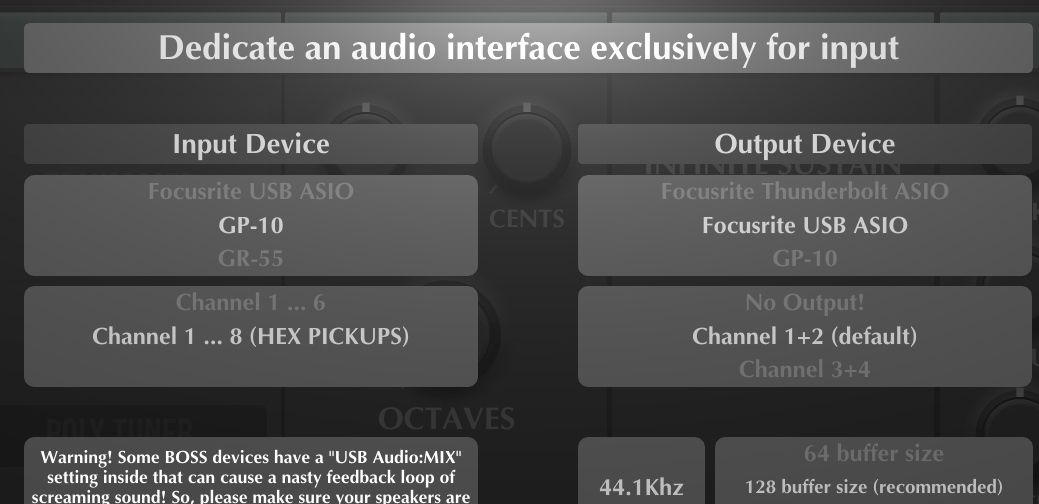
When I start up MIDI GUITAR 3 HEX it’s displaying ‘NO HEX INPUT!’ under MIDI GUITAR 3 HEX. Under Settings, Audio Interface I’ve designated GP-10 (Channel 1 default) as the Input Device and Focusrite USB ASIO (Channel 1+2 default) as the Output Device. There is no sound when I play the guitar. Also when I add the MIDI Guitar 3 plugin to Cantabile and send the GP-10 MIDI input to it and then MIDI out to Pigments there is no sound.
I should say that I’m primarily looking to use this with Synth plugins and would ultimately run everything under Cantabile Performer, but right now I’m just looking to get a sound using MIDI Guitar Hex. Any Sound!
Apologies for my naivity. If there’s documentation I should read I’d appreciate getting pointed to it. Any ideas how I can get this to work?
I’ve gotten this working using input device: GP-10 and Channel 1…8 (HEX PICKUPS).
I get sound and I can use 3rd party plugins (Pigments, Audio Lab) on chain 1 however tracking isn’t very good. I get octave up ghost notes and when I release a note on the fret board the open string plays no matter how gently I release my finger from the fretted string. I’ve tried changing all sorts of settings on MIDI Guitar HEX (strike, pressure, cc74, release) but can’t get it working decently.
When I gently pluck an open low E string, multiple higher strings are displayed on the Seeboard keyboard display (and are sounding) even though I’m muting all but the low E string, so it’s not sympathetic vibration. II’ve tried both my ‘Made for Roland’ Strat and my Godin XTSA. I’m also wondering why when I turn up Chain 2 in the mixer I get a weird distorted sound even though I’ve removed all modules except Analog Lab V in Chain 1 (no modules in Chain 2 or 3). It’s almost as if there are native sounds from MIDI Guitar 3 playing along with the Analog Labs sounds unless I turn down all but chain1 in the mixer.
One other interesting note: when I run the ‘Log/Troubleshoot’ utility, it shows line after line of ‘DEDICATED INPUT DEVICE UNDERFLOW’. I’m thinking this might be significant but don’t know what to do.
I’ve heard that the developers monitor this forum. Sure hope I can get some help here!
Glad you got it working, I was just about to send you a screenshot of the Cantabile Audio Port setup.
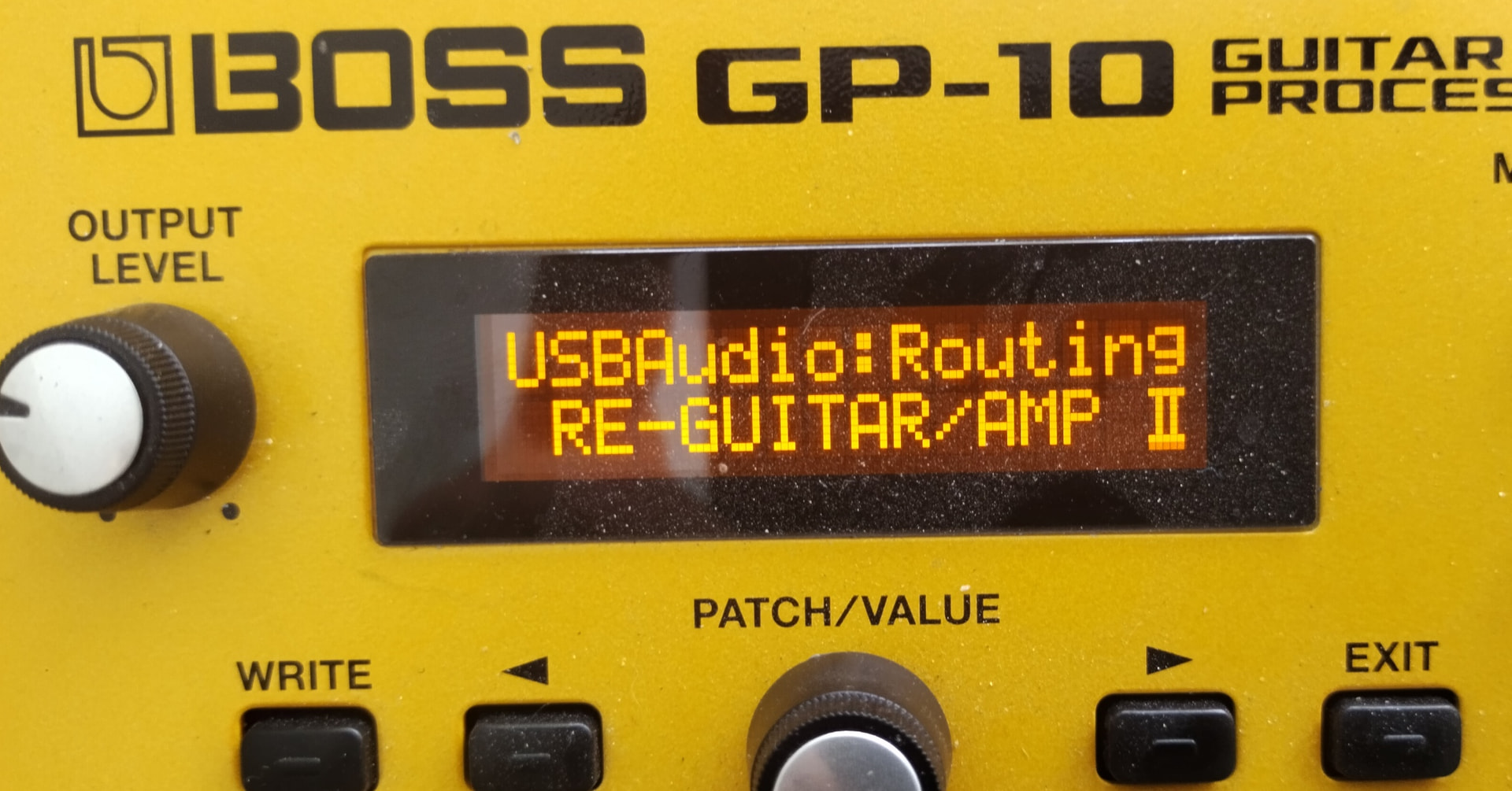
It should not be that an empty chain is giving a distorted sound. Make sure that you don’t use a GP-10 patch with any modulation or FXs, or set the GP-10 USB Audio Mode to: “Re-Guitar/Amp II”.
When I click apply I now go back to the main page with ‘NO HEX INPUT!’ in the MIDI GUITAR 3 HEX pane.
On the GP-10 system settings, I’m using USBAudio:Routing DRY GUITAR. I tried RE-GUITAR/AMP II as suggested and there was no sound. I’m also using a ‘Gt Clean 1’ patch. The sound out of my Focusrite output is what I’d expect. Dry and clean, but MIDI Guitar 3 Hex can no longer detect hex input.
I originally was getting MIDI detection in the application but no longer and can’t seem to get it back. I’ver turned off/on the GP-10 and closed and opened MIDI Guitar 3. Is there some documentation on this? It’s certainly not intuitive. The non-hex version was plug and play.
The BOSS Tone studio and all the synth sounds work fine. I can use the Windows app to change settings and the synth sounds are coming out of my Focusrite audio interface. I don’t have the Tone Studio running while I’m trying to connect with MIDI Guitar 3.
Whenever I change the ‘AUDIO DEVICES’ configuration in MIDI Guitar 3. GP-10 ‘No Input!’ is always set even though I’ve previously Applied Channel 1..8 (HEX PICKUPS). Very frustrating. It’s like it doesn’t actually get set because when I click apply I go back to the original screen with ‘No MIDI Input’
According to the web site, there’s no help documentation because there’s supposedly help in the application. Really? Where? If I do somehow get MIDI Connectivity in Midi Guitar 3, I’d like to read documentation on how tune the tracking. People on the forum seem to be familiar with it. Is there some site I can go to for documentation on this application. It shows as beta. Is there a stable release I can download?
Guess I’ll give up on this for now as it’s quite frustrating and I don’t have the information necessary to troubleshoot. It would be so great if there was support on this product.
Just finally got it to work. I reinstalled GP3, rebooted my PC, powered on off my GP-10. Finally, the settings for GP-10 MIDI input 1..8 (HEX PICKUPS) are sticking and I now hav e MIDI input.
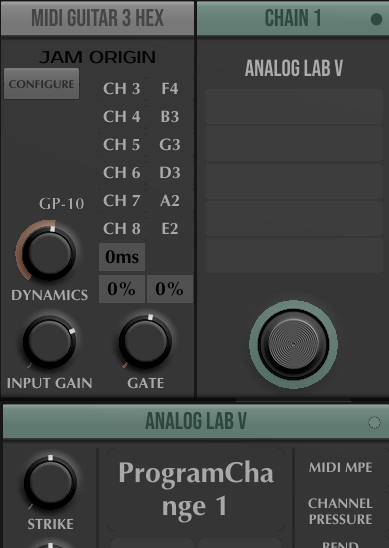
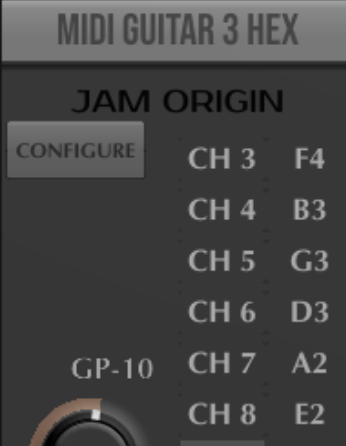
I’m using Analog LAB V. Tracking wasn’t working but I figured out I had to set the configuration for the MIDI channels as shown below.
Tracking still isn’t perfect (some of my VSTs are really bad) and string bending doesn’t work. Again, a user manual is really key here. Help on that?
I’m going to declare success for today. Frankly I’m not convinced that this is an improvement on the standard MIDI Guitar 3 (non-hex) where I can use any of my guitars. BTW- I also have a JamStik and its tracking and usability are vastly superior.
I tried running the MIDI Guitar 3.3 VST under Cantabile Performer and no luck so far. No problem running the JamStik Creator VST3 under Cantabile (or standalone).
I’m hoping I can fix all this with proper configuration. Sounds like some people are getting this to work successfully so that’s encouraging.
After I tried using MIDI GUITAR 3 HEX unsuccessfully with Cantabile Performer, I exited Cantabile and brought Midi Guitar3 Hex back up and ‘NO HEX INPUT’. I agein went to Auido Devices and was able to successfully select input GP-10 with MIDI 1..8 (HEX PICKUPS). Hoping I can find a way to permanently save these settings instead of having to reset with crossed fingers every time I bring up the app…
Most likely the bend range of MG3 Hex and your VST you selected are not the same! If Analog Lab V expects a bend range of 2 and MG3 is set to 48 (by default) you can barely hear a bend.
In Cantabile you have to setup (create) an audio port that is containing the eight incoming audio signals (L & R, plus string 1 to 6) and than use it to route to any VST.
make sure the guitar is well intonated and tuned, and that the action is high enough that there is no fret buzz. Clean playing is also a factor.
turn the string sensitivities of the GP-10 down to the point that you see about 3 bars. For me, that’s around 40% for most strings, higher for the high E.
if you’re using a piano VST, mute open strings, use the chromatic module, and turn off bends. Getting piano to sound good is a little touchy.
I like to use the MIX output of the GP-10, with a patch with no effects other than guitar modeling. That way, I can get the modeled pickups from the GP-10 input 1, and the hex inputs as you are doing, plus my regular pickups.on the Scarlett input 1.
These are not MIDI channels – they’re audio channels from the GP-10.
I think many users would disagree with you on this point.
Some people? Many people!
There is documentation – work in progress:
Just an opinion – I have used BOSS gear and MG3 Hex on both Windows 10/11 and macOS. I chose to stick with macOS only for audio/MIDI because there are less quirks/roadblocks with managing complex audio/MIDI device setups.
Just to clarify. The standard MIDI Guitar 3 worked fine for me right out of the box. I additionally got the HEX version because I thought it would track better with my Godin and Fender/Roland 13 pin guitars. It’s the Hex version of the software which I’m struggling with.
I’ve been using these same guitars quite successfully with a GR-55 (both with the built in sounds and as a controller to use under Cantabile Performer with various VSTs). The big problem with the GR-55 is it doesn’t support string bending as a controller. I bought the GP-10 (which is otherwise crap compared to the GR-55) specifically to use with MIDI Guitar 3 HEX and I’ve been banging my head against the wall without getting any decent results.
I realize this is a better solution than Jamstik because you’re locked into their mediocre guitars but I can say that Jamstik has worked as a controller for me with very little tweaking and MIDI Guitar Hex so far has not.
I’ll review the documentation and really appreciate your sending that. It’s really encouraging to hear many people have gotten this to work. I’ll keep at it!
it seems to me that you may get to where you want to go more quickly if you first get mg3hex standalone working to your satisfaction.
one of the issues you’ve raised (hex input not found) is something i’ve experienced when switching between config options when using mg3hex inside ableton and standalone.
once you have pitchbends and tracking and whatever else operating as you like, then add cantabile back into the mix. the advantage will be that you know that these features are working properly outside of cantabile. this should make it easier to track down what is going wrong.
The GR-55 does send pitch bend information, even for each string in separate channels in mono mode. It can be used very well to control sampler VSTs. What it doesn’t do is sending audio per string. The GP-10 isn’t crap, it just has its focus on guitar emulation and not on PCM synth modelling (apple and pears).
Pitch bending works fine with the internal gr-55 sounds. When I control Omnisphere 3 within cantabile using the gr-55 as a midi input, pitch bending doesn’t work
I don’t understand what you mean by audio per string in the context of using the gr-55 as a midi source.
I’m new to the GP-10 but the synth sounds seem unmusical compared to the gr-55. However I only bought the gp-10 (used) to control VSTs using midi guitar 3 hex.
Assuming I can figure out how to get guitar string bending to work in plugins using the gr-55 as a controller midi interface, what are the advantages of using midi guitar hex with the GP-10?
You maybe need to read the GR-55 manual. Pitch bend data are only transmitted when “Chromatic” is set to off in the Guitar to MIDI section. If “Mono” mode is selected 6 consecutive MIDI channels will transmit the data for each string (not sure if Omnisphere 3 can handle different MIDI input channels). In “Poly” mode pitch bend is transmitted on one channel but if you bend one string and another string is sending a note ON in parallel this will be bent as well (sub-optimal). This is where MG3 comes in the game. You can play more than one string and only those you bend will change the pitch. This applies to MG3 and MG3 Hex. The advantage of MG3 Hex is that the tracking results are better and the dynamic is fantastic. Much better than using MIDI from a Boss device.
Because this is the reason why you can’t use the GR-55 in combination with MG3 Hex. MG3 (Hex) are using audio input and not MIDI. The GP-10 is sending the raw audio of each string from the hexaphonic pickup to MG3 Hex. The GR-55 just sends the summed signal of the hex PU.