
What’s the internet equivalent of verbal diarrhea?
I wasn’t insulting anyone. I’m confused. I still don’t know how to get mg3 working.
I don’t know if it could be anything to do with ilok.
If I had of installed mg3 before adding ilok for the Eventide Rotary Mod maybe it would have worked.
As far as I know the rotary mod is working as licensed and not in demo mode but MG2 was already installed before adding ilok.
Is it possible ilok is preventing MG3 from instlling correctly?
I uninstalled mg3, logged into ilok, reinstalled mg3 and when I run Midi Guitar 3.exe it still says “need to reinstall ASIO link driver” and then opens with a black screen with absolutely nothing and I have to use task manager to cancel it.
During installation it said it was installing the stand alone so I assume that Midi Guitar 3.exe is what to run for the stand alone. Is this correct?
Words matter, but let’s move on.
Can you get the plugin version of MG3 to load in a DAW? Seems like an obvious course of troubleshooting action.
I strongly advise you to get MG3 functioning with an alternate device/driver. I’m not a Windows user, but I recently installed MG3 on a family member’s Windows 11 computer to verify correct function. It operates perfectly smoothly — as expected. The installation was seamless, even for this non-Windows user. None of the three interfaces I connected gave me any of the problems you’ve reported.
I can’t see how iLok could have any bearing whatsoever on the installation. I have iLok installed on macOS (and now Windows) and it doesn’t interfere in any way at all with any other installed software — no probs in at least a decade.
But you mentioned that you don’t have this device connected to the internet. Being mindful of your security concerns, I still think it would be highly worthwhile to let this machine connect temporarily — at least to establish the connections you need make sure everything is operating correctly.
It is connected to the internet via wireless. I just normally download on a different computer that has ESET security and then copy the download to the laptop thru the network. I don’t have any special security on the Laptop so I prefer not to access the internet on it but I can if needed.
I’m glad it’s not likely Ilok.
So I just tried using MG3 in the Free studio one daw and it works but it didn’t at first. It took several minutes and then came up with an activation screen. I clicked it, it sent a code to my email, I entered it and a few minutes later it said “activated”.
Then I tried running the stand alone MG3. Didn’t work.
So I downloaded the new MG3 directly to the laptop, uninstalled MG3 and reinstalled it.
Still same problem. The stand alone can not find the ASIO driver and says it needs to be installed and then goes to just a black screen.
So I tried running it again and leave the screen black and see if someone happens but after a few minutes nothing had happened.
I tried running MG2 first, leave it on and then MG3 but still the same problem with MG3 not finding and ASIO drivers (not installed) but MG2 works fine.
I pushed the black screen around until I could pick the upper left icon on the Caption bar and got these after I re-scanned the network using the Presunous Universal Control panel shown on the right.
1st screen and screen after universal control re-scan.pdf (275.3 KB)
. It still can’t find the correct drivers. The Studio 24 presonus drivers are ok in device manager.
I should have emphasized that MG3 works fine in the the free version of STUDIO ONE that ships free with the Presonus Studio 24c Audio interface and that MG3 did not work at first.
I had to try it several times and then it finally said I needed an activation code.
I just can’t get the stand alone version of MG3 to work so far.
MG3 stand alone can’t find the ASIO drivers.
A few things:
- As you can see there is a driver update available for your interface. Would it be worth doing this?
- As far as I can see in your settings, you do not have the actual target devices select selected — is it the PreSonus Firestudio driver? If yes, you need to select both of them and hit apply twice. I’m working on the assumption that you’re using the same input and output device;
- It might also be a good idea to confirm that the sample rate/buffer of MG3 and of your audio interface are set identically. In MG3 (Windows), hit the control key and the comma key at the same time to open the audio settings. I believe you can also select the audio interface in this setting area.
Try these and let us know how you go.
None of the buttons would work.
Then I tried your cntrl/comma and it did come up with a list of drivers to choose from. I chose the correct one (Studio USB ASIO) for in/out etc.
I even clicked the Control button and it brought up the Presunus universal control that showed the same bit rate etc.
I don’t think I should update the driver because I had to work with a tech at Presonus just to get it to work with MG2 and I seem to remember having to load an older driver.
Now it opens ok without saying the driver can’t be found.
Now none of the buttons work when I click on them. I can’t see any levels happen when putting a signal in. I tried to click the settings button but nothing happens.
As soon as I change the screen size it goes blank until I click the upper left icon in the Caption bar.
Is there a keyboard shortcut for the settings? Since the cntr/comma worked maybe that will so I can check the settings. Maybe some key shortcuts to test other things?
I didn’t realize the output was working. There’s no visible signals but there is audible outputs. None of the buttons work or at least not visibly. I tried clicking the preset/patches at the top and they do cycle thru different sounds but show no visible change on the screen.
Maybe it needs to be registered somehow. Is there a keyboard short cut for that?
I know it showed up with a registration page after a few minutes in the Studio one daw and the buttons work and everything else when used in the daw.
Time to get smart.
Use the computer’s built in audio card (mic/speaker or headphones) to see if you can use your voice to trigger MIDI Guitar 3 in standalone. You NEED to 100% establish whether or not this is a problem with your interface/drivers.
Is it a bad idea to update a driver? Maybe — Maybe not. Set up a rollback point and try it. You have nothing to lose and everything to gain.
Perhaps a Windows power user can also chime in… Is there some kind of Windows component/update necessary for the software to operate correctly? The Windows 11 machine I tested on is up-to-date on all
fronts…no issues here.
The audio interface drivers are working. I can send signals to MG3 and audio outputs are working. I don’t see what trying a mic instead of a guitar would make any difference since the audio drivers are working ok anyway.
The problem is nothing happens when I click on any buttons except for the upper left caption bar icon which refreshes the gui.
Using keyboard shortcuts DOES work but I don’t know what they all are for MG3.
Does anyone have a list of keyboard shortcuts for MG3?
I am thinking it could be something to do with a video driver since all the audio works, just not the gui as far as clicking or moving controls. The gui DOES appear correct.
I have the windows screen scaled so fonts and screen icons are bigger. Would this be a problem for MG3?
I have the screen set to 100% and MG3 still no difference.
MG3 works perfectly in Studio One DAW.
It’s just the stand alone that has the problem of the GUI not responding.
I tried installing ONLY the stand alone and no difference so I re-installed all three options.
It still works fine in a DAW but NOT as a stand alone.
Has anyone tried MG3 STAND ALONE in Windows 10 64 bit?
With over 50 messages in this thread, it wasn’t entirely clear to me whether or not you had your interface’s driver working, hence my suggestion.
That defines the problem somewhat more clearly. But what is the “upper left caption bar icon”? If I click in the area I think you mean, nothing happens at all. All other clickable areas work on this system.
The only shortcut that I’m aware of is the one to the audio settings, which you already know.
You might be onto something there but I’m not really sure what to recommend as a primarily macOS user. But since I didn’t understand why MG3 would draw in Studio One but not in standalone, I asked ChatGPT and it answered in depth. Here’s the final summary:
"In short:
When it looks right inside Studio One but not in standalone, it’s almost always a Windows-scaling or graphics-driver mismatch.
Start by adjusting the High DPI settings under Compatibility and updating your GPU drivers — that fixes most cases instantly."
So, maybe consider those points and have a look under these settings for something that might help you:
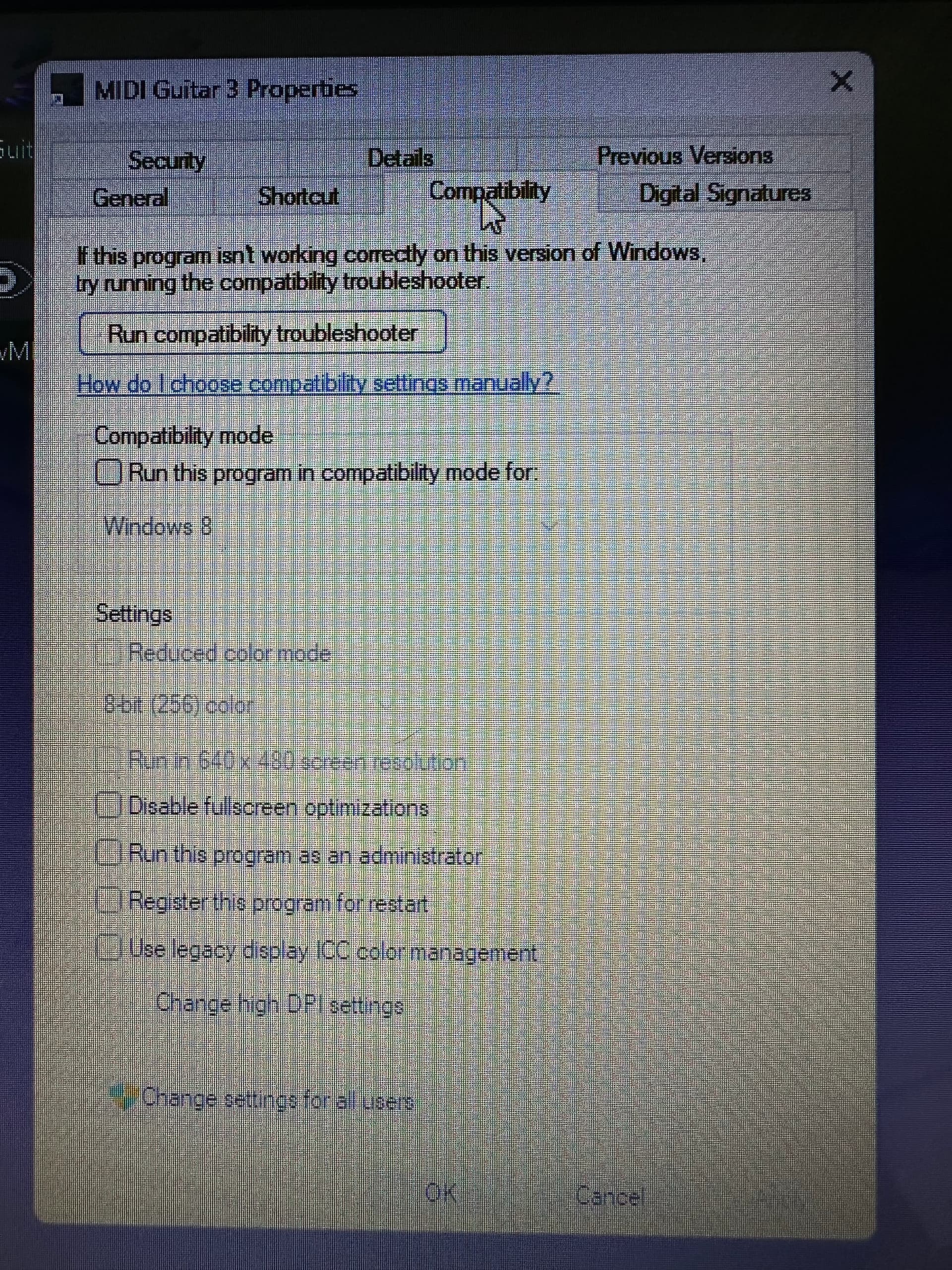
Yes, I installed MG3 Standalone/VST3 on Windows 10 and then “upgraded” to Windows 11 later the same day. For me, MG3 worked correctly on both versions of Windows (64-bit).
Good for you.
Ok Mr. Chat. previously said that I scaled it back to 100%.
Sorry you missed that one.
Maybe more info next time.
Maybe Mr. Chat can read the entire transcript from beginning to end then try to advise.
So I should ruin everything that works so far and install something no one likes that will likely not do any better?
I would assume MG3 works equally well on Win10 and 11 although no one ever wins on an upgrade except for the people doing the upgrade.
Sorry for the bad joke.
I also just lost ALL the presets/patches in MG2 after doing ALL of your suggestions.
Nice.
I will get them back as I always do.
Please get someone else on this forum to help now.
I’m not really sure what you’re talking about. The OS/version you use is of zero concern to me. I was simply trying to help you get MG3 running in standalone. I never suggested you should “install something” – I simply pointed out that an AI response had indicated there could be a problem with High DPI settings and possible out of date GPU drivers. It seemed reasonable to consult on this issue since I probably do not know Windows as well as you.
@GJNichol, what absolute garbage! I have not suggested anything destructive – without a backup.
Frankly, your communication style to this point has been appalling.
Your collective insult toward the people trying to help you (and the forum as a whole) followed by your claim that you weren’t doing it speaks for itself. Granted I described your posts as “verbal diarrhea,” which probably irked you. I should have just said nothing and let you continue your incoherence.
I contribute here to help people who treat others with respect. That now excludes you.
I’ll bow out now. Best of luck fixing your Windows setup with more patient forum members.
I was making comments on ALL of the suggestions, not just yours. I’m sorry you feel bad about it but you could read the whole post and realize I was getting very frustrated not necessarily by your comments. I never tried to insult anyone on purpose.
All I know is that MG2 works brilliantly as always but MG3 on the SAME system does not have a properly working GUI.
I’ll have to contact Presonus and ask if they have had any problems with the Studio 24C interface/ driver software with MG3.
Could be that simple.
Meanwhile if I find out anything I’ll post it here but it may be very hard to find this far down.
your combination of issues go way beyond the scope of this forum, this is not a support forum for ilok or eventide or presonus.
i suggest you find someone local and pay them to fix your problems. an adept will charge you $150-300 and make it all work.
the level of assistance you need isn’t going to come your way for free.
you’ve blown away any former good will posters here might have held towards you. that was a valuable resource, it’s a shame you wasted it.