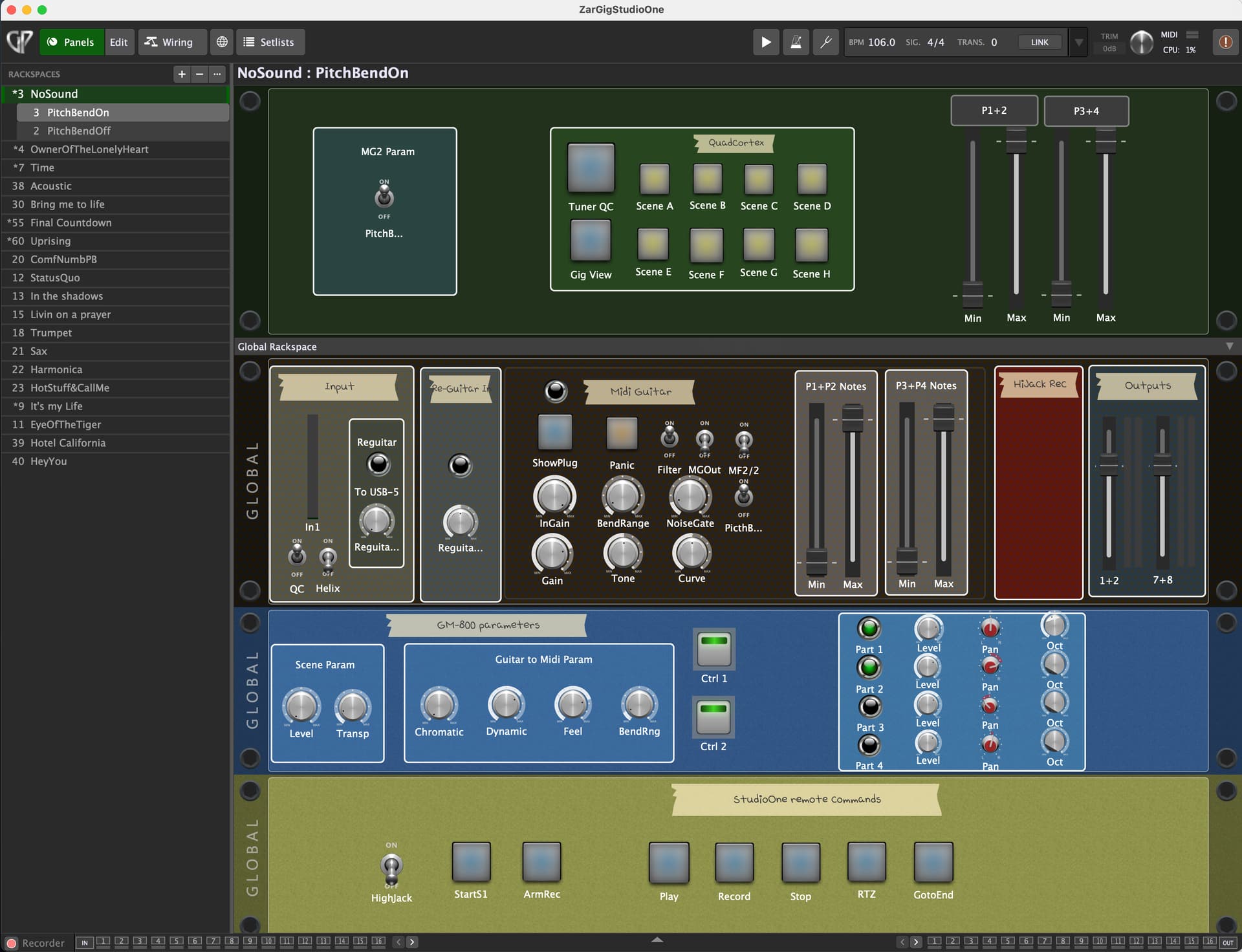
In first case, MG has decided it needs to split the workload into two cores. (“2CPU” top right)
It has made that decision because you have added external VSTs. So you have two cores running at lower CPU each.
In the latter case, MG has decided it will run in a single thread. (“1CPU” top right), because it doesnt do anything significant, other than tracking.
This will give you one buffer less latency, and it’s always up to the host to split the workload among its plugins anyways, so it seems mostly the reasonable thing to do.
You can force MG to always use multi threading in its audio devices settings, but really it should be the host that makes this decision for you.
Finally, I should add that I dont know of any good way of actually measuring the CPU load, and Idont think GigPerformer knows that either. So the CPU meters both in MG and in GigPerformer are not really measuring CPU load but rather something about how big a fraction of time it spend when processing (and sleeping), compared to the durations of buffers, which is misleading.
Thanks for the answer!
Indeed, Gig Performer only manages a single core for inextricable synchronization problems in multi core, given its operating mode.
I tried a third scenario, with MG3Hex in standalone and the other plugins in Gig performer and it works very well. The problem is that I can not manage the MG3 parameters from Gig performer…
But since my first example works, does this also mean that MG3 as a plugin in Gig performer can use several cores? is this correct?
How many cores at most can MG3 use?
My macbook has an M1-Pro chip with 8 high-performance cores, can they be used?
Would it be possible for the MG3Hex plugin to use a stereo audio input channel in addition to the 6 channels dedicated to Hex mode?
I won’t attempt to answer all your questions but I can’t see why you wouldn’t be able to control MG3 standalone from within Gig Performer (GP).
Simply route MIDI for control data from GP over to MG3 via an IAC MIDI bus and route the MIDI generated by MG3 back to GP.
Also, I don’t necessarily think all your control of MG3 would have to come through GP as MG3 doesn’t expose its own plugin parameters anyway. So you won’t be linking widgets to MG3’s controllable parameters in a typical GP method.
So you can just conceptualize the MG3 plugin as virtual hardware, much the same as you can conceptualize GP as a virtual piece of hardware.
In any case, GP is very flexible so there are probably multiple ways to skin the cat.
Also, what is stopping you from feeding the first two empty channels of the MG3 multi input plugin with a DI signal from your guitar?
Yes so we need to expose some parameters to the host. It’s non trivial since MG has this flexible layout which can’t be mapped to a fixed set of parameters.
But how about we make the patch bay slots become the input parameters, which you then wire up inside MG? So the host takes over the midi controllers, but instead of sending CC into MG those slots become the parameters for the host.
MG currently use only one or two cores, but many plug-ins themselves use many cores. I have seen Diva use 20 threads!
So in his case you have plug-ins spawning threads inside MGs two threads inside the hosts X threads.
As @Vaultnaemsae point out you already have control over the two extra channels. In MG3Hex you can select which of them to forward to guitar modules.
I also find that the idea of presenting the inputs of the patch panel as a parameter of MG3 would be very useful!
I use an aggregated audio device: QuadCortex + GM-800
I don’t see how I can transmit audio channels 1&2 (QuadCortex) to one channel of MG3 and audio channels 3 to 8 (GM-800) for Hex mode to the other two channels?
To understand why these requests, I would like to explain my goal:
First, I find that the MG3Hex mode is excellent and I would like to use it live instead of the GM-800 MIDI conversion.
In addition, I only have one guitar equipped with a GK5 sensor and I want to be able to use MG3 (standard) with a guitar without a sensor, in case of string breakage, for example. This increases the latency of the Midi game but it remains playable.
All this can be programmed in GigPerformer. One click on the “Midi Guitar” button and the switch is effective. I use MG2 which I can easily program on the fly according to GigPerformer patches. My goal would be to replace it with MG3…
It seems like you would want a D.I. from the QC (that’s probably not Ch. 1/2…I’m guessing it would be 3/4, 5/6 or 7/8…No?). I’d just wire that to 1/2 of MG3. Depending on what’s going into your QC you might want to combine L/R.
Your six hex channels (GM800 Ch. 3-8) are already configured correctly for MG3. What do you mean by “the other two channels”?
As a comparative example, I feed the dry guitar from my mag pickups via the GK/SY-1000 out on USB 1/2. “Normal” guitar hits USB 2 then goes to MG3 Ch. 2, while GK modeled guitars hit USB 1 then go to MG3 Ch. 1. The other channels are configured the same as yours.
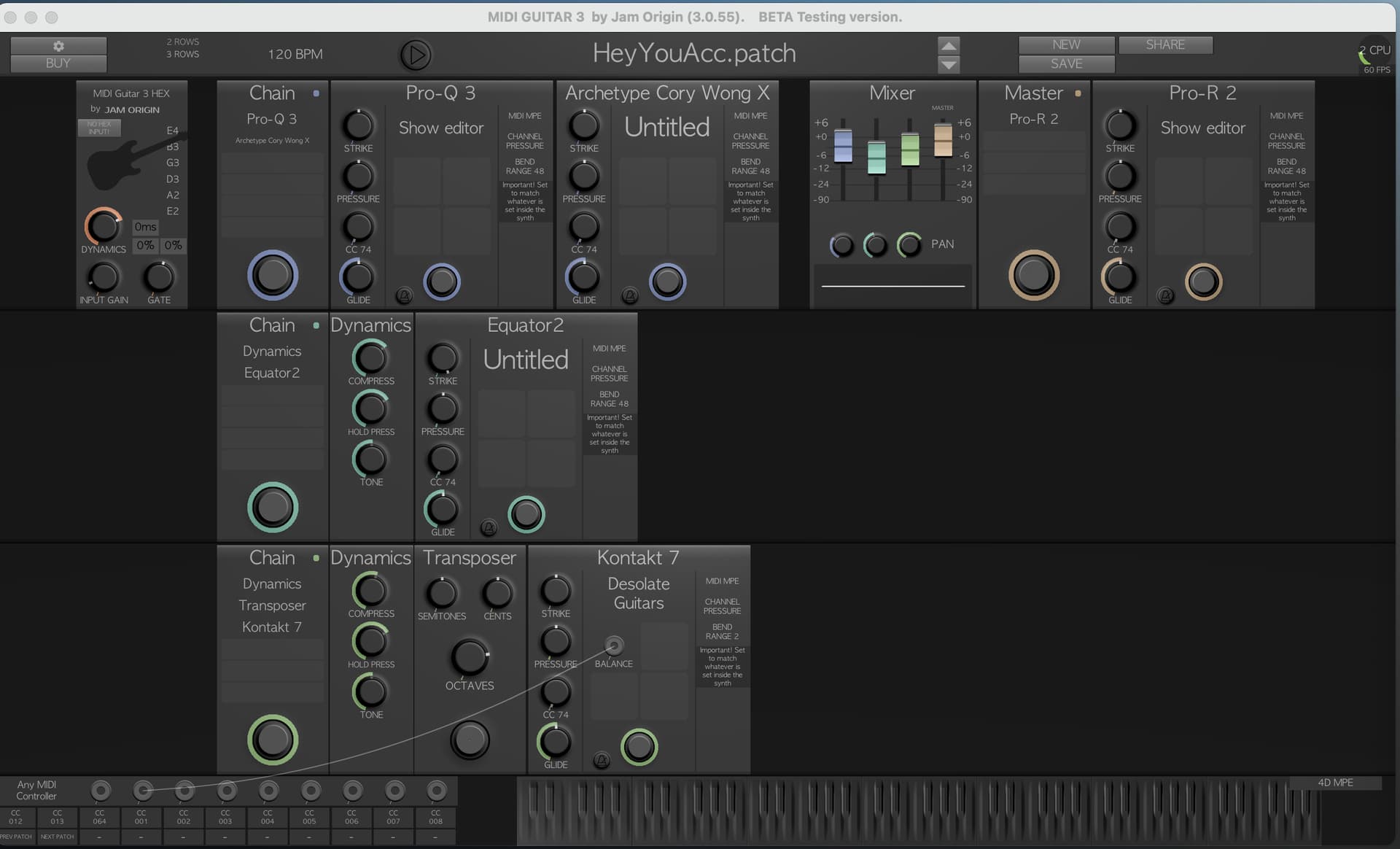
For this example, below, I want to use the 3 MG3 chains as 3 layers played simultaneously.
Chain 1, which includes the “Archetype Cory Wong X” plugin, uses the GK5 audio signal that I filter upstream so that it sounds like a guitar pickup.
Chains 2 and 3 are Midi instruments that use Hex mode.
Having a “Non Midi” chain (chain 1) allows compensating the possible latency between the output of the virtual instruments and the sound of the guitar.
A better solution would be to send the DI sound of the guitar (QuadCortex USB 1) as the source of the chain and, thus, have a better sound than that of the filtered GK5. But I don’t know how to do that with the current version of MG3
I was just playing with a similar idea trying to delay the D.I. guitar to see what the effect would be. But, at least in my experience, MG3 is processing audio-to-MIDI conversions so fast that I’m not hearing/feeling any real issues in terms of perceivable lag on the synth side. Has this proven to be a significant issue for you already?
So, this has been a bit confusing for me too. I’ll try to explain how I understand it and @JamO can correct me if I’m wrong.
You can allocate eight audio inputs to MG3 in standalone or any of the plugins.
BUT: In standard mode (non-hex), MG3 listens to Ch. 1/2 only. In hex mode, MG3 listens to Ch. 3-8 (w selectable option for D.I.: Ch. 3-8, Ch. 1 only or Ch. 2 only).
When in regular tracker mode, if all eight channels are connected you will see a message: “TOO MANY INPUT CHANNLES. TRACKING QUALITY DEGRADED.” …but MG3 is only going to use Ch. 1/2.
If you allocate your QC to MG3 Ch. 1/2 (while in hex tracker mode) MG3 will default to using the aggregated hex signal from Ch. 3-8 of your GM-800, unless you choose either Ch.1 or Ch. 2 under CONFIG.
I verified this by feeding the processed outs of my Axe-Fx II to MG3’s Ch. 1/2. In hex tracker mode, the processed audio is inaudible, yet there is definitely a clean D.I. signal available on any chain. Therefore, MG3 must be aggregating the hex signal. EDIT: This is only partially correct. You can still select Ch. 1 or Ch. 2. as an input source for the chains (under CONFIG).
When the MG3 plugin is hosted, you can basically route anything you want to Ch. 1/2. Where the host allows, this is eay to configure. But, again, it will only be used as a source in regular tracker mode.
But, using MG3 in standalone with an aggregate audio device, one issue is that there is a limitation on configuring the input source for Ch. 1/2 when the channels do not follow a specific order, i.e. Ch. 1/2 must fall in sequence before your hex channels that feed Ch. 3-8.
Like you, I also use an aggregate audio device. I tried to feed the D.I. channels from my Axe-Fx II into Ch. 1/2 of MG3 and the SY-1000’s hex Ch. 3-8 into the respective channels of MG3. As the Axe-Fx is the final device in the aggregate, the channels cannot be lined up. However, you can acheive this routing in a host without issue. Just the actual input source will be dependant on the selected tracker.
Does that make sense? I hope so
FWIW, I did find a way to acheive what you want but it’s a little convoluted. I had to use Blue Cat Audio’s Connector plugin to grab and send the D.I. signal as network audio from the Axe-Fx II D.I. to another instance of BC Connector asting as as a receiver positioned in front of the Cory Wong X plugin in MG3. It works perfectly, but it’s a lot of work to get a specific D.I. signal. Makes more sense just to get a D.I. from the SY-1000, in my case.
It seems to me that MG3 might be able to do what you want it to do if there were: 1. a more rigourous method of allocating the input sources of Ch. 1-8 in MG3; and 2. some allowance made regarding how each chain in MG3 chooses its input source, i.e. maybe you would have a module that you need to select to get hex input on any given chain.
I’m a little on the fence with this. It seems easier to just route it all in your host/DAW. But, it would also be cool to be able to use MG3 as a one-stop host for all your audio processing needs.
@erol recently mentioned having an antares atg-1. it seems likely that mg3hex could be adapted to provide a similar solution.
i’ve tried to do something like this using multiple instances of two of the off the shelf autotune packages, it was messy, but that was before mg3hex. i will try again.
i think there would be a small but serious demand for this. i’d love to turn a standard guitar into a true temperament instrument. also those who use middle eastern or microtonal tunings might be interested.
maybe it is sufficient to do this using sampled or synthesized instruments. and even if it gets any consideration this should be a back back back burner issue. but i am curious to see what might be possible.
Very useful answer, thanks.
That explains why I observe no sound in a chain with no MIDI when MG3HEX enabled. 1&2 are not used. So if you want to mix your guitar sound from GP10 (processed) you need to use the GP audio output into a separate audio card even if this occasionally can produce ground loops (an USB Ground loop isolation might help here). Right?
@kimyo is it your idea to emulate different possibilities of antares-engine in mg3 and to edit the guitar tone itself with e.g. microtone manipulations in real time?
I don’t know if such an engine would be a new rabbit hole for @JamO, but it would open up very far-reaching possibilities for original tone manipulation.
Yeah. Rabbit holes is what I do! I got you all covered with tuning…
With MG3Hex it’s trivial and with MG3 vanilla its good enough for some purposes at least
But it’s for another product/add-on (codenamed Deep Amp). I have more to say on this later.
In Live: if you’re USB 1/2 is sending a D.I.-type signal you can route it also to “Track In”.
In MG3 standalone: selecting GP-10 as the audio device (along with the hex pickup option in the audio settings) USB Ch. 1/2 will become the D.I. source when in non-hex tracker mode.
EDIT: Be aware of the setting for CONFIG under HEX TRACKER.
When using the technology of an elastic audio engine, there might also be additional possibilities within MG3 that could go beyond the manipulation of the audio guitar tone like in DEEP AMP, e.g. to a further parameter extraction of string play in MG3 in general. More later
Many thanks @Vaultnaemsae for the time spent helping me solve my problem!
I hadn’t thought of using a plugin like the “Blue-Cat connector”.
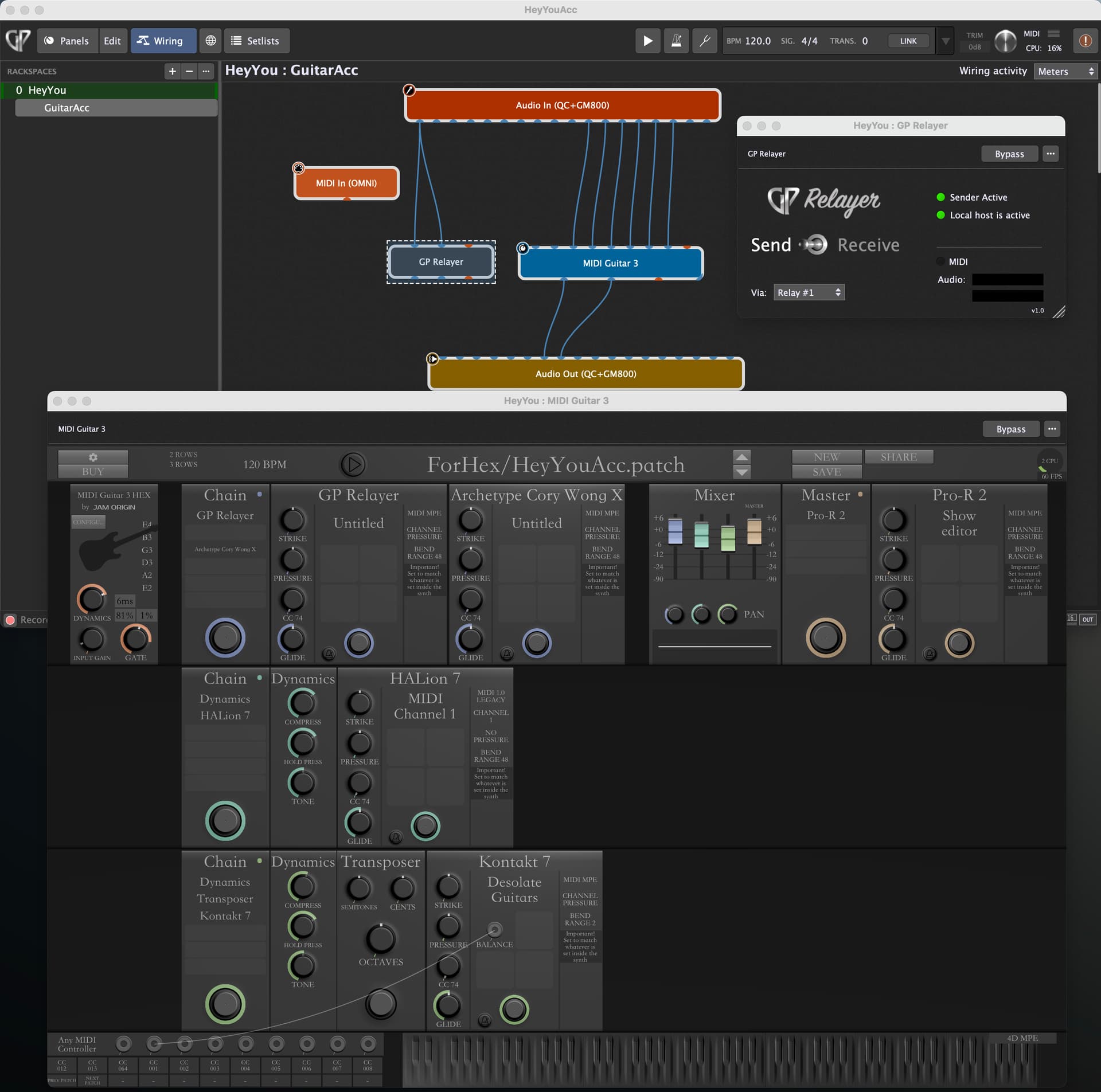
With the latest version 5 of Gig performer, an equivalent plugin, but easier to use, was introduced: “GP Relayer”.
So, everything works wonderfully, no more drop-out with the two threads generated by MG3!
Small neophyte question for @JamO: would it make sense to have one thread per chain in GP3, so 3 threads in this case?
Nevertheless, with these 2 threads, I already have excellent results.