
Yes, for Windows control and comma (simultaneously)…I should have written it more clearly. It’s a very common shortcut to audio and MIDI settings in various software packages so I thought it would be relatively obvious.
1 Like
UPDATE on my Latest Version of my MG3 Hex Gig Rig! .
My goal is to have one stand alone MG3 running on a small computer that can be as easy to gig with as any plug+play hardware unit like the Roland GR-55.
I currently play 4-5 nights a week. I’ve been gigging with my latest portable MG3 rig for a couple weeks. I’m running MG3 on a GPD Pocket 4 Mini Laptop, Win 11, AMD Ryzen AI 9 HX 370 32GBRAM, 2TB storage.
I use a GODIN hex output guitar into an Antares ATG1 which has a hex out going to a MOTU MK-5 ultralight interface via a Separate Strings breakout cable. BREAKOUT CABLES
I also use a standard mono output bass guitar. I created a macro to automatically open 2 standalone instances of MG3 and set one to HEX input 3-8 and set the second instance to channel 2 of the MOTU with MIDI Bass tracker.
Tracking is excellent in both Hex and Midi Bass. It simply feels faster and cleaner than any of my previous experience with Roland, Axon, Yamaha, Jamstick or FTP. (yes I’ve tried them all).
GUI layout is easy and intuitive and full of features! Lots of good stuff happening here.
Not sure why sample rates and buffer sizes sometimes seem to randomly change, but if set everything, to 44.1Khz and a 128k Buffer it usually holds. If I try to go with 48kHz or 96kHz, it often seems to randomly change the buffer dropping down to 16k in the Cuemix and system software.
I have several bug reports and wish list items which may or may not have been previously reported:
-
Individual string gain controls in HEX are not working.
-
Mono or Duophonic in Bass mode does not retain when saving patch (defaults back to duo)
-
Audio Device inputs don’t save with the patch. If they did I wouldn’t have to run two instances of MG3 in order to switch quickly back and forth from bass to guitar. It would be a HUGE help if MG3 would save the audio input setting with the patch. Then I would no longer need Loop Midi and Midi OX, nor the script used to open two instances of MG3. It would get me closer to my goal of making one standalone MG3 all that is needed on a gig.
-
Drop out of sound during load time between patch changes. It would be great if while the new patch is loading the previous one could remain active, OR at least the raw instrument audio would remain active. Right now if I make a patch change, it drops to silence while loading the new patch. This is not a good thing for live gigs.
-
Strike, Pressure, Brightness and Level settings for my Sampler instruments do not save with the patch. They default back to 50% position. These are great modifiers for the instrument, it will be awesome when they save with the patch (some of my samples don’t sound good without adjusting those parameters).
-
I’m not really sure of the requirements for Sampler instruments to work? It seems some do, some don’t. Sfz files mostly (not all) seem to work.
-
One more chain would be nice, or the ability to run two VST instruments simultaneously in a single chain?
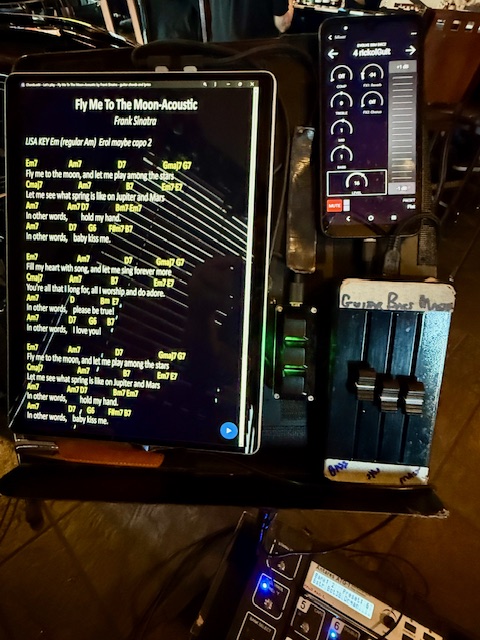
Pics of the rig at a gig. While performing I close the laptop lid, this prevents errant touches to screen or mousepad (all control and patch changes are done via midi). The music stand holds my tablet for music, a sparrow midi 3 midi fader and my phone for bluetooth control of my EV 50M. I posted a youtube video of the automated start up script I use so I don’t have to kneel down and squint, trying to navigate the all the menus on the tiny screen. https://youtu.be/btPbrYx72Rw
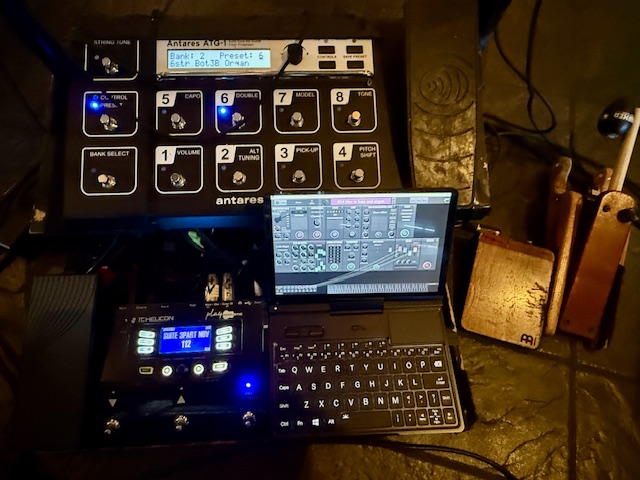
The computer sits on top of the MOTU interface, they have about the same footprint. Since the fan is intake is at the bottom of the laptop, I stuck a couple small spacers between it and the MOTU. It has performed 3 hours gigs in 90 degree heat without a crash.
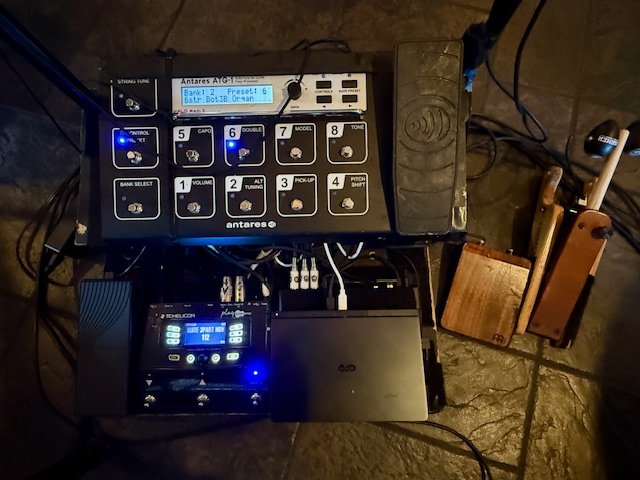
Below is the entire rig (without the bass on this show) the small brown pedals are my foot percussion (I don’t use tracks).
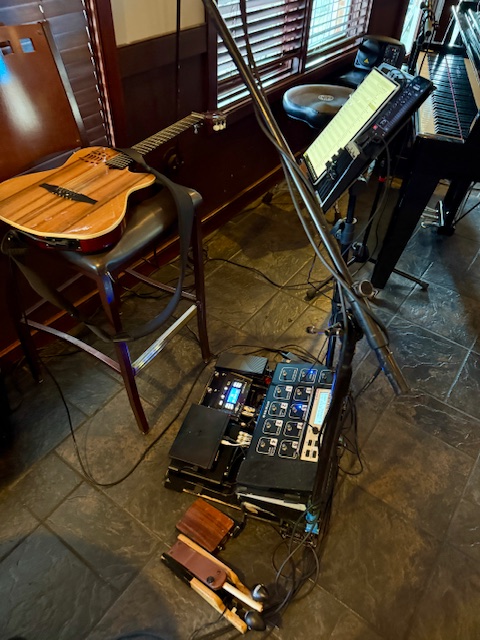
Below is my music stand, ChordsWiki on tablet, EV pa controls on phone, Sparrow 3 midi fader. also a 3 button keyboard to control the sheet music tablet.
2 Likes
9/30/25
The last few months I’ve been gigging 4-6 nights a week using stand alone MG3 Hex and MG3 Bass on every gig! Here are my observations:
The software loads fast, and its rock solid stable under ALL my various gig conditions. MG3 Hex tracks better than any hardware unit (I’ve used them all). MG3 Bass is almost as good as Bass mode on a GR-55 but not quite, it has more false triggers and lacks polyphony of my hex basses on a GR-55.
Here are the areas I’d like to see it improve for live performance, in order of importance:
1.) When changing patches there is a silence gap. Understandable that the software has to load the new sounds and fx. Would it be possible to have it load in the background, keeping the current patch active until it’s in, then maybe a fast crossfade to the new sound?
2.) Save audio device inputs, tracker, input gain, dynamics and gate with each patch to account for the use of different instruments. Then we can switch from a hex guitar to a standard bass guitar (or different hex guitar) without having to go in and adjust those parameters in the middle of a gig. Current work around is to boot two instances of MG3 then set one to Hex and one to Bass.
3.) Individual string gains (has been reported as not working). Please don’t abandon that feature, it’s very useful for cross fading sounds between strings and evening out sensitive sounds.
4.) On a five string bass, please allow triggering for notes below E down to B. I realize tracking will be slow and not very good, but it’s still useful. The GR-55 and GM-800 allow it and I use it. If it causes issues, users can disable it with the note filters.
5.) Hex for Bass (I have quite a few hex equipped basses and given how well MG3-Hex works for guitar, I’m sure it would be great for bass too!
6.) The Level and Pressure settings for my Sampler instruments do not save with the patch. They default back to 50% position.
4 Likes