In ableton i need the plugin to expose a desired parameters, such as on/off for midi out. I press ‘configure’ on a device, touch some parameters in the plugin - but nothing exposes… Also i see 9 exposed parameters that actually do nothing and are not mapped to anything in the plugin.
But the idea is to trigger exposed parameters to control vst internal parameters. Like in every vst on the market.
May be you are suggesting to map midi input section parameters to something, like midi out on/off. And then trigger exposed parameters? But it does not work at all.
Do you have a solution to control vst internals using exposed parameters?
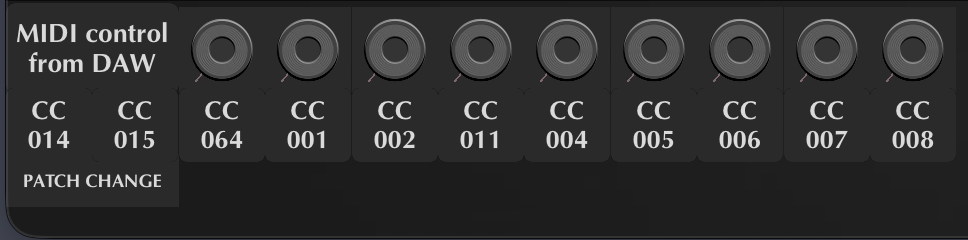
Yes, they work. But the caveat is that each parameter from one through nine corresponds to CC#001 through CC#009. i.e. you must configure the dials to match the parameter numbers.
I do not think it is the ideal configuration. In my opinion, parameters one through nine should link to the corresponding slot numbers rather than to specific CC numbers.
Further to that, I do agree with you that it would be very handy to have greater access to general MG3 parameters for automation. But having said that, they’re not entirely necessary at this point, and there are plenty of workarounds depending on your workflow.
That’s a good point. I think it was never intended to map to CC, but something that slipped my mind.
To the original question, the system is designed to be modular and extensible, so there is no general midi output module (maybe its not loaded or maybe there are two of them) and hence the VST parameters are the patch bay modulation values that can be wired to anything.
Im currently making a seperat MG MINI plugin which is hardwired, and it will have direct VST parameters.
Inside MG3 vst i have 1 chain with 4 midi out modules. If i trigger on/off each midi out by mouse - everything works fine. But i need to expose such on/off midi modules outside the vst to control them from outside.
So the exposed parameters 2-5 can help.
As 2-5 exposed parameters are hardly mapped to internal MG3 VST 3-6 knobs inside MG3 vst i have mapped 3-6 knobs to 1-4 midi out modules on/off.
While all modules are on, i turn 2 exposed parameter off = 3 onob off = midi out 1 module off - it cuts out all other modules in a chain… All other modules looks like they are in ON statem but no midi is going out…WHYYYYYYYYYYYYYYYYYYYYYYYYYY???
Dear DEVELOPERS!!! I REALLY NEED YOU ATTENTION TO THIS TOPIC!!!
The messages are very hard to understand. Perhaps you could write in your native language and get an LLM to translate it to English?
The part about what you’re seeing each of the nine automations actually doing particularly worried me.
@JamO, I did a quick test to verify @Hellem’s message and can confirm that if the very first slot (patch change) is assigned to CC#001, the automation data will trigger a preset back action. I don’t think users should have general access to this as an automatable parameter – it’s too dangerous. The only way it would be safe is if it followed the general design I laid out in my previous message.
@Hellem, if the parameters didn’t respond to automation messages, it means that you had disabled “MIDI from DAW”. Anyway, I strongly advise against using CC#001 on a patch change slot unless you are very clear about what you’re trying to do. What you described in your above post is surely not the intended use case. As you can see in the example below, CC#014 and 015 are outside of the 001 to 009 range, so they are safe from possible accidental automation changes.
Also, do not put four MIDI Output modules in one chain; that is a very bad idea!
I’d also add, if you’ve ever developed a VST, then you will be aware that not everything has to be exposed. There are things you might not want to expose depending on the design and intended function. And then, if you change design mid-development, that can really mess things up for existing users who rely on certain configurations.
Thank you for your replies, I will test and record a short video.
But!
Exposing a certain parameters is essential. Most vst let users to expose only touched parameters with device configure enabled. Which is great, but it is not done yet in MG3…
Exposing preset change is very essential. It is dangerous for inexperienced users only. But very essential to advanced.
Presets are already directly accessible via MIDI PC messages. @JamO has done considerable work on MIDI input to refine this system. I consider program changes to be a far more appropriate method for selecting presets;
The “essential” preset change you are referring to is preset increment/decrement via the MIDI input area. I agree that it’s potentially useful, but I don’t think it’s the same as general preset selection.
In my case, I have the S1/S2 switches on my guitar’s GK pickup assigned to move through patches. It’s like a manual override for PCs if you only wanna move one preset at a time. I suppose somebody might have a use case for automatable preset hopping…