
Hi everybody,I am trying to setup MG 3 and midi harmonizer, but unsuccessfully. In the first case (see picture 1) I hear harmonization, but with midi harmonizator sounds (and great delay).
In the second case I hear just MG 3 instrument sound without any harnonization.
I’m not “profi” in midi at all, so be so kind to explane me all my mistakes. How to solve this problem?
Thanks in advance
Link for the pictures:
Hi Konstantin!
If you are looking to get the effect from the harmonizer to affect the instrument in MG3 (Kontakt in your first picture), you should use the settings from the second picture;
MIDI IN = MIDI Guitar OUT and MIDI OUT (Harmonize) = “from Midi harmonizer V404 MB2”
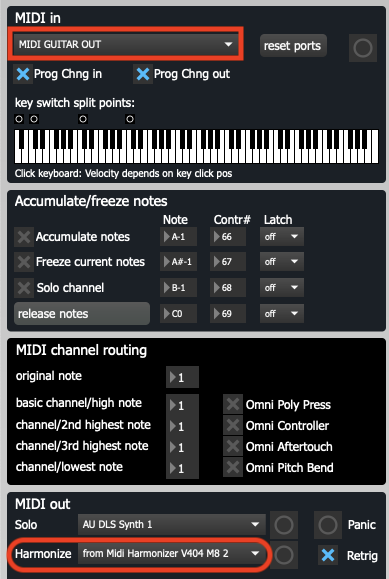
In your first setup you are hearing the Harmonizer synth sound (triggered by MIDI Guitar 3,)
And for your second setup i would suggest you try putting the MIDI OUT on its own Chain. 
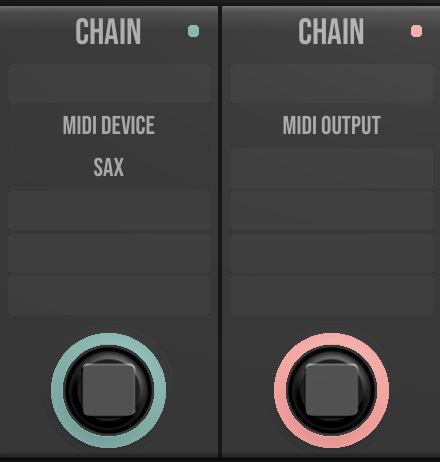
Dear LoFiLeif, you’ve been very helpful, God bless you.Good luck!
1 Like
Just to let everyone know, Johan Looijenga’s MIDI Harmonizer is available for sale again here, https://www.johanlooijenga.com. His storefront had been down, but is back up and working again. Thanks @LoFiLeiF for letting us know about this great piece of software.
1 Like
It is? I am glad to hear. This means I don’t have to feel guilty anymore, everytime someone has any questions about it!
1 Like
That’s an interesting looking MIDI device by Mr. Looijenga. I imagine this would be fairly simple to emulate this kind of functionality in a DAW like Live12 using the native MIDI effects. A reasonable assumption?
2 Likes
Maybe? I haven’t had the time to use Ableton that much lately (and I am still on 11  ), so I don’t know what MIDI tools are avalible at this point. This is indeed a Max creation I would assume that there are some similar M4L stuff to be found if someone cares to have a go at it. It seems to be (mainly) two parts involved: a chord mapper and a handling protocol ffor chord structure, harmonization and rotation.
@LoFiLeiF Thanks for your insights. My interest is piqued  The demo by The Art of Wind Synth guy on the MIDI Harmonizer software info page is something else!
1 Like
Yeah, Łukasz Knapik
He has made all these great presets for Falcon, Reason and Serum that i still use all the time. And he also provided a great solution for breath control use in Ableton (controlling an Amp and Filter) that I referred to in my “DIY Synthaxe guide”. Here is his video on that, for anyone interested:

He has a lot of interesting stuff that works great also for us MIDI guitar players.
1 Like
Just to mention, Kontakt (even the free player) has a built-in harmonizer and chord tool:
To use just the generated MIDI notes following option can be selected and routed to any other VST:
2 Likes
@Dutti67 Just came across your post. I didn’t know that about Kontakt. Brilliant.
About the second video, how would you use this, how do you route it to another vst?
Hello Bernard, with “any other VST”, any other instrument that is running in Kontakt is meant. Maybe my wording is misleading, you can’t use it outside of Kontakt (player).
Edit: I had to dig into that issue again > you can send it to any other VST inside a DAW environment when you follow the procedure shown in the second video, but it will not work if Kontakt is hosted in MG3 standalone and you use the MIDI output module to control other applications.
1 Like
So… So I can understand that we can use any other instrument within Kontakt. I already tried that with a few other. Fun! But about the second thing you write, are you just saying that it works within Kontakt if Kontakt is used as a plugin—which I am, in Logic—or that one can actually use its harmonizer with other vst than Kontakt?
Yes, in Logic it should work for any other VST too (at least in Cubase it does). You should have the scripted MIDI output of Kontakt available as MIDI source to input into any other VST when you tell the Kontakt engine to add generated notes to the MIDI output and make them available . You can mute the Kontakt VST track but the output is still available.
1 Like
Interesting. I’ll look into it. Thanks.