Hard to have sound when it makes your host stop communicating with the drivers!
But this was windows, it hasn’t happened to me on Gig Performer on mac

Hard to have sound when it makes your host stop communicating with the drivers!
But this was windows, it hasn’t happened to me on Gig Performer on mac
Ok, just checked on two more Windows PCs, running windows 11. I cannot find any way inside of MIDI Guitar 3 to change the sample rate.
This has to be something MIDI Guitar 3 is doing and I have no way of keeping it from happening.
@pipelineaudio, just to clarify…do you mean you can’t change the sample rate when you’re running MG3 inside of GP5? This is to be expected, as was already stated, you cannot change the sample rate internally when operating the plug-in version. That is the job of the host software.
However, if you’re talking about the standalone application, you need to simultaneously press the control key, and the comma key (Windows) to access the audio settings.
No, there were some claims that you could set the sample rate internally in the standalone version of MG3, and that maybe, that would carry over to the plugin and have it stop trying to change the sample rate of my host. I am just saying that I cannot see any way to do that. I see no way to change sample rate in the standalone version of MG3
Not that it matters, under NO circumstances should a plugin be trying to change the sample rate of a host
Ahh well there you go! I will give this a try thanks!
However, even if that succeeds in keeping MG3 from bugging out Gig Performer, it still should not be happening, but I’ll report back after I try it.
The audio settings shortcut (standalone only) was mentioned a couple of times earlier by member @Dutti67 but I guess it got lost in the thread.
Let us know how you get on with this. I only have GP5 for macOS and no RME interface here so, unfortunately, I can’t even attempt to replicate this issue.
Oh shoot! Sorry @Dutti67 I missed that one!
pressing Control & or Control Shift 7 does nothing in MG3 standalone here. I am on 3.0.63. Where is the documentation that talks about this keycombo opening audio interface settings?
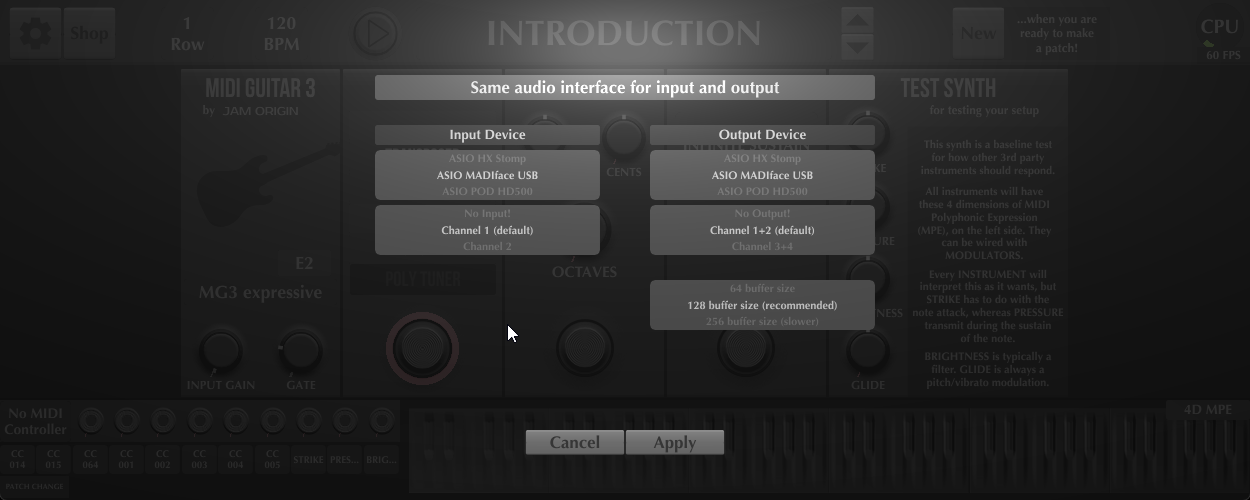
Here are the only settings I can get to, no sample rate.
If I chose my Digiface as the interface in MG3 settings, it switches it to 44khz, while the DAW is trying to hold it at 48khz.
Control and “Comma” (“,”) together.
That did it! Gig Performer now loads MG3 without messing with the sample rate now
However, the plugin should be getting its sample rate from the host and UNDER NO CIRCUMSTANCES be able to change it like that. This definitely needs to be fixed.
Very good that it worked for now, I’m sure that @JamO will look into it.
Could this indicate that the sample rate is somehow getting saved in the MIDI Guitar 3 default settings which are then getting loaded up when it loads in Gig Performer 5? And if that were the case, why would we not see the same behaviour in Reaper or any other DAW/host?
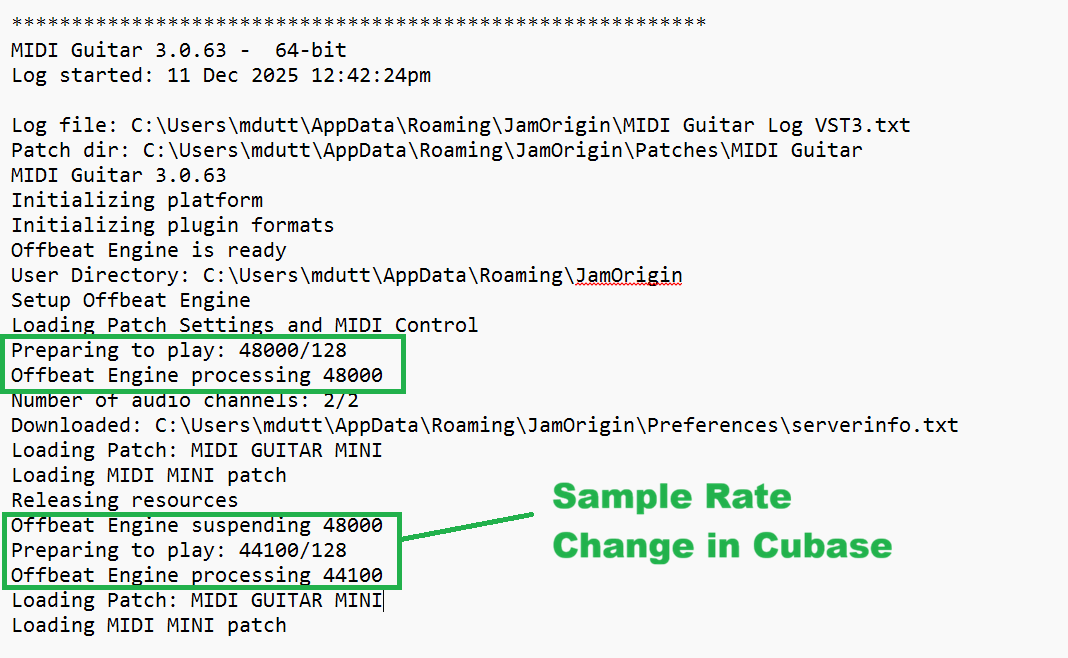
When I do sample rate changes in Cubase and have MG3 inserted as a plugin it automatically changes the rate as well. This is also visible in the log file.
Certainly a strong hypothesis!
I posed this question to Justin Frankel earlier, we shall see what he says, but in the past extremely naughty plugins that were known to do sample rate nonsense in other DAWs wouldn’t affect REAPER, so I’m not too terribly surprised there, but I’ll relay what he says when he answers.
I was able to confirm this same behavior on a windows laptop running the onboard sound and on the same laptop running a Focusrite 4i4 3rd gen. In those two cases, it gave the lost connection with driver error in Gig Performer and tried to change the sample rate on the Focusrite drivers
That’s the direction things are supposed to go.
The weird case here is that it is the tail wagging the dog, with the plugin changing the sample rate of the drivers, while running inside the host rather than the other way around
I’ll look into this. Generally a plug-in cannot change anything in the host or its sample rate.
But MG3 got this feature to open a separate dedicated audio device (useful for boss hex hardware) in the plug-in. As mentioned above - I think you must accidentally have been using this feature which must have caused the audio interface to change sample rate, which caused the daw to change sample rate.
But I realize when reading all comments here that it’s not intuitive. The hidden window (command and comma) was meant to be removed and never be used as it can open a device which it’s not supposed to do.
How would I get to this feature? I have never seen a way to change the sample rate inside the plugin, only the standalone.
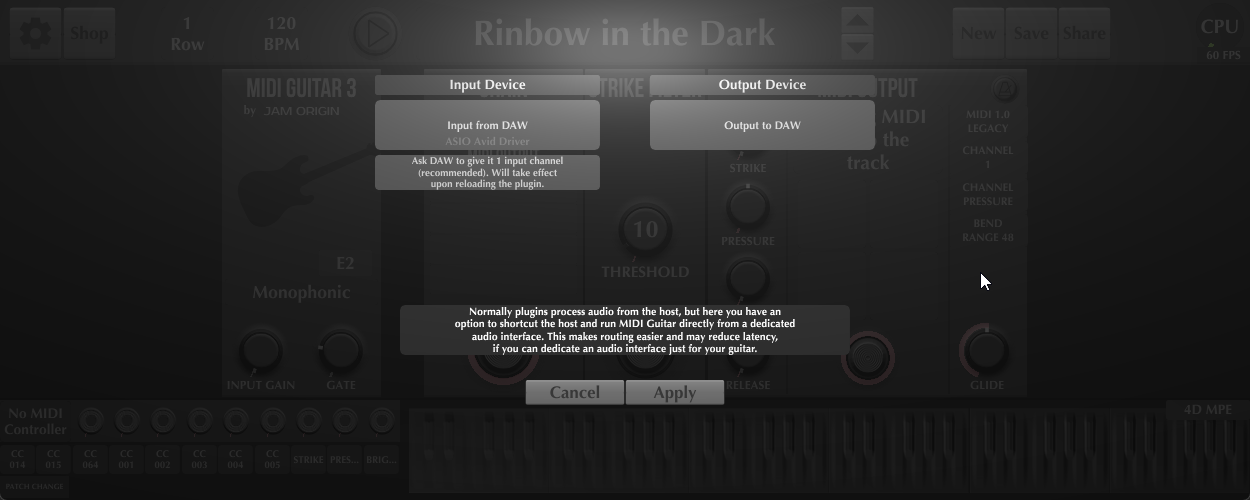
In audio device settings, see @xtian82 post above:
But you should use “Input from DAW” to not open any audio devices.
Here is the setting when running MG3 as a plugin on Gig Performer when it tries to switch sample rates on the interface.
This only happens if the Standalone version is set to 44khz. If set to 48khz, the issue does not happen. However, it seems to me there should be no chance of that setting mattering to the plugin version, as it should be getting its sample rate from the host
This is how it is set on my desktop running an RME interface, and on my laptop running either onboard sound or Focusrite 4i4, same results with any of these
Thank you for reporting. I’ll look into this.
The plugin cannot affect the host (that’s simply not possible), however the plugin can open an audio device, which in your case makes the RME driver change sample rate of the RME interface, which cause the host to change samplerate.
But something is obviously wrong as it should not open the audio device at all.
I think the implication was that you may have accidentally selected the hex tracker, which is the second item in the tracker menu.