Why should I buy the Hex system? I have the MG3. It works well.
Then you shouldn’t buy the MGHEX tracker. It is a great deal for anyone that already have a full hexaphonic setup (Guitar with a hexaphonic Pickup and a way to get the 6 audio streams from that pickup into your computer (GP-10, Sy-1000, Breakoutbox/cable, etc.)), and also would like the extra details that comes with the 6x monophonic tracking.
The standard MG3 is fantastic and you get almost everything with it, but extracting really big chords in real-time from just a single magnetic pickup output has its limits, of course. And also, there is a per-string retuning capability not possible with standard MG3 (yet?) until a strategy for identifying notes on particular strings is discovered/invented.
But if you are happy with MG3 as it is, just go with it. That is still the most versatile setup in terms of connectivity. Just connect a cable (or even wireless) and you are good to go. 
2 Likes
Adding on Lofileif’s : I am owner of GP10 and GK equipped guitars. Using MG3 mainly for solos I have to say that I am absolutely happy with it. When it comes to chords I haven’t got big problems except for odd jazzy intervals (not all, only the most complex). For that reason I hook up GP10 only when needed for my recordings if that capability is required. Sure if I had more space in the home I would keep the GP10 hooked at all times to avoid any hassle and perfect my workflow but being my main machine an old VG99 (which lacks the ability to split strings via USB) I often use that and MG3 while for complex tasks I use GP10 + MG3HEX. When using VG99 I have to use Alternate Tunings in VG99 to have keyboard like arrangments while with MG3HEX you can create alternate tunings after standard detection in MG3HEX Patches so it’s more powerful and you do not need to take a patch position in your GK machine to have it. YMMV. Hope this helps.
Hi @denissimpkin In the documentation/overview by @JamO at Overview - JAM ORIGIN, you will find a (preliminary?) table comparing the most important parameters of MG3 and MG3Hex.
The VG-99 is still a good synth. You are correct that you can’t split the audio signals for each string. MIDI can be transmitted per string in mono mode.
I fairly new at this, so I may not have found the best setup. I have a GP-10 and a guitar with GK-3 pickup. I’m mostly interested in recording, or just monitoring my practice sessions in a DAW.
To use MG3 hex with my DAW, as I understand it, I would use the standalone version, getting the inputs from the GP-10, and then sending the midi out to the DAW. I have done that, with good results.
I don’t see how the MG3 hex plugin should be used in a DAW, if the separate strings are already coming into the DAW from the GP-10. Am I missing something? What is the application of the hex version plugin version, in this case, or perhaps it’s not intended for this case when separate string inputs are coming into the DAW?
For recording, so far, I find that the standard MG3 plugin applied to each string separately in the DAW is working best of what I have tried, and gives very nice results.
The procedure greatly depends on what you want to record (each individual string or just the audio output of the MG3 Hex) and which DAW you are using. Can you let us know your setup and intentions.
My setup is GP-10 and guitar with GK-3. My DAW is Reaper, and I’m using OSX.
In configuration A, I can get the regular pickups on inputs 1/2, the GP-10 modeled pickups on inputs 3/4, and the individual strings on inputs 5-10. For each individual string, I can use the normal MG3 plugin.
In another configuration, say B, I can use the MG3 hex standalone app to receive the GP-10 individual strings inputs, and I can route the midi output to Reaper, which can also receive the ordinary pickups.
These both work very well. My intention is just to hear some nice multi-instrument sounds when I practice, and to record once in a while. I like the first setup more, for what I’m doing, so far. It works great, and does everything I need.
My question is whether or not I’m missing some neat application of the hex plugin (not standalone). I don’t see how I can get a better result from it than what I’m already getting from setup A. I guess I don’t understand what the plugin version of the hex tracker is for, exactly.
TIA
Your setup A is basically what MG3 Hex does with one VST instance. However MG3 Hex offers some modules, like the “Chord Shifter”, you can’t simulate with six single instances of MG3.
Beside that you are saving CPU power with only one instance open.
Just try it out and decide afterwards what fits the best for your needs.
1 Like
in reaper i believe you have to combine tracks in order to feed the plugin the required 6 inputs. once you have this going, it’ll work just as the standalone does.
in ableton i have 3 stereo tracks for EADGBE, which get routed to an instance of mg3hex on a fourth track.
in terms of useful hex features - there’s individual string / open string muting. alt-tuning for instant drop/open-d etc. chord shift is neat, you could emulate it on your “A” setup but it would be a major headache.
less-used features would be auto–generation of tablature, improved ‘complex’ chord handling and slide performance.
in my view, mg3 standard is the right solution for 9 out of 10 users.
1 Like
… And rightfully so. Everytime I used it I expand my knowledge and ask myself why I didn’t do it before? I own it since 2010… but with MG3 Audio manipulation capabilities I am getting closer to my ‘signature’ sound I got in VG99. Deep Expressor and Mods help me get closer.
2 Likes
Thanks, @Dutti67 and @kimyo, that makes sense. I can see that I need to explore more the extra features that the hex tracker offers. I will give it a try.
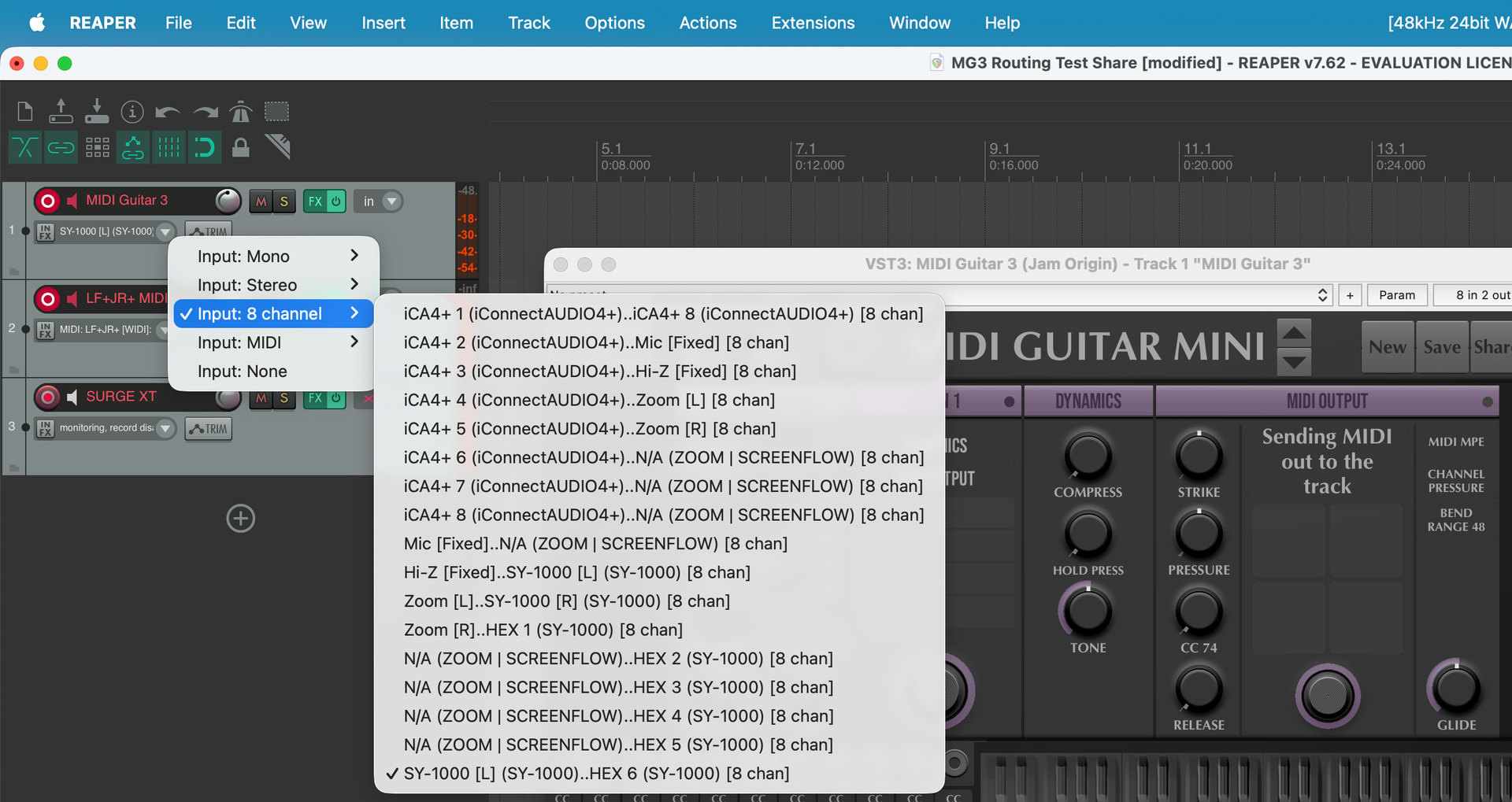
In Reaper you click on the track setup icon and turn the track into a 6 channel track. I can provide further instructions if needed.
1 Like
I was looking for how to do that. Thanks! I think I will be able to figure it out, given this hint. However, this info does not seem to be widespread, according to my search, so if it were made more obvious, that could be good.
Please explain in more detail. I wasn’t aware this was possible in Reaper. Can it be set to 8 inputs for correct multi-input allocation (2 channels + 6 channels)?
I’ve been looking around, following @ElectroFuzz ‘s post. These videos by Kenny Gioia seem to cover it, but I haven’t had a chance to try it out yet. Looks fairly easy to do.