
I have a problem with Jam MIDI Guitar 3. It flashes and lights up, but the notes are not being recorded into the playlist and it also does not connect to the given plugin. It gives me a buffer error, but even when I reduced it with an older version, it still didn’t work. I don’t know what to do, I’ve tried everything. I am working in FL Studio 25.2.5. Thank you for your response.
please provide a few more details re: your os and audio interface.
it is best to make certain mg3 is working in standalone mode before moving on to using it in a daw.
on errors, screenshots or the exact text would be helpful.
I have a problem with Jam MIDI Guitar 3. It flashes and lights up, but the notes are not being recorded into the playlist and it also does not connect to the given plugin. It gives me a buffer error, but even when I reduced it with an older version, it still didn’t work. I don’t know what to do, I’ve tried everything. I am working in FL Studio 25.2.5. Thank you for your response.
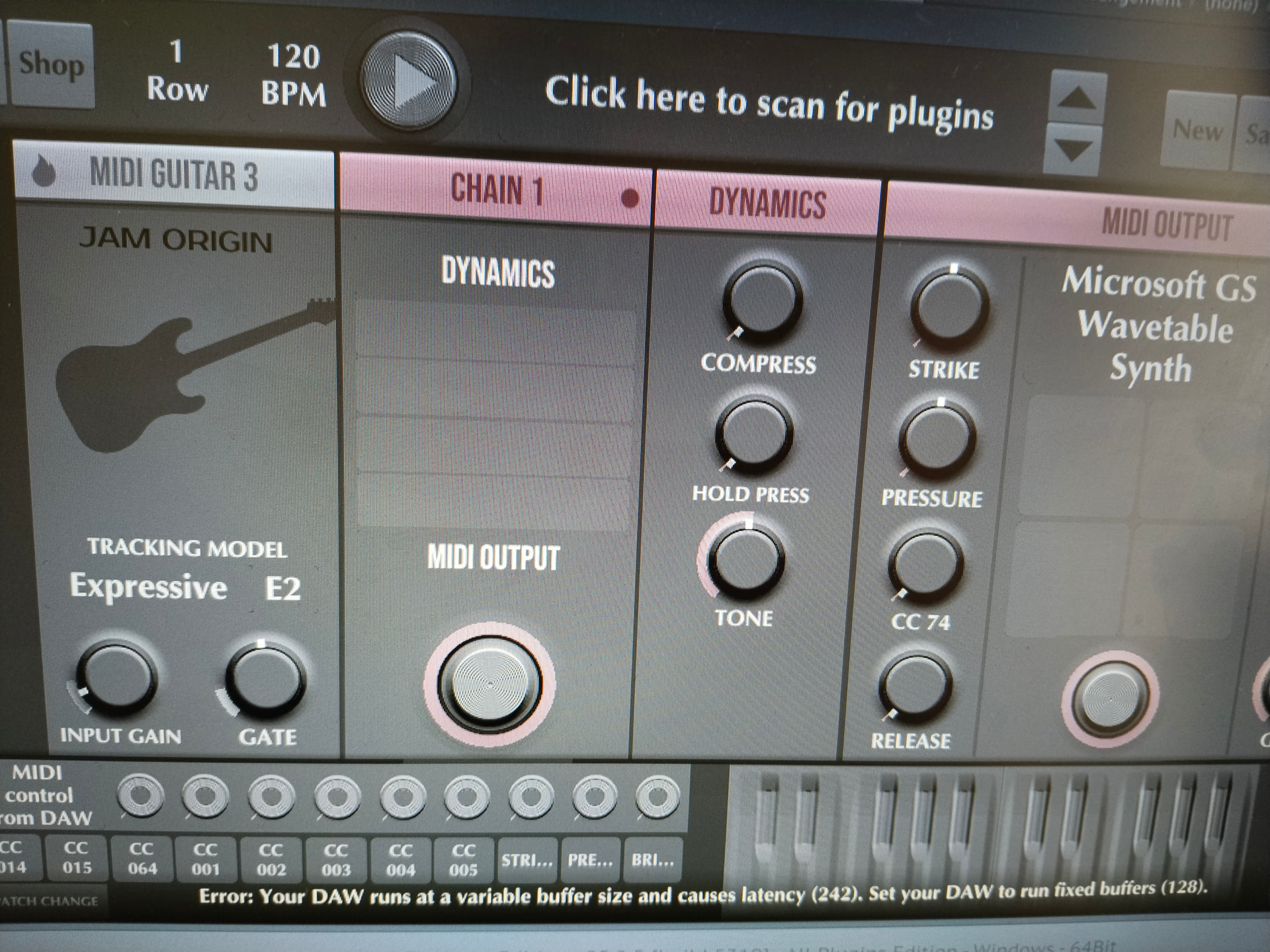
I use the Steingerg UR12 sound card
Pianoroll is empty. I don’t know what to do…
A buffer size of 242 you are running on is unusual. The UR12 comes with a proper ASIO driver and the Yamaha Steinberg USB Driver control panel. I don’t know FL Studio 25.2.5 but you need to make sure that you run it on the Steinberg ASIO driver. Then you can set the buffer size to 256 or 128.
Are you attempting to run MG3 as standalone app and try to send MIDI data into FL via the MS GS wavetable? This is not a good idea and creating a lot of latency.
You should insert MG3 on an audio track and send MIDI out to an instrument track inside FL Studio. If this is not possible use a fast MIDI port program, such as loopMIDI.
does mg3 work in standalone mode?
instead of the microsoft gs wavetable synth try one of the included synths. the microsoft wavetable synth may be outputting to your sound card instead of the steinberg.
to reset the sample rate use CONTROL - , (hold control, hit comma). try 128.
The plugin does not blink and does not write to the piano roll, otherwise MIDI Guitar 3 works
this is very old, but it appears that fl studio does not support internal midi with mg3 unless a midi loopback is used:
Recording midi in FL Studio into the pianoroll is still only possible via a midi loopback.
The imageline people told us that this somehow a weak spot in their architecture, and that they are thinking about a solution.
If you want to use MG inside FL Studio, please follow the instructions on:
https://www.jamorigin.com/docs/daw/#toggle-id-12
also it appears that there are sample rate issues:
Note 1: MIDI Guitar is not made with variable buffersize in mind. The display of buffersize and cpu load are erratic
lastly as of jun 2025 fl studio did not support mpe.