
I’ve had no problem sending midi program changes over bluetooth from my SongBook app on iPad to a standalone instance of MG3 running on an iphone. However, I’m struggling to make program changes work with both apps running on just the iPad. AI has not helped me resolve this. Hoping someone else is doing this and can provide guidence.
I believe your SongBook app doesn’t send out program change messages. I briefly checked the manual and only found the option to send control changes. With that, you could only jump to the next or previous patch in MG3, but not to a specific one.
I should have specified I’m using Linkesoft Songbook as I believe there’s another app called Songbook. With bluetooth and midimittr, I can send program changes from Songbook on my iPad using {midi: PC0021@4}, @4 being the midi channel for MG3 running on an iPhone. This seems to works fine. But I would really like to avoid the iPhone/Bluetooth/Midimittr and just run MG3 on the iPad with Songbook. AI queries tell me to open a Virtual Midi Port in MG3 to receive the MIDI commands, and even tells me how to do it, but the instructions are missing something.
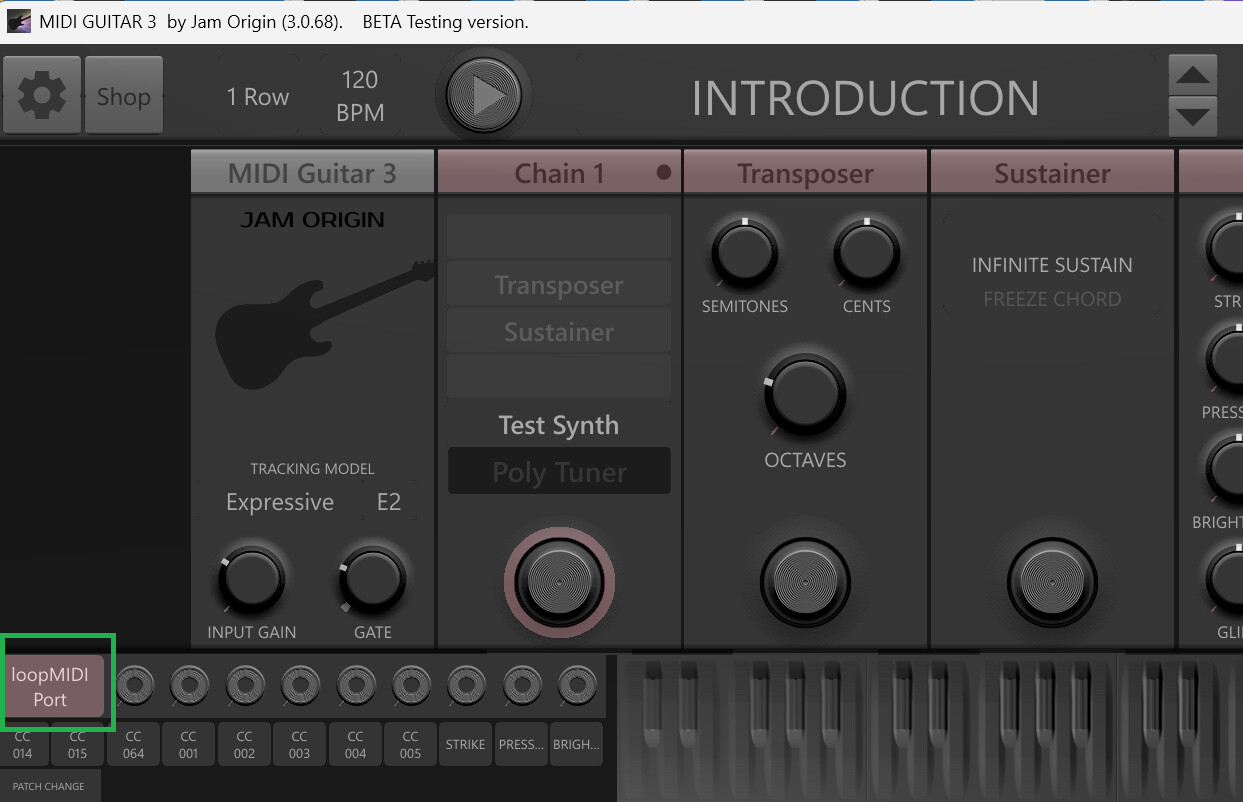
I see, attached picture shows the windows version of MG3 but it is the same for iOS. You can select a virtual port as marked. In order that your presets are called up correctly you need to save them using a number block in their name (e.g. “001 prest1”, “002 preset2”, and so on…).
Thanks! Wondering if the key is LoopMidi providing the bridge. I had tried midimittr but it seems to be bluetooth specific and LoopMidi is only windows. But, thanks for pointing me in the right direction. I’ll post if I get something working.
1 Like