
Sorry, it’s a bit hard to follow the entire thread but in Cantabile, do you select tracks as MIDI sources or do you select specific MIDI ports as sources? I’ve never used this software before.
if cantabile’s omni mode takes input from midi channels 2-7 and aggregates them that would explain why jamstik’s mpe works and mg3’s doesn’t.
internal midi devices like mg3 may not have this option, or maybe it is elsewhere.
you can confirm this by using a tool like loopmidi to create virtual midi ports, and running mg3 as a standalone device.
if this works, the benefit will be that all of your existing cantabile setups for jamstik will be usable with mg3.
i don’t know if you’d consider loopmidi to be proprietary. it is free and available here:
there are mac options as well.
some mpe info: mpe mode uses multiple channels on a ‘round-robin’ basis. the first note will be transmitted on the first output channel, as long as it is held, the next will be on the next, etc.
thus if you’re missing notes, but some are sounding, a likely cause is a mpe/non-mpe mismatch.
as a side note - unless my pdf reader is broken, the cantabile manual contains zero occurrences of mpe. it might be useful to request mpe operational tips on their forum.
I’ve made good headway with this tonight through some tinkering. There’s a bit of setup to do for each new 'song’ with a new plugin or set of plugins but it’s fairly consistent. I’m not 100% sure what I changed to get things to work but I’m pretty happy it is working.
I can only get MG3 to work with the MINI option but that’s fine. Ghost notes and tracking are still an issue but I haven’t watched the LoFiLeif YT video yet so maybe he has the solution. I’ll also review some of the responses on this thread and regarding MPE especially.
I have Phaseplant, Pigments, Generate, Omnisphere, Arturia Jup-8 and Analog Lab and they’re all working. Tomorrow I’ll install a few more synth plugins (Serum, Falcon, Diva) and try them out. If those all work I’ll declare success and move on to solving the ghost note issue.
Once that’s solved, I’ll start working on MG3 Hex with the BOSS GP-10. I’ll probably need help from this excellent group for that.
Interestingly, there seems to be some differences in tracking based on which guitar I use. The Suhr Antique S I’ve been using doesn’t seem as accurate with MG3 as the B&G Step Sister I’m using tonight. Not sure if I’m imaginating, I’ll try switching back tomorrow.
In Cantabile all is port based.
Thank you. Obvious now that I look at the screenshots 
check the intonation on the suhr. are you using the bridge pickup with the tone all the way up?
I read a recommendation to use the bridge with tone turned to max treble earlier today. I was probably using middle because I was mixing in some clean sound. I’ll check this plus the intonation (which I think is ok) I own an absurd number of guitars so I might just keep trying different models to see if this makes a difference. My guess is single coils work best.
I just downloaded Cantabile 4 as a 30-day trial to see what it’s about. In roughly 5 minutes, I had MG3 loaded, aliased and doing what it does in every other DAW/host. Tested: Direct MIDI output, Virtual MIDI port (LoopMIDI) and loading the same synth VST inside MG3 as a plugin. All work as expected.
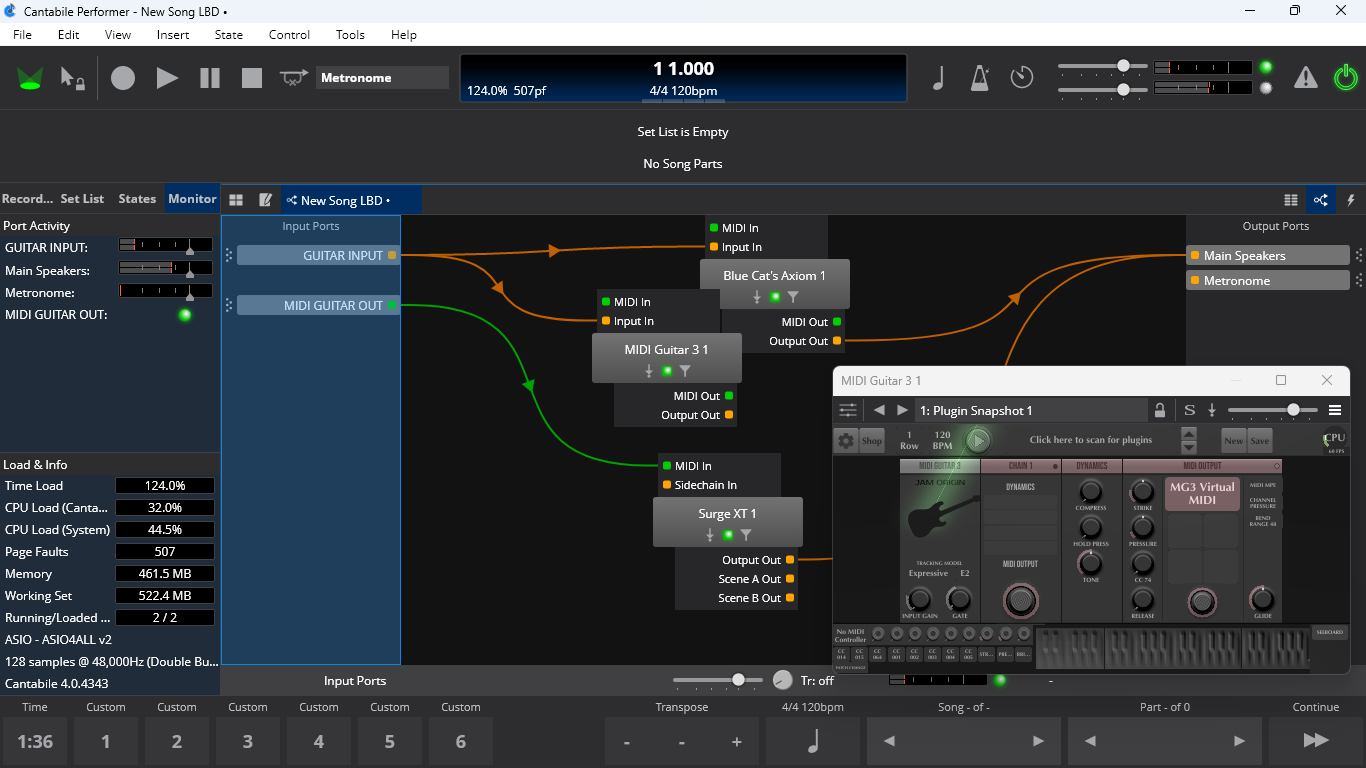
I’m not sure what other way there is to use MG3 when you’re trying to drive a synth since you need a MIDI Output module, which the MIDI GUITAR MINI preset contains by default. If there’s no module, there’s no MIDI to drive the target synth. Cantabile will accept that MIDI output or a Virtual MIDI port. The choice is yours.
With MIDI Guitar 2/3, fundamentally, audio goes in, MIDI comes out! (Also, audio goes in, audio comes out.)
So what does “get MG3 to work” mean to you? Because I tested it all and it 100% works!
1 Like
Exactly! That was also my first reply in this long thread.
Not sure I understand. In Cantabile, I’m going from Focusrite (microphone), to MG3 audio in : midi (event) out, to synth plugin midi in, audio out to Focusrite (speaker). And it does work (only) with the MINI module. Some of the synth plugins required tweaks to work with MG3 but I got them all to work. I did struggle a bit with MG3’s interface but it’s become easier to troubleshoot problems as I’ve become familiar with it. Like I said, I’m used to a keyboard controller where all VST plugins work without any adjustments as soon as you add them to the chain. All good. Thanks.
new mg3 presets do not contain the midi output module by default. the mini preset does.
but any preset will work as long as a midi output module is added.
before you start to explore hex, it might be worth your time to take a quick look at a couple of mg3’s audio processing tools like deep expressor, sweet spot or the nams.
i think these will pair nicely with your ‘absurd’ collection.
Yes, just verifying your findings
1 Like
…to get familiar with a one pick-up setup.
OK. Please read the following again to assist in understanding. If you do not have an answer to this, you will struggle unnecessarily.
Anyway, you said:
No. This is incorrect.
OK. I know I’m probably being viewed as a bit of a moron, but still struggling to understand.
I’’m trying to set up Cantabile with a global ‘MIDI GUITAR OUT’ as shown in Vaultnaemsae’s screen print. It would be very helpful to see what the global MIDI input port on that Cantabile mapping actually is. When I try to add a global MIDI port, I don’t have any option to add MG3 or any MIDI guitar out port.
Confusing to me on this Cantabile mapping is that there is no output from the MIDI Guitar 3 plugin. My assumption is that you are using the AU and not VST plugin?
In Jam Origin’s YT video: https://www.youtube.com/watch?v=DrAV_8NLmkQ&t=84s it is clearly shown that the VST version should be configured to use MINI and the MG3 MIDI out is directly connected to the MIDI in on the plugin being controlled. Only the AU version is set up without being connected to the MIDI in of the downstream plugin.
Are you saying the VST3 version of MG3 will work without the MINI module?
I would rather not use LoopMIDI. It’s just another piece of software to support and I don’t see the benefit over other options.
To be clear, this is really just an effort to wrap my mind around the options with MG3 instead of just taking the first thing that produces sound with Cantabile and MIDI controlled plugins. (Yes, that’s my definition of ‘works’). MINI works, but if there’s a more versatile solution that ‘works’ I’m all for it.
BTW- Tried this with a PRS Silver Sky on bridge pickup with tone at 10. Using MG3 MINI out to Arturia Analog Lab. Fantastic. Great tracking, no ghost notes. Still want to understand how I can set up MG3 with Cantabile without MINI but I’m ready to move on the MG3 Hex with a GP-10 and 13-pin hex pickup guitars. Wondering how it will improve on the standard non-hex MG3.
there is a difference, but most hex features focus on issues other than tracking:
- ‘complex’ chords
- per-string processing (bass on EA, sequencer/cc triggers on D, sax GBE)
- mute individual string, mute open notes
- chord shifter
- slide usage
- captures for tablature
- nifty processing such as @Vaultnaemsae ‘s ‘scale demon’
even the heaviest shredder should be just fine with mg3 standard.
mg3 when loaded as a vst inside the daw cannot provide ‘global’ midi ports. it will not appear as a global port in cantabile, or in any other daw. each daw handles this issue in its own way.
I guess I’ll have to wait for clarification on Vaultnaemsae’s Cantabile routing map. I have not been able to get a MG3 VST3 plugin in a Cantabile song to output MIDI without using the MINI module. I’d like to understand it for educational purposes but it may be a solution without a problem as MINI seems to be fine for sending MIDI information to a downstream plugin.
AS far as MG3 hex, I would have thought tracking would be better given that MG3 is getting specific information from the GP-10 on which string and note is being played. In any case, I can see a future use for orchestral plugins, assigning different guitar strings to individual instances of a plugin. I do this with keyboard ranges to assign to bass, cello, viola, violin.
if an mg3 preset is not transmitting midi to cantabile, add a midi output module (under ‘essentials’).
all mg3 presets will work, as long as there is a midi output module in place. midi output is not enabled by default as most users run vst’s inside mg3.
the reason why the MINI preset (not module) works every time is that it already has a midi output module in place.
if there is another preset you’re interested in, just add the midi output module and it will function just like the MINI preset.
Ah ok. I didn’t see the MIDI output module but I’ll look again. I haven’t tried any of the MG3 presets (besides MINI) but I will check them out.
this shows how to add a midi output module to a new preset:
for any existing preset, click on an empty slot and navigate to essentials.