This works fine with MG3 standalone and I can add other plugins, such as Omnisphere 3 and Eventide Generate.
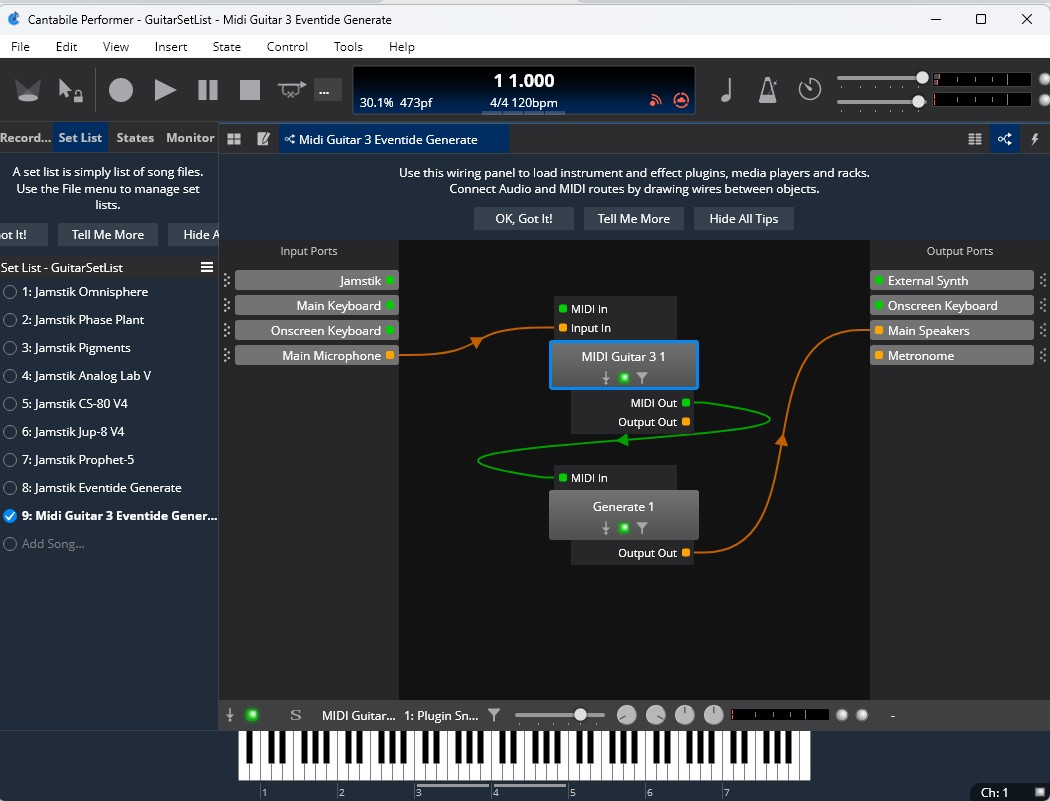
I added the MG3 plugin in Cantabile and have the MIDI output going to Eventide Generate. The MG3 editor is showing that it’s receiving input while I play but there isn’t any MIDI output coming out of the plugin (I can confirm this with Cantabile’s MIDI monitor). I have MG3 set up for input and output to the DAW. I’ve tried various MIDI settings in MG3 but no joy. Can someone give me a simplified roadmap for setting up the MG3 plugin to output MIDI?
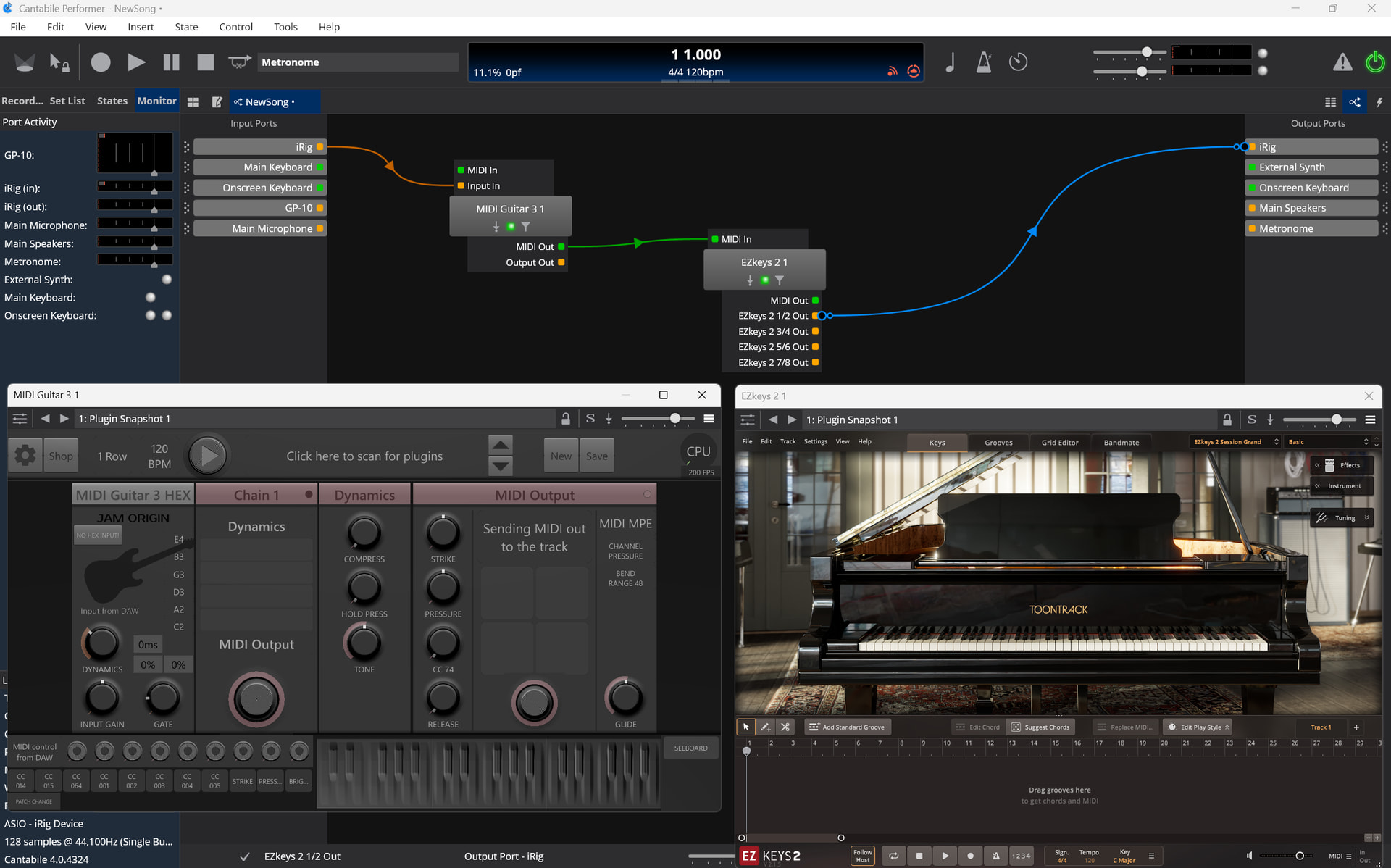
My non-working Cantabile setup is somewhat similar as shown below but again no MIDI was being sent from MIDI Guitar3 to the Generate plugin. The difference in my setup is my Focusrite in/out is using the default ‘microphone input’ and ‘speaker output’ labels but when I edit the properties they both indicate they’re using Focusrite. Also, I only have the single audio output option from generate, not the multiple options your EZ keys plugin is showing. I have many plugin licenses, including EZ keys but only a few are installed on this PC. I thought I’d play with Eventide Generate as I just bought it and the H9 plugins a couple of weeks ago. I also have Omnisphere 3, Phaseplant, Pigments and several of the Arturia Synths installed on this PC and will try those next as they’re a little more ‘normal sounding’ then Generate.
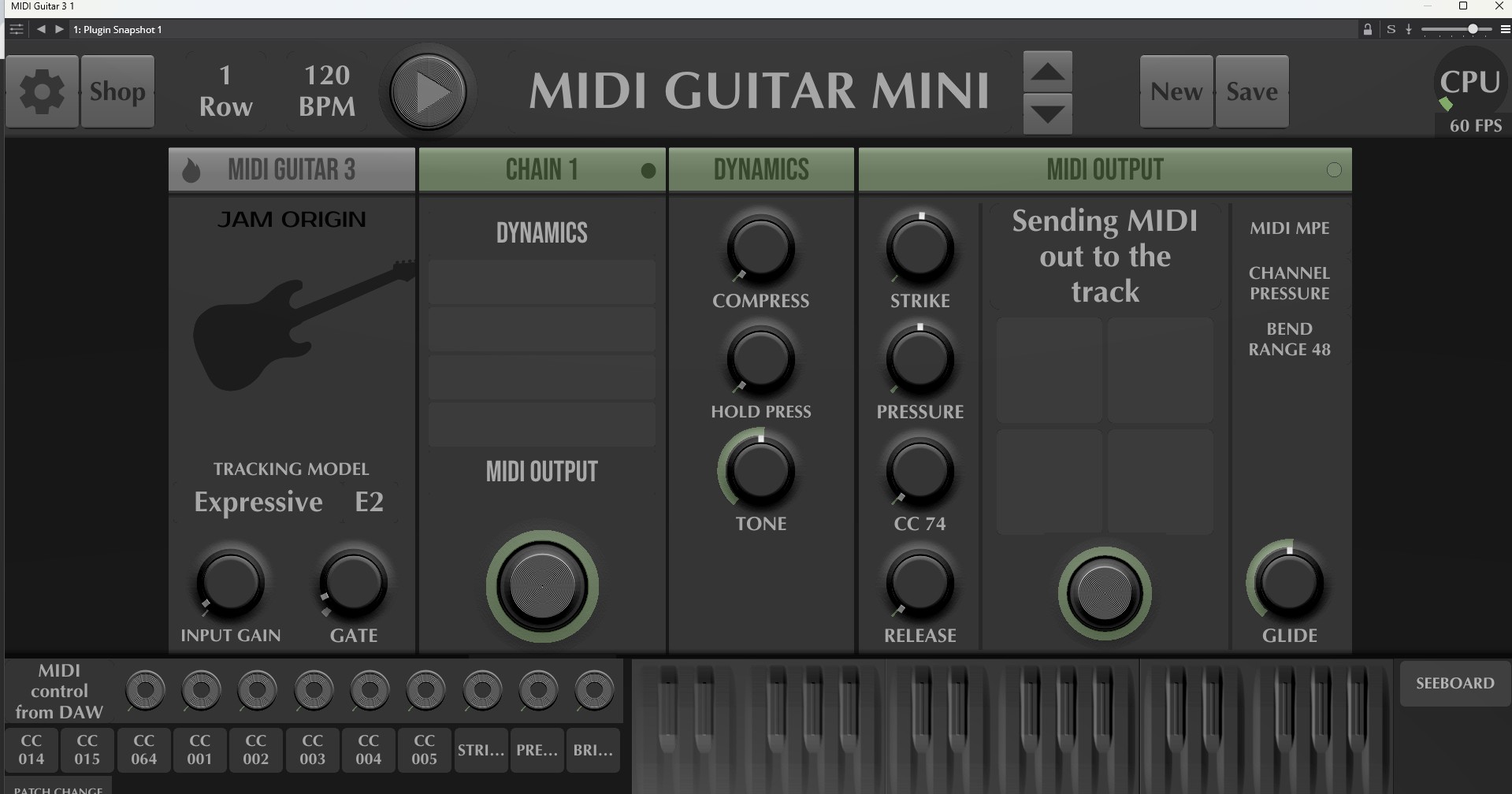
I looked at some YT videos and the recommendation was to set MG3 to use ‘MIDI Guitar MINI’. When I did this, it started working. I had to turn the gain down as it was much higher with this setting. I’ve also included a screen shot of my new MG3 settings.
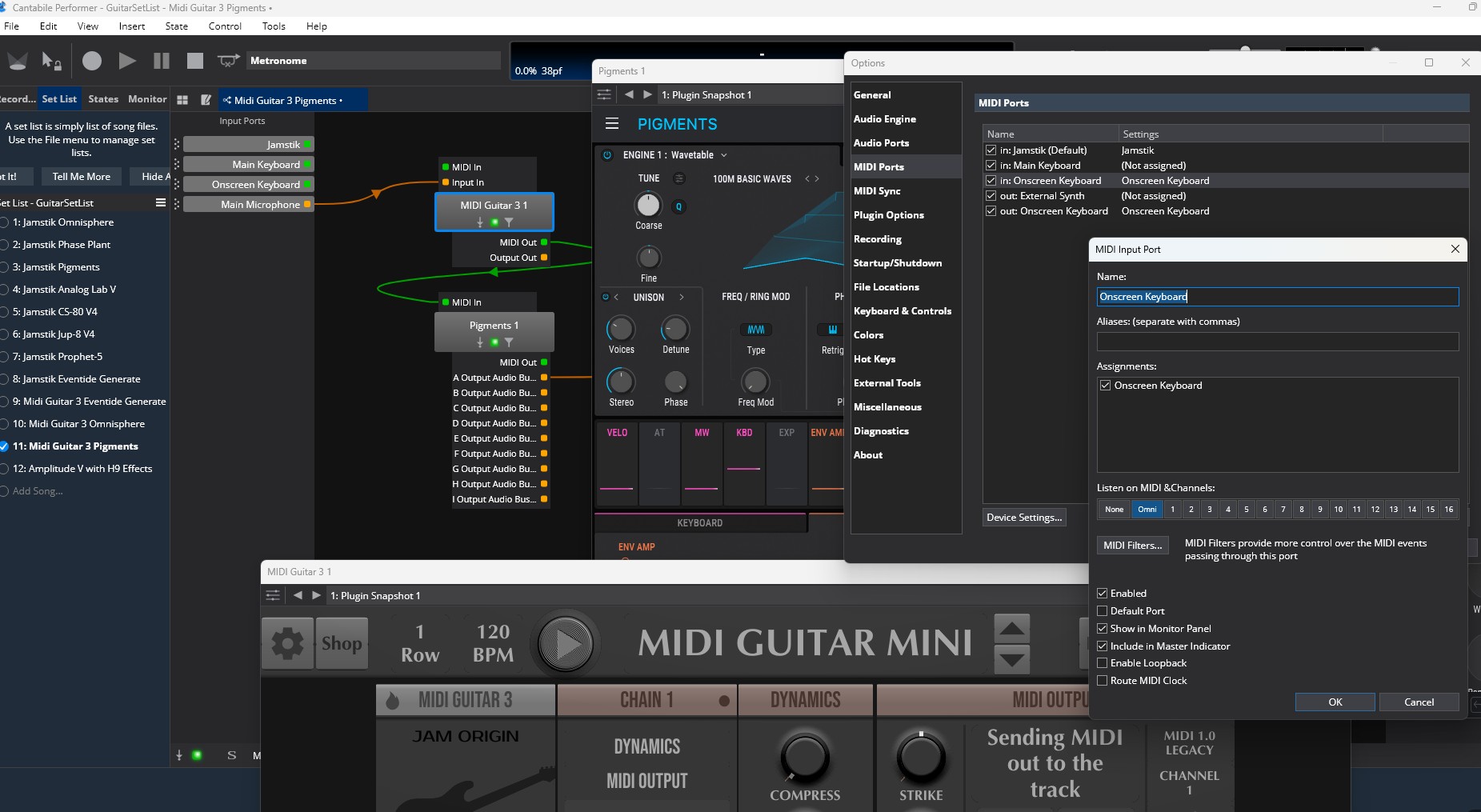
Here are my working Cantabile and MG3 settings (note that I didn’t change my Cantabile mappings to get it to work, just the MG3 setting to ‘MINI’.
Just tried another Cantabile ‘song’ with Omnisphere 3 replacing Generate in the mapping and that also worked fine with MG3 ‘MINI’. I had to activate the pitch bend on the right side of the MG3 interface for pitch bend MIDI to be sent to Omnisphere but it’s working fine. Tracking is pretty good. I also have a Jamstick I use on this PC. It’s tracking might be a bit better with the hex pickup but it’s less versatile as you need to use their guitar. In my dedicated guitar lab, I have a BOSS GP-10 I’m trying to get working with with MIDI Guitar 3 Hex. I still can’t get to work right but I’ll keep tinkering as I know there are others who have it working. With that rig I also have a GR-55 I use with the same Godin/Fender-Roland 13 pin guitars and that has always sounded great with the standalone sounds though less good as a guitar MIDI controller as it doesn’t seem to support string bends when used as a MIDI controller.
i think your initial issue was that there was no ‘midi output’ module in place.
in any patch, as long as the ‘midi output’ is in place, cantabile should see midi coming from mg3. ‘midi guitar mini’ works because it has the module already loaded.
re: hex/gp10 - share some screenshots of your audio interface setup. usually that part of the setup is relatively easy.
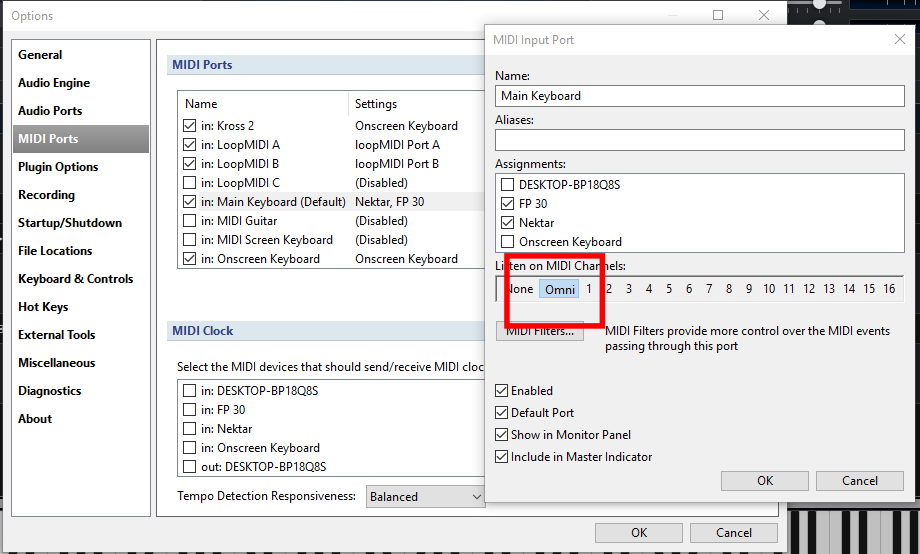
Kimyo- I was able to get Omnisphere working with the non-MINI version of MG3 by changing the channel setting from ‘1’ to ‘any’, however I’m finding the tracking isn’t as good as with MINI. I’m sure there are some settings I need to make to fix this but my question is: is there any reason -not- to use the GP3 MINI module? It seems to work fine without much tweaking.
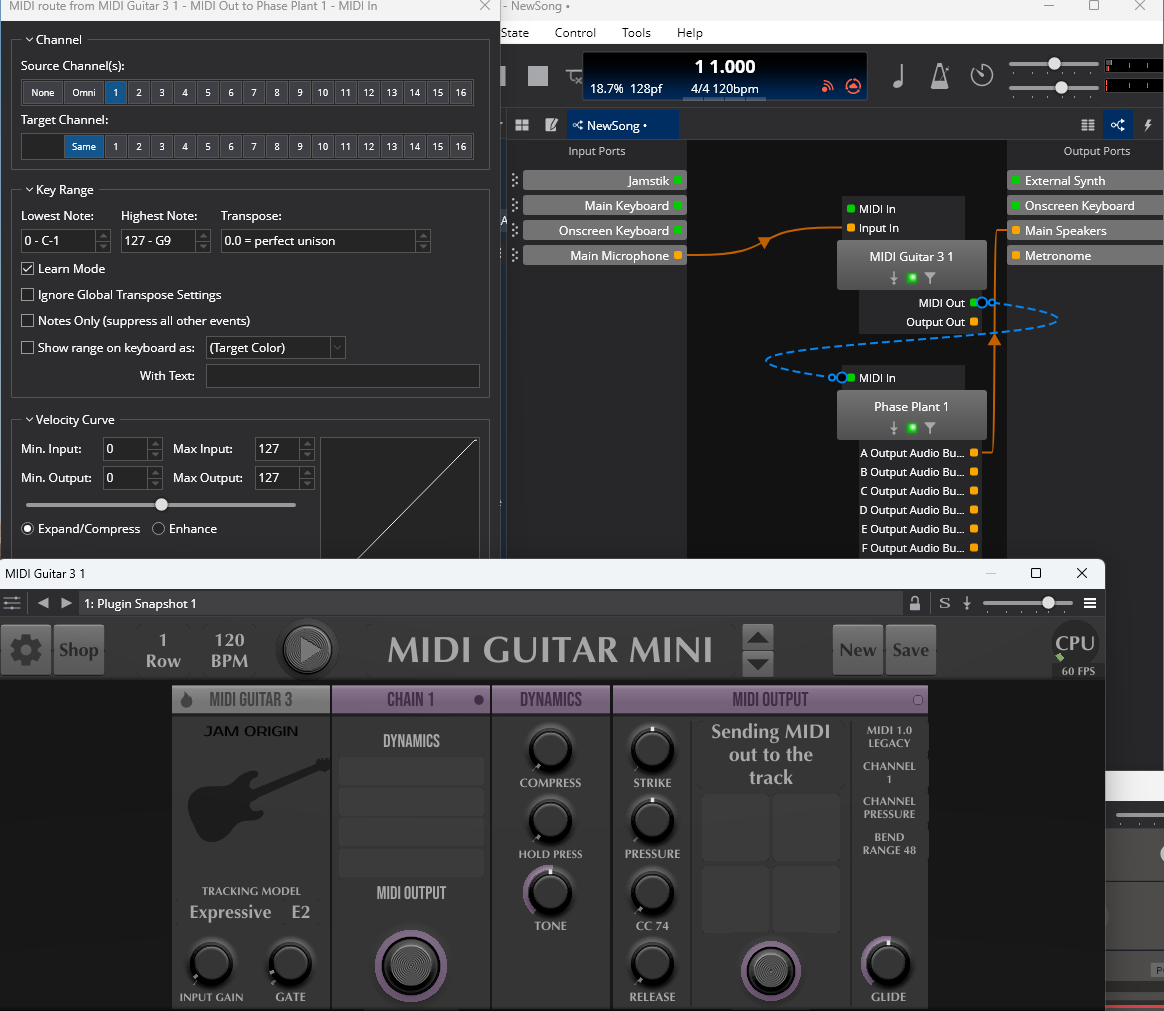
Also, I just set up a new Cantabile song with MG3 and Phase Plant. Again no MIDI appears to be going to Phase Plant. I tried both the standard and MINI versions of MG3.
Phase Plant looks like it uses the DAW host to set up MIDI channel mappings. In the screenprint below, Cantabile has a dashed line for MIDI going from MG3 to Phase Plant. I’m thinking that’s significant but can’t seem to fix it. Ideas?
(After sending this, I replaced the Phase Plant plugin in the Cantabile mapping with Pigments and the dashed line MIDI out from MG3 became solid and Pigments is working (with MG3 MINIE) So, I’m still wondering how to get Phase Plant to work with MG3.)
An issue I have with Pigments when running inside Cantabile controled by MG3 MINI is that the notes I play cut off prematurely. This is with any preset, including strings, so not terribly useful. I tried tweaking some MG3 settings but couldn’t find one to fix it.
PhasePlant works inside the MG3 standalone. I get some artifact notes I’m not playing but it otherwise works fine.
Sorry for all the problems. The inconsistencies are quite frustrating from my perspective.
I should mention that these all run without issues inside Cantabile using Jamstik with decent tracking. I’m hoping I can get MG3 to work consistently with all my synth plugins so I don’t have to only use my Jamstik ‘Classic’ guitar. I’m using a Suhr Classic S Antique with MG3 and it’s a bit better to play than the Jamstik.
I’m primarily a keyboard player and I have more than 200 plugins installed on my ‘keyboard’ PC using a Kawai NV10s, Roland UM-One and a Motu 4. Whenever I add a plugin on that rig it always just works out of the box so I’m scratching my head why each plugin requires special handling here.
thorleif discusses this issue at 45:00 in the video here:
cabling a pressure modulator with a minimum to the release in the midi output may address your needs. it may also introduce the ‘whale sound’ problem (pitch drop off on fret release).
Thanks kimyo. I’ll go over the video link you sent tomorrow. I’ve watched several of LoFiLeiF’s YT videos but might have missed this one.
I’m using MPE with Jamstik.
I’m hoping I’ll have a ‘ah-ha’ moment with MG3 where I can add a plugin without major configuration changes for each different plugin. This is the case with Jamstik. I will say, Jamstik worked fine standalone and under Cantabile, but I did have some issues getting it to work with Reaper. I contacted support and one of their techs got on the phone with me and worked through the problem.
I also have a license for Gig Performer 5 and might try that to see if it works better with MG3 though my guess is that Cantabile isn’t the problem here.
Once I get MG3 working, I’ll move on to MG3 Hex…I also realize I probabably have to learn more about MIDI to work with the MG3 products.
On my keyboard (MIDI to USB via Roland UM-ONE), I’ve never had to mess with any of the MIDI settings. I just map each new Cantabile ‘song’ to the UM-ONE for input and the MOTU interface for output. Works with all my plugins with default settings, and as said I have a huge number of VST2/3 plugins and they’re all running in the latest version of Cantabile Performer under a master set list.
I don’t understand that. I have not a single plugin where I would need to change anything in order to play it via MIDI sent from MG3.
Edit: When you set the MIDI output module in MG3 to “MIDI 1.0" Legacy” you are on the safe side. If you have a VST that is MP3 compatible you can set it to “MPE” but for most cases MIDI 1.0 is also good enough.
I’ve tried MIDI 1.0 Legacy and didn’t detect any difference but I’ll standardize on that for now to try to keep things simple. I’d like to find a way for MG3 to work with any plugin under Cantabile so I’ll keep at it. As mentioned I first want to get the non-Hex version consistently working before I go back to the Hex version, which is on a different PC in my dedicated guitar lab. It’s actually comforting that I’m hearing people getting good results with this, gives me hope.
Before I stopped tonight, I was using using Amplitude 5 and the Eventide H9 plugins under Cantabile. I guess it’s unrealistic to have MIDI controlled plugins tracking and sounding as nice as audio plugins but I’m hoping I can get MG3 to something that’s usable.
i don’t understand what you mean here. what are some examples of ‘midi controlled plugins’? are you playing virtual guitars?
as a keyboard player it looks like cantabile is a great choice. but most users here are not seeing the issues you are. maybe cantabile is not such a great choice for use with mg3.
are there features specific to cantabile which you require?
what made you decide to use mg3 inside cantabile instead of in standalone mode? with three chains and a master there’s plenty of slots for amplitude/eventide and beyond.
I’m probably taking focus of the issue here but to answer your question directly…
I use Cantabile on my keyboard setup (different computer, audio controller, location) as it allows me to save all my preferred customized settings for any number of chains of VSTs and have them in what amounts to a menu system for easy identification and instant selection. I’ve been using Cantabile for over ten years and have built up a huge collection of VST plugins I use with it on my keyboard controller.
I have three separate guitar rigs apart from my keyboard rig. These setups have large pedalboards and amps so the MIDI sourced plugins are somewhat new alternative to me for guitar. I don’t have to use Cantabile, it’s just a convenience. I can have a menu of ‘songs’ which can be a combination of MG3, MG3 Hex, JamStik and non-MIDI VSTs like Amplitude, Tonex. Obviously, I’ll need to use different guitars for these but it allows me to have all of the software in a slick interface that supports any hardware configuration.
I could use Gig Performer or Reaper for this as well, I’m just most familiar with Cantabile and I know it works with every plugin package I own (with a keyboard MIDI controller).
If I have to use proprietary software for MG3 to get it to work consistently I will, but I’m hoping I can get it to work wirh Cantabile. I don’t know why I’m having these issues. It’s probably my lack of familiarity with the product. It’s just that I’m used to VST plugins being plug and play with Cantabile and this hasn’t been the case here. It’s also might be that keyboards are more natural MIDI controllers than guitars. I’ll keep at it and appreciate the support here.
understood on cantabile, and i agree it should work without fuss, unlike your current situation.
starting with consistently: almost all mg3 users will spend zero time on this. please post some specific examples.
now that you’ve standardized on midi 1.0 the performance should be very consistent.
screen shots or audio samples will help us help you.
which proprietary software are you referring to? i don’t believe any of us suggested this option?
i think it’s more that most keyboards, and yours particularly do not provide mpe output. the issue is that mg3 came into being during this period where everything including your toaster must have MPE and thus it defaults to it.
if you had a roli or linnstrument then you’d face the same compatibility issues. which would quickly be resolved by switching to midi 1.0.
the only curious bit is you said that your jamstik is setup for mpe. that doesn’t fit into the picture i see. the jamstik is mpe–capable, but ships in ‘single channel mode’. this is from their manual:
• By default, the Jamstik MIDI Guitar is in Single Channel MIDI Mode. To change MIDI
modes, go to Device Settings using Jamstik software.
i’m guessing yours must be in single channel midi mode.
No. The Jamstik support guy I was working with recommended MPE and that’s what I’m using. I seem to remember there was some issue with Omnisphere which was resolved by going to MPE.
I’ll go back to single channel where I can. Omnisphere lets you select. I didn’t see any place to set it in Phase Plant but it might be a Cantabile setting.