
I am trying to activate my midiguitar 3 - it is stating that I do not have a default app to open it and I cannot open to activate
Im guessing you are trying to open the license file?
Please see FAQ:
For MG v3 you don’t need the license file at all. It will ask for your email and send you a code.
Also, note that it can take a little time to receive the email. I remember finding that part confusing, there was no message about a mail having been sent, as far as I recall.
My specific issue at the moment is that I appear to have successfully downloaded the program but when I attempt to open it, I am getting a message that states that there is no default app to open the program. Can’t get past that to see if the rest of it works.
please provide details on your operating system.
also confirm that you downloaded the install file from this location:
Device name WIN-A8GGT3TD207
Processor Intel(R) N97 (2.00 GHz)
Installed RAM 16.0 GB (15.8 GB usable)
Device ID 8361E79D-45FC-4E57-A16D-D45FEF3999A2
Product ID 00331-20210-00000-AA472
System type 64-bit operating system, x64-based processor
Pen and touch No pen or touch input is available for this display
Storage 477GB Graphics 128 MB
that looks like a nifty pc for mg3 use.
is the file you’re trying to install named MIDIGuitar3.0.68.exe?
the app message will usually appear if you are trying to open a file with a different extension than ‘.exe’.
The file that downloaded was labelled midiguitar/Bass/Cello 3.0.68 for Windows 10/11 but it is labelled as a .dll file not exe. This was the only thing I could see to download
this is a copy of the link from the download page:
https://jamorigin.com/downloads/latest/MIDIGuitar3.0.68.exe
that should put an exe file in your downloads directory. the file should be 53.9mb.
what is the file size of your dll file?
The .dll file is 28,389kb.
Using your link, I was able to download the .exe file. it is in my downloads and has a shortcut; but when I try to open it, it just kees on wanting to reinstall and does not let me open it.
did the first attempt to install complete successfully?
once installed, you will be able to start it like any other app.
are you trying to decompress the file? this is not necessary.
I was able to download it but still not able to open and use
When I attempt to open the app ,it keeps on reinstalling
Is there a way I can arrange for remote access to try to figure it out ?
how are you opening the app? from the windows start menu?
before you start allowing complete strangers (albeit with good intentions) access to your pc, you could record a screen video showing the open/install issue.
please answer: did the install ever complete successfully?
Sounds like you are running the installer, not opening the MG3 app.
There is no direct link to a .dll file on the download page. I’m not understanding how you could be directed to a .dll file.
This is the installer download link:
https://jamorigin.com/downloads/latest/MIDIGuitar3.0.68.exe
The “.dll” file is the VST3 plugin.
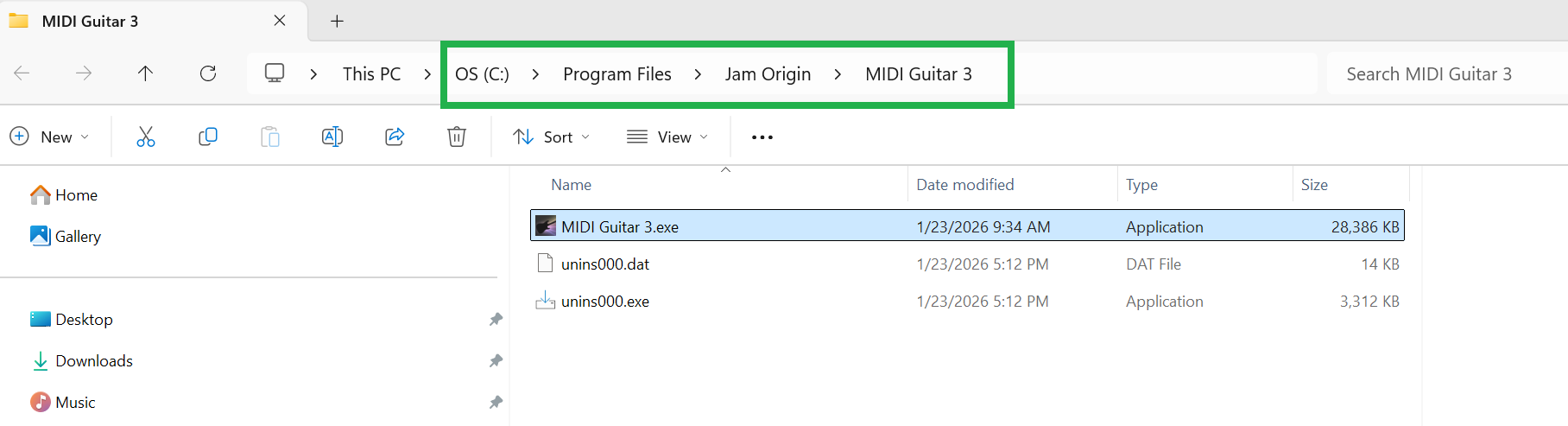
This shows the default location of the standalone App after installation (but it should create a desktop icon as well).
I have download the app and have a desktop open. . What everyone is not getting is that even after dowloading and installing the app, I am unable to open it. When I select open , it just reinstalls.
Thank you to all who responded. I downloaded the earlier version and it went fine. I can now open the program and have it as a desktop icon. I am sure I might have more questions as I start to work with it, but I appreciate all he help and it looks like this immediate issue is resolved.
We are getting your problem, but that indicates that the installation hasn’t completed successfully. There could be many reasons for this, but it is most likely related to your system and configuration, as no other user has reported this issue.