I seem to have a problem with MIDI input in the most recent Windows beta (3.0.65). Patches written with 3.0.63 don’t seem to recognise the incoming MIDI expression data.
This may well be me just being stupid. It is a while since I wrote those patches and I may have forgotten something about setting them up. But I have been using them regularly for months, and they worked just fine.
I thought I would roll back to 3.0.63 to test this issue, but I can’t find the old installer on my system. I would like to download the old installer, but I don’t see anywhere that I can access it. Can anyone tell me where to find it, please? Or failing that, has anyone got an old installer copy that they can let me have?
You are absolutely right. I had the version numbers wrong. Sorry!
However, my problem remains. It is 3.0.63 that is giving me trouble with presets written for 3.0.61. The standalone does recognise external MIDI input, but its tracking seems out of whack with a lot of harmonics getting picked up. The plugin seems to track better than the standalone, but external MIDI isn’t getting through to it. I’m sending MIDI from a pedal into Reaper. The MIDI shows up on the Reaper input track and I route that MIDI to the plugin track as usual, but nothing shows up in the MG3 plugin.
So I would like to get hold of an installer for 3.0.61 so that I can roll back and test what the differences might be. Something has changed for the worse here. Has anybody else noticed anything similar with the latest beta?
You can probably tell that I am somewhat out of the loop. I found the current downloads here: Downloads - JAM ORIGIN and 3.0.61 doesn’t appear to be there. Where should I be looking?
That is odd. I am simply loading MG3 onto a track in Reaper and sending it guitar input direct from my interface plus MIDI from a second track that is listening to my MIDI pedal for expression. Nothing else, and yet the results are utterly different.
If there is no difference in the tracking code, then I need to check my audio interface settings. For my own understanding, I would really like to be able to roll back and forward between beta versions. Is it possible to download 3.0.61 from somewhere?
Having been able to test both versions, I could tell that I had a new hardware problem in my setup that affected both versions. I was getting some microphone bleed across into the guitar input on my usb audio interface. I had no idea that so much channel leakage could happen in there.
So there was no tracking issue. Both versions seem to track the same. Thanks to all who helped me straighten that out.
However, there IS a difference between versions on the MIDI input side. The standalone versions both receive MIDI fine, but in the VST3 the behaviour differs. If I use the same track template for routing MIDI into MG3, and do so in a fresh instance of Reaper, MIDI input works in 3.0.61 but does not work in 3.0.63. I’m pretty sure that something has broken between versions here. Was anything changed in that part of the code?
You are very welcome to ask. We are all here to iron out these wrinkles.
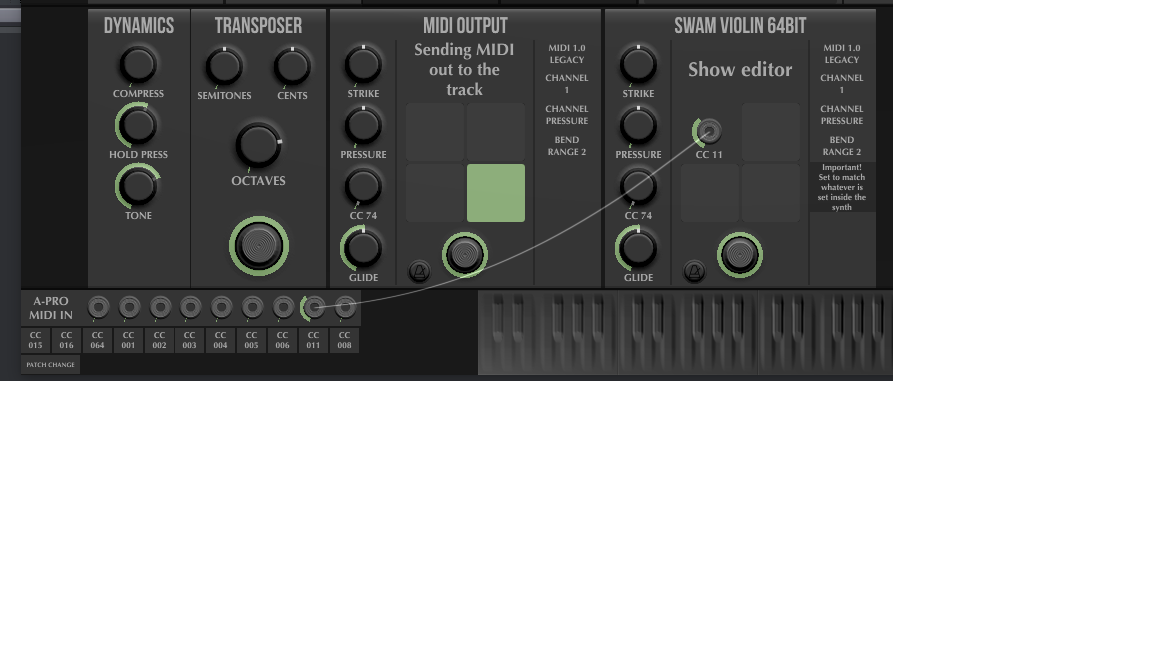
I hope I understand your question correctly. If the MG3 MIDI patchbay is the row of knobs at bottom left of the interface, the one that I habitually use in this group of patches is the second from the right which is assigned by default as Controller#007. I have it set to receive Controller#011 and it is patched to Ctrl#011 in the SWAM instrument.
As I said before, this works in BOTH standalones and also in the VST3 of 3.0.61 but not in the VST3 of 3.0.63
When I put a MIDI monitor on the input track from my pedal controller there is normal activity for Ctrl#011 when I move the pedal.
The setup is up-to-date Reaper 64 bit on Win10. I don’t think the external pedal matters because the data is successfully reaching Reaper. Let me know if you want any further system info
I don’t usually install the VST2 versions, but if it would help shed any light I easily could.
Yes, that’s the MIDI Patchbay in the bottom left. You select your input port/s here and make controller connections/settings.
Keep your eyes on where MIDI is entering MG3 in a DAW environment. MG3 has a unique ability to access MIDI ports directly for its controllers. You can also use DAW routing for MIDI, which might be safer when troubleshooting the kind of problem you’re having. It could be that the same control signals are hitting the plugin twice somehow – that would surely mess with MG3’s operation if the control signals are critical to the production of sound, as per SWAM instruments. I recently had a related issue in Logic Pro with CC#01 continuously re-zeroing every time it reached 127, but it was resolved once I took a really close look at my MIDI routing. There was a loop occurring.
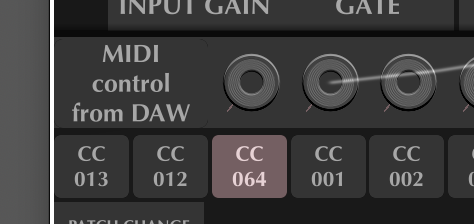
I think you ought to try choosing “MIDI control from DAW” when using the plug-in versions, set the MIDI inputs at the DAW level and see how you go with that.
You suggest using the option to take “MIDI control from DAW”. I can see it in your image, but I can’t see how to select it in the plugin. It doesn’t feature in the MIDI input list that appears when I click on the button at the left of the patchbay..Does one select it somewhere else?
I have tried changing the MIDI input from the MIDI input list to various options. In 3.0.61, they ALL transmit pedal expression data. In 3.0.63 NONE of them do**.** This is true even for “No MIDI Controller”.
I had no idea that MG3 was capable of listening to MIDI inputs that were not specifically routed to it in a DAW. That is really unusual. To test that functionality, I installed 3.0.61 (the one that “works” in this regard) and tried running MG3 without specifically routing the MIDI input from a separate input track to the MG3 track. Set up like that, MG3 no longer receives the expression pedal MIDI regardless of what MIDI control input I select. This makes me think MG3 is only receiving the MIDI that I am sending it through Reaper’s routing. Once I take that away, MG3 seems to detect no MIDI coming in.
Without a clear view of the flow of MIDI data on the input side of MG3 I am not sure what else I should try. I am now clear that there is some difference between 3.0.61 and 3.0.63 in this area. My test are all repeatable. If you have any test that you would like me to try, just ask.
Simply click on the box to choose a different MIDI input including the one I suggested. I’m not saying it’s going to solve your problem, but it might give you some clarity.
The key point of having the MIDI Patchbay in the plug-in version is that you can bypass DAW routing if you so desire.
I just thoroughly tested the standalone and plug-in versions of MG 3.0.63 on Win 11.
The standalone version worked exactly as I expected. No problems with receiving MIDI from selected devices.
Also, selecting a specific controller from the MIDI Patchbay under either VST2 or VST3 works correctly. Again, all data received perfectly.
Tested in Bitwig 6 only. Everything seems to work fine, so it appears there really is no limitation of use, as far as I can see. I’ll see if I can get a trial copy of Reaper to test.
Thanks. I have been clicking on the box to change MIDI input. It works as expected in the standalone. Not so in the VST3.
First thing to mention is that the “MIDI control from DAW” option doesn’t appear in the dropdown, so I can’t test that configuration at all. You do access it from the MIDI patchbay input dropdown, don’t you?
In the VST3, if I simply run an instance of MG3 and change the MIDI input source, I get no MIDI regardless of whether I choose the input where my expression pedal is or not. Doesn’t this imply that MG3 is not succeeding in bypassing the DAW and receiving from the chosen MIDI input.?
If I make a second track that specifically listens to the MIDI input from the pedal, then that track receives MIDI data. If I then route that track to the track with MG3 then MG3 starts to respond to MIDI.
Putting these two facts alongside your statements about how MG3 selects its MIDI input source makes me wonder whether there isn’t something unexpected happening with Reaper’s MIDI routing. MG3 doesn’t seem able to over-ride Reaper’s routing in the way that you describe.
I think it would be worth getting a trial version of Reaper running under Windows to see if this behaviour is specific to Reaper under Windows. Reaper under macOS might also be worth a try.
At a guess, I would think it implies that maybe audio tracks can’t receive MIDI directly in Reaper, but as I understand it’s a pretty advanced DAW, so my assumption is almost certainly incorrect.
This sounds like what I’d expect based on my experience using Ableton Live and Logic Pro. But which input is MG3’s MIDI Patchbay set to when it works? Or doesn’t that have any bearing?
I’ll have a look at this once I get a demo of Reaper.
I’m going to try this. I’ve always been curious about Reaper anyway, so it will be a good chance to have a look at how it works.
I wonder why “MIDI from DAW” isn’t included in my dropdown. Is that a clue as to what MG3 isn’t seeing?
Reaper tracks have only one input, either MIDI or audio. If a track has an audio input but you put a MIDI VSTi on it, it doesn’t receive MIDI unless it gets MIDI through a receive from another track when it then plays fine. I recently learned that you can put MIDI items and audio items onto the same track in Reaper - why one would want to do that I can’t imagine, it’s a recipe for confusion - but you can do it and they all output if you have a VSTi on the track.
If I route MIDI from a second track to the receive on MG3’s track it does not matter what input I choose in the patchbay dropdown. It just works, whatever is selected.
Good luck with Reaper. I found the learning curve a bit steep initially, not helped by the verbose menu system. Once you get started, it is amazingly customisable and continuously improved. I don’t regret having put in the effort.
If you think of anything I could try here that might shed more light, just ask.