@pasha, that’s the MG testflight, not the GM.
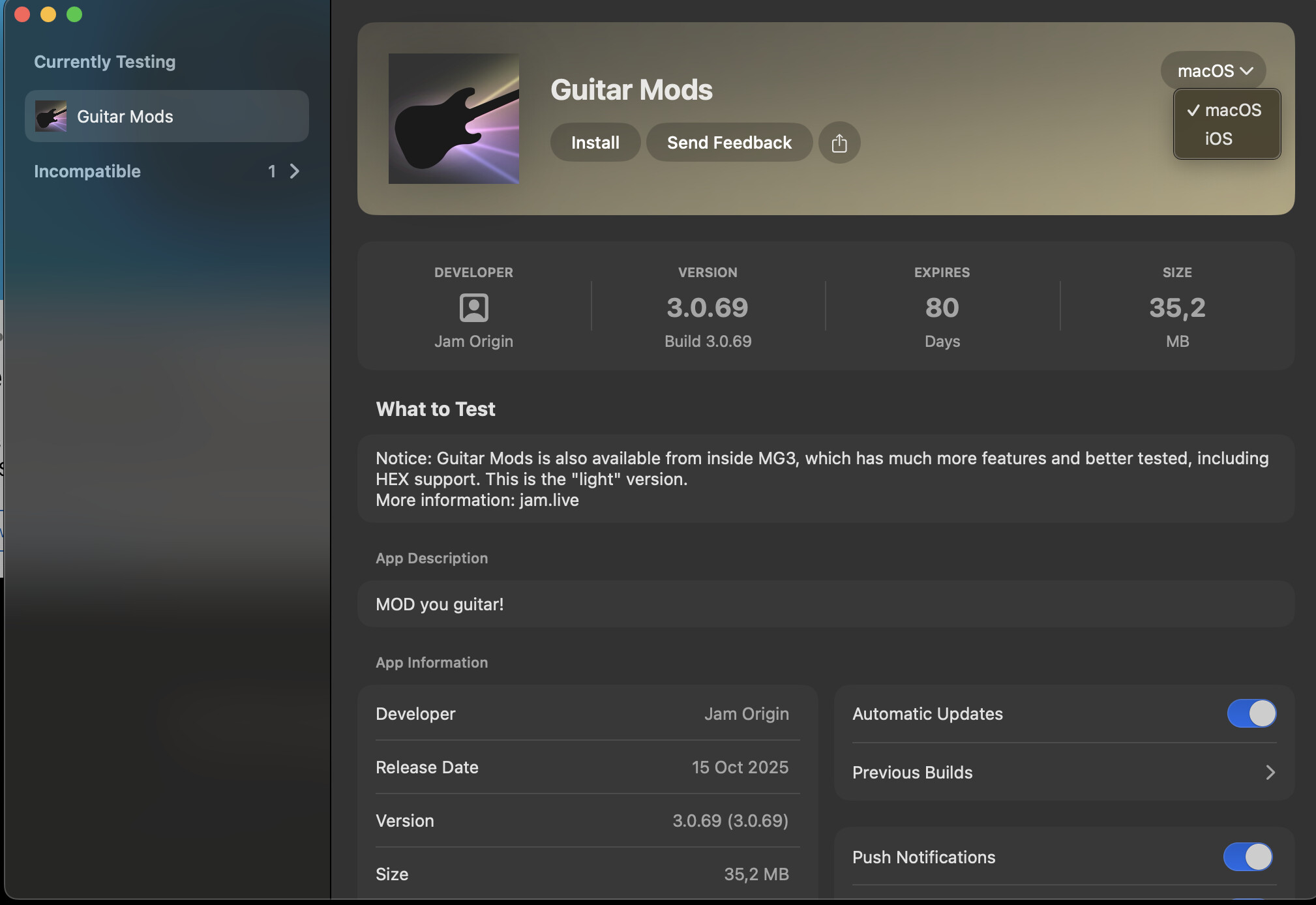
Here is GM, and there is a switch in the top right corner for Mac/IOS:

@pasha, that’s the MG testflight, not the GM.
Here is GM, and there is a switch in the top right corner for Mac/IOS:
I have a Boss GP-10. It’s set up as the main input device and to receive all midi channels 1..8.
This works for MG3 Hex. I can’t get a sound out of the Mods though?
For 3. (above) I realise for now a separate channel works hence why it’s not a big issue.
For audio channels 1-8, the hexaphonic pickup audio streams are 3-8.
To access Guitar Mods, or any audio effects when you’re in Hex mode, use the Audio Device module at the start of the chain with Mods instatiated to bring in the D.I. audio signal. This assumes however that you have your hardware configured to send a D.I. on audio channels 1-2. The hardware doesn’t (can’t?) allocate this by default.
On the SY-1000 you can tell the USB audio settings to send direct guitar on channels 1-2, but I’m pretty sure you can’t do that on the GP-10. I prefer to keep the SY-1000 in standard USB audio mode and create a custom patch where I set the D.I. signal to feed channels 1-2.
Thanks for help. However I cannot sort this out. I have no switch in the top right corner for Mac/IOS and I understand it’s because that test flight invitation I used was for MG not GM, so maybe the culprit is : Where I find the Testflight Invitation for GM? - Thanks!
It shouldn’t be necessary to use the Audio Device module.
@David_Marshall the switch on the GK3 should be at “guitar” or “mix” to get the main guitar audio out of it, but maybe there are more settings inside the box. I will try to reproduce this again today with a GP10, but I know @Dutti67 has the same issue on GM800 so, something is clearly wrong on my side.
@pasha. I just tried on a fresh Mac with no problems. Could it be your MacOS version is below 12?
The testflight invitation is obtained by clicking “View in TestFlight button” in Step 2 View Midi Guitar” at this link: Join the MIDI Guitar beta - TestFlight - Apple
Maybe this is a unique config issue for my main guitar + SY-1000. Sorry if I led anybody astray.
I run separate cables from:
In the past, I used a merger box from Primova to hit the SY-1000 with a single 13-pin cable carrying both paths.
Now, there is no option to use a mix selector switch as it doesn’t exist in my system; both paths are always being sent to the SY-1000 independently/separately.
Maybe the SY-1000’s internal routing is also different compared to the GP-10. If I want to hear the D.I. guitar signal on a regular patch, I must configure a preset as described in my previous post. If not, the D.I. doesn’t pass to USB.
I sold my GP-10 months ago, so I can’t confirm the exact function, but I recall that I had to do a similar preset programming to have access to both D.I. and hex over the USB audio stream.
FWIW, I just tested the SY-100 with a different GK-3 guitar (regular external with mag pickups cabled into the GK-3 – with a GK-Mix-Guitar selector switch present). It’s the same. I can only get the guitar audio through with a custom-routed preset.
All that to say: No Audio Device module = no Guitar Mods (when in Hex mode)…at least in this case.
This comment was incorrect/misleading. My apologies. It should read:
To access Guitar Mods, when you’re in Hex mode, …
Other effect types register the signal from channels 1/2 of the USB audio stream from a selected 8-channel input device.
I’m trying to describe the situation I’m facing. I have a GP-10, SY-1000, GM-800 and a VG-800 that I tested with MG3 Hex in combination with MODs.
The regular guitar PU signal is transmitted via the 13-pin cable to the synths. I use synth patches for MG3 with just the dry signals (no effects or instruments) and the outputs set to zero, because those synths are connected to the studio mixer, monitors and PA. The Hex and normal PU signals are sent to the computer via USB cable. A empty chain in MG3 Hex delivers the high treble sound of the Hex PU, so far so good and all VST etc. can be played.
As soon I insert any MOD module in an empty chain the input sound switches from Hex to the normal guitar PUs which is also good. The chain is now taking the input from channel 1 & 2.
Unfortunately the MOD module doesn’t do anything. That is the issue which was addressed and getting solved.
This finding is valid for all synths mentioned above.
OK, so I have a GP-10.
The suggestion of using the audio input module to get the D.I. channels in works – the main MG3 Hex channels from input.
The GP-10 does a direct input option for DI and string audio although I agree a clean patch output is more flexible.
So we have a work around for now, direct 1-8 channel input from the GP-10 USB audio would be preferable and we still have the raw D.I. signal leaking.
Now it works I am on MacOS 14.8. I had not the right invite I think.
Now getting into it. 
Hi
Not sure if its me doin something wrong or if the TestFlight signup link is broken?
Everytime I click on th link it says invalida code or something went wrong etc.
thanks
OK, I got to this link from: Downloads - JAM ORIGIN
Click on the “MIDI Guitar/Bass/Cello 3.0.68 for iPadOS/iOS via Apple’s TestFlight” link.
From there you click on the TestFlight link and then get the page where you can choose Mac OS or IoS version.
@David_Marshall and others with hex problems. Mystery solved.
For Boss GP10:
Have a look at page 8 of the GP10’s parameter guide on “USB Routing”:
The GP10 has a setting called “USBAudio”. This must be set to “DRY-GUITAR”. And then disable the BP10s own sound by press the pedal to all heel.
And the GK3 must be have a main pickup cable connected and its switch must be set to “guitar”.
This gives us both dry guitar of the main pickup and the 6 channels hex audio into USB. Most likely you have been using “STANDARD” which will only give you the GP10 own output sound into MG3, and that’s clearly not what we want.
Careful!!!
There is a “USBAudio” option called “MIX” which will feedback the output of MG3 back into the GP10 and it will give a feedback loop that can blow your ears. Just make sure your speakers are turned all way down, when dialing the “USBAudio” setting as it will pass over “MIX”.
For GM800/SY1000/VG800:
I’m sure for GM800, SY1000, VG800, there are similar settings. Will edit this post when I figure out.
Ace, I’d got as far as “Dry-guitar” but not turning the GP-10 sound down!
I still need to use a separate audio input module for the guitar pickups?
So guitar mod works great and is super responsive and fast – it has potential for sure.
I assume that the “dry-guitar” issues only exist in this beta and can be remedied? – it would be great to be able to mix wet-guitar with the mods within MG3’s channels.
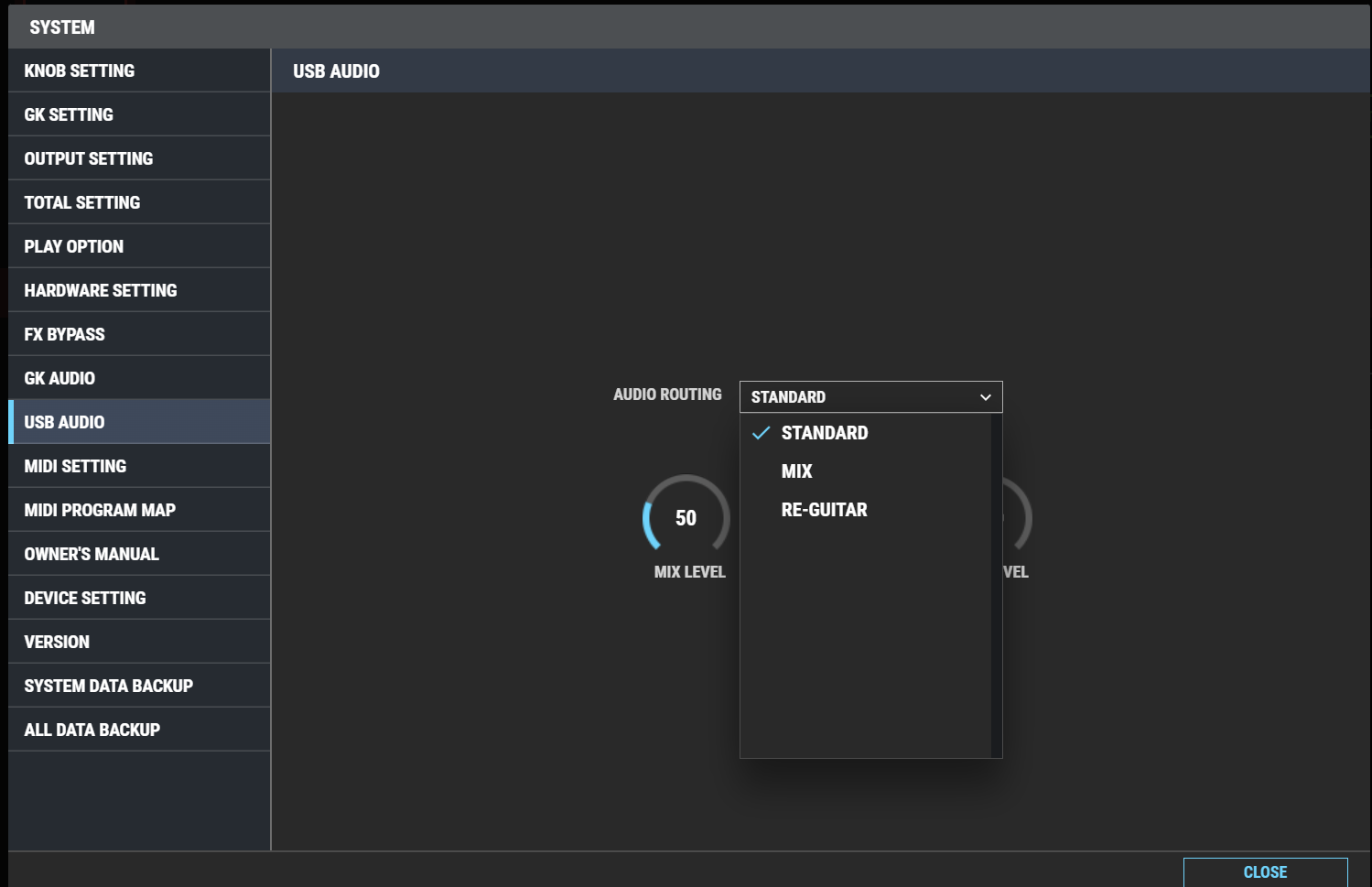
All synths after the GP-10 don’t have the “Dry-Guitar” USB option anymore. They just have “Standard”, “Mix” and “Re-Guitar”.
@JamO, one of the issues that I had with the GP-10 was that it would not honour my selected USB audio settings when using the device in conjunction with the software editor. I recall that I would use the device set to Direct Off (I was monitoring from a separate interface), but every time I’d open the BOSS editor to adjust a patch it would force it back to Standard. It seemed to be fine if I didn’t use the editor. Solution: edit via hardware only.
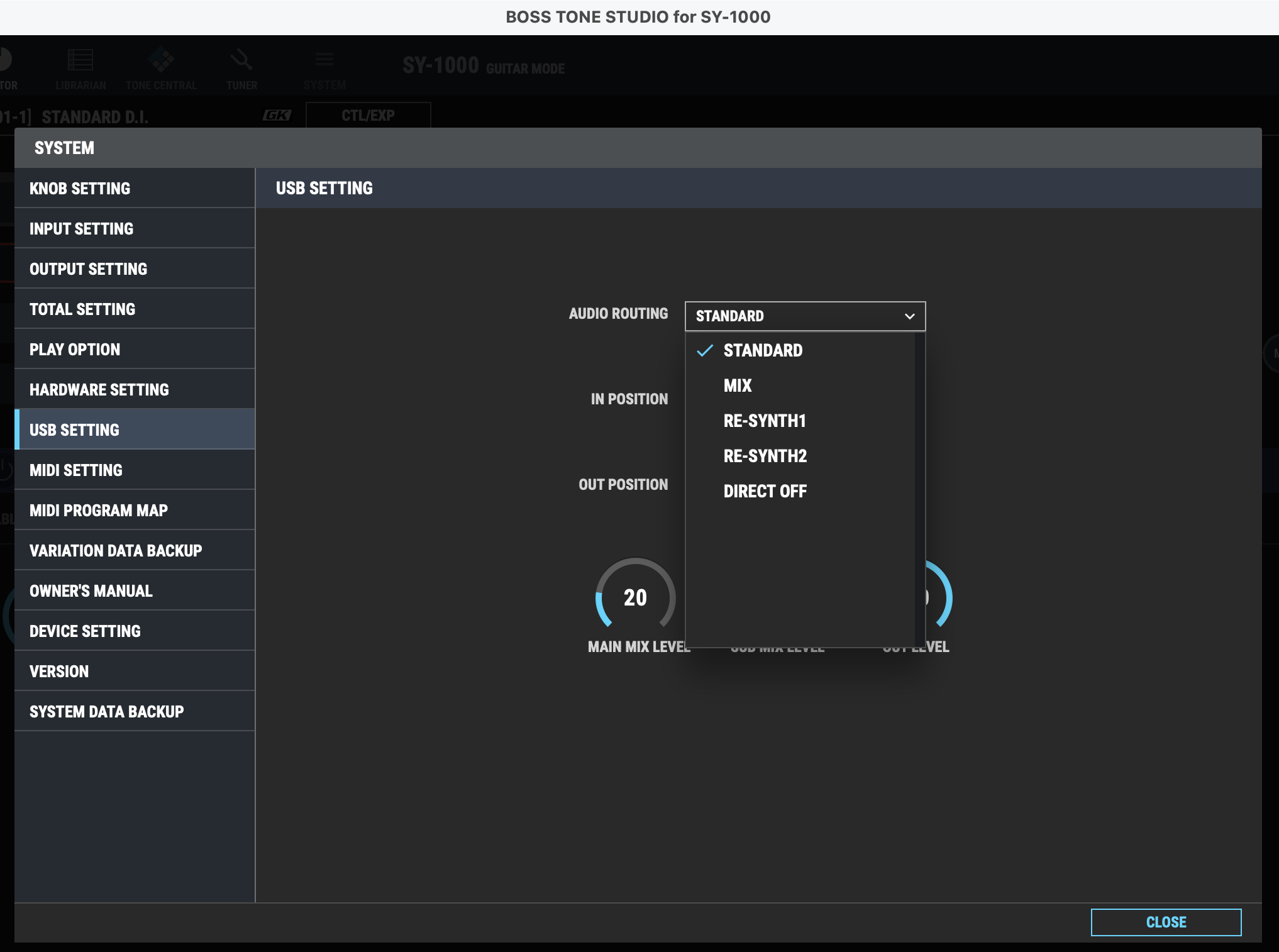
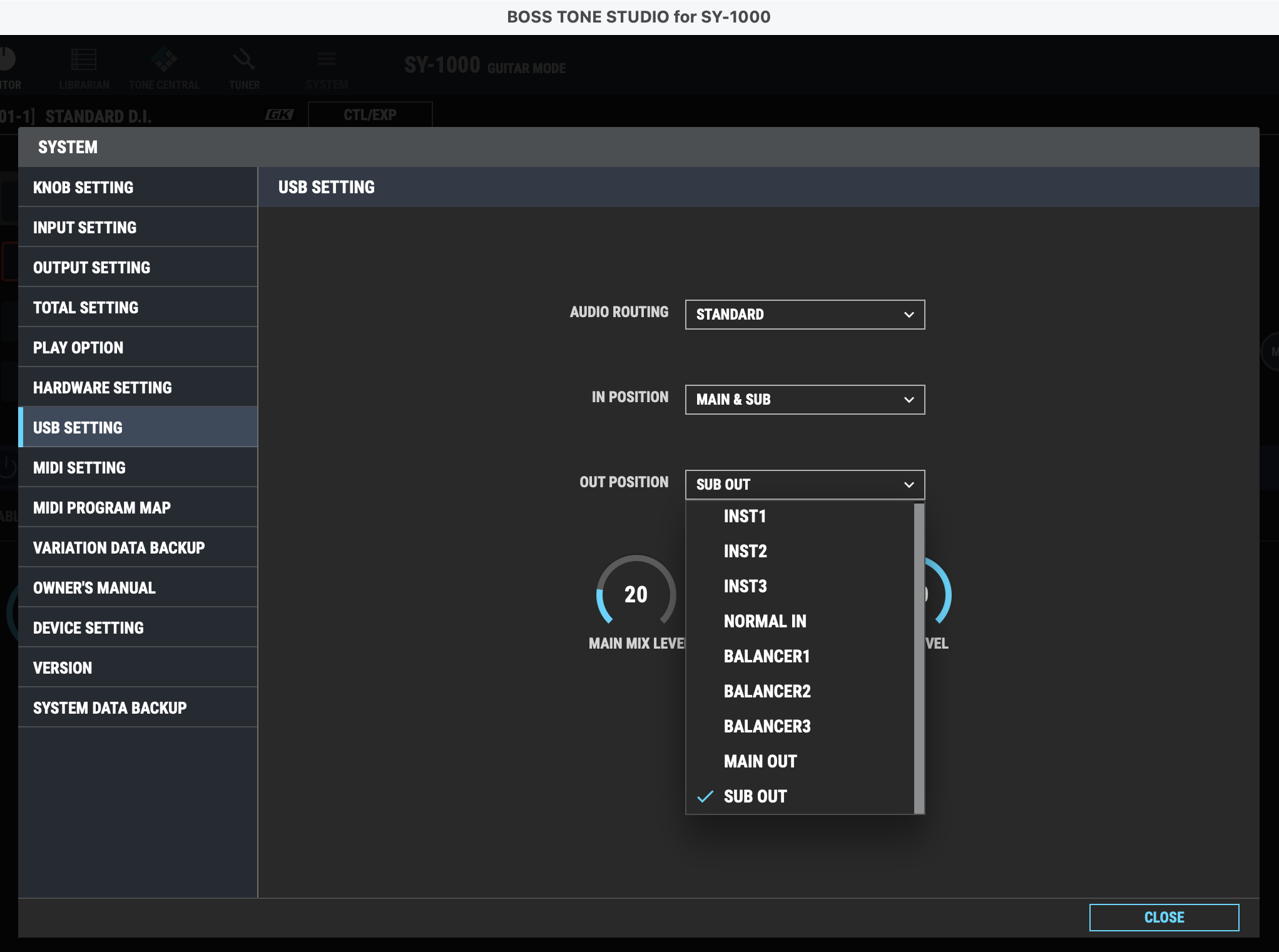
@Dutti67, that screenshot looks like a more recent device. I recall reading on the Vguitar forum that the GM-800 and VG-800 have fewer routing options compared to the GP-10 and SY-1000. See the SY-1000’s additional USB AUDIO ROUTING options below.
The SY-1000’s OUT POSITION setting is where you select the audio source that you want to feed standard MG3 (or any other audio software) with via channels 1/2. Channels 3-8 are always active carrying individual string audio over USB.
You can do some pretty nifty things with all the routing possibilities. I stripped out all audio interfaces except the SY-1000 and a USB mic from my workspace recently and I can still do almost everything I need.
Thank you guys!
I should have been better aware of this, and i’m sure I have ignored a few of your mentions of this, but now I finally understand. In this light, I will revisit some of the recent changes I made to the hex audio processing.
Basically you open a new MacOS audio device with the Audio Device module. It may come at some (small) latency penalty. But instead, I guess it’s possible to have a relatively dry guitar preset on the GM/SY/VG and make its output audio come out directly to MG3s channel 1+2? Could that work?
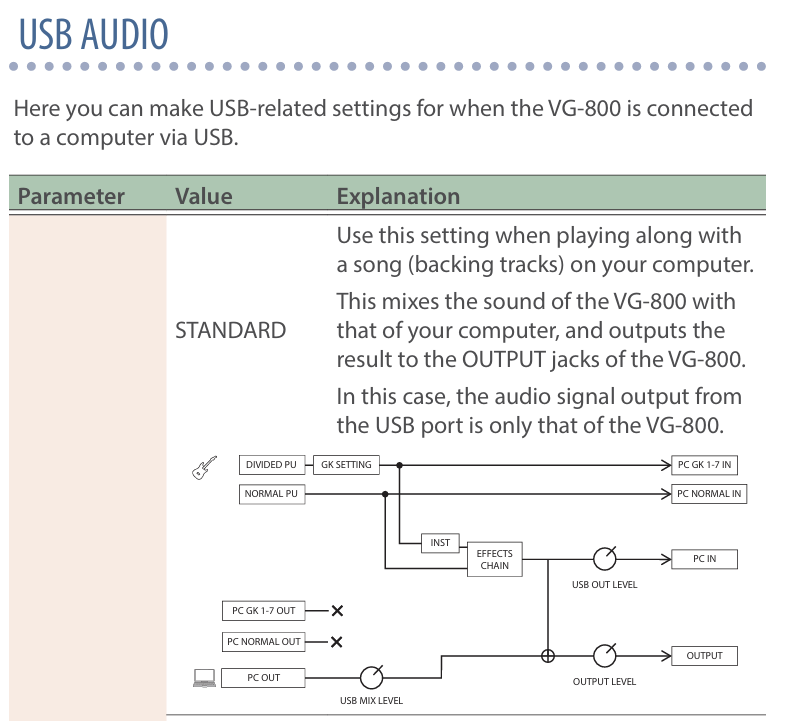
This is the routing schematic of the VG-800. It always send the dry normal PU and dry Hex PU signals via USB. A special preset is not needed to get those dry signals into the computer. I just choose a “special” preset with no output to the mixer because I want to hear only the MG3 Hex sound when testing.
In MG3 Hex I can hear the dry Hex PU signals and when I insert a MOD the sound is switching to the normal PUs (still within MG3 Hex). The light bars in the logo are illuminated just the string indicator is disabled (makes sense) and the mixer output shows amplitudes.
Just the MOD module does not work, I can only hear the dry normal guitar PU sound.
I have been using a dry signal so far in a GP10 patch I named MG3