MIDI Guitar 3.0.67/3.0.68 is out for all platforms!

This is big update, especially for Windows, which was lagging behind the Mac version. The update is across all platforms (Mac, Windows, iOS) and mainly bug-fixes and UI improvements, but there are also some new features.

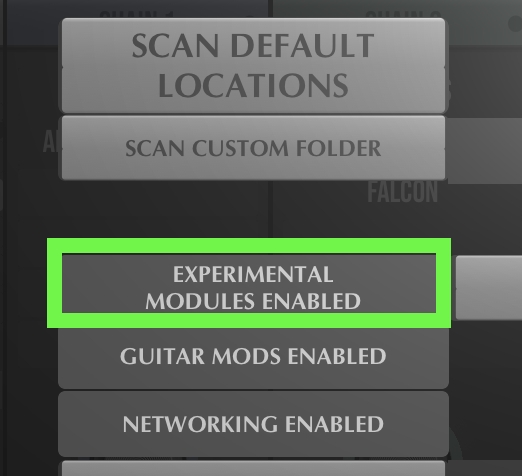
It will now hide all experimental modules by default, so you if you seem to be missing some stuff, go and enable it in Settings => Plugins => Experimental Modules. The rationale is to focus on finishing the non-experimental stuff and get out of beta.

Changelog 3.0.67:

  • New AUv3 version (not quite, but soon) available on Apple TestFlight. Opening dedicated audio (hex) inputs works on this AUv3 version, to make hexaphonic routing really easy in Logic or other DAWs.

  • Plugins: New support for MIDI FX plugins.

  • Plugins: Fixed MIDI 1.0 aftertouch/channelpressure problem.

  • Patch Bay: Can now aggregate MIDI controllers, filter MIDI Channel and MIDI Program Change messages.

  • Neural Amps, Cabinet and Reverb IRs improved.

  • NAM: 10 new tonestack circuits in addition to the NAM official one.

  • NAM: All 6 knobs work and can be cabled and modulated.

  • Cabinet: IR-evolver fixed so it can also evolve IR files.

  • UI: New fretboard and scales visualizations.

  • UI: Before only the source of a wire could be affected. Now any switch/knob/slider in a wired chain affects all the others.

  • UI: When searching for plugins textually, sort the search results by name typed.

  • UI: Shows a little fire icon on Chain or some modules if they are very CPU-intensive.

  • UI: Resize window is smoother.

  • UI: Changing sample rates will reload the patch, rather than the introduction patch

  • UI: Help tooltips are displayed at the bottom, but not yet for all knobs. Can be disabled in settings.

  • Bugs: Many minor bug fixes.

Changelog 3.0.68:

Just minor fixes from yesterdays version:

  • Reduced CPU load when a chain has a hex processing module and an instrument.
  • Process MIDI Machines before instruments. This avoids issues like Transposer act as pitch shifter when playing an Instrument.
  • MIDI FX and Instruments: when switched off, 3.0.68 would simply pass through MIDI notes, but still process MIDI notes inside the MIDI FX.
  • Legato module adds 8ms as option.
  • NAM can process stereo.
  • NAM tonestack selector
  • A potential fix for a strange issue with virtual midi outputs.

Since the Windows version missed some previous updates, there is a better overview here:

And one more thing…

  • An API for various technologies and JAM Engine is starting to emerge, but not ready yet. More information will occur over here:

Downloads:

8 Likes

@JamO, Congratulations on the massive update! Thank you for all your hard work and dedication to bringing us these fantastic audio-MIDI tools.

3 Likes

It wouldn’t be possible without all your help!

Hi, @JamO Thank you very much.! The sleeping giant is awakening…

And everything else has @Vaultnaemsae already been said. :slight_smile:

Massive Update!!!

Thanks a lot. I will give it a try this evening (CET).

MG3 it’s becoming the STAR TREK ENTERPRISE for guitarists …. and @JamO is our Captain Kirk to lead us ’Where no man/one has gone before’. :smiling_face_with_three_hearts:

2 Likes

(Mac OS) I cannot see the “Audio Device” or “Midi Device” modules in the “Essential” module list any more?

I can’t see them in any other menu lists, but have they been moved somewhere or are they missing?

Past presets still show and use additional audio devices (I presume but not tested similar for midi devices).

These were essential to my workflow (Midi Hex but controlling mods with ordinary pickups, plus I find MG3 chains useful for quick selection and routing of different audio inputs: HeX and ordinary)

Enable “Experimental Modules” under the Plugins settings.

Thanks, Is this documented? I missed this – I did not realise these were (still) experimental modules!

it’s mentioned in the changelog:

Hides all experimental modules by default - enable in Settings => Plugins.

As I said it was not explicit enough for me to realise this! I did not realise these were (still) experimental modules!

Just wanted to mention that the new NAM layout, and especially the new tone stack circuits are great. Just paged through the tone stacks until I got the sound I needed after setting up the general levels on the Bass, Mid and Treble. Got the sound I wanted with little effort.

I would like it if there was a way to get a scrollable list for the tone stacks, and most of the other cases where you have to click through a long list of items. I find a scrollable list more useful when there are a lot of items in a list. The click to go forward and double click to go back is nice too sometimes, so maybe have some kind of keypress while clicking to get the scrollable list.

2 Likes

@David_Marshall It tripped me up too for a minute, but it’s referenced in the top post.

1 Like

Good call. Just added scrollable list for tone stacks.

Version 3.0.68 was just released for PC/Mac and iOS 3.0.71 with a handful of fixes proposed here over the last couple of days. Thank you all for feedback!

More info at the top.

2 Likes

Hello,
in MG 3.067/68 some vsti loaded does not make any sound (multipoly) and other work without issues (zebra3).

Even when using Cantabile Performer (a live host) and routing the MIDI Out signal to an external rack (outside of MG3), Multipoly does not produce any sound. If I route the same MIDI signal to a rack containing Zebra, it works correctly. Its even more strange, because MG only sends midi signal (right?)
When using MG2, everything functions normally—both inside MG2 and when sending MIDI to other racks.
Is there any configuration, setting, or additional step required to avoid this issue?
Im in a new pc (core9 285k) using win11

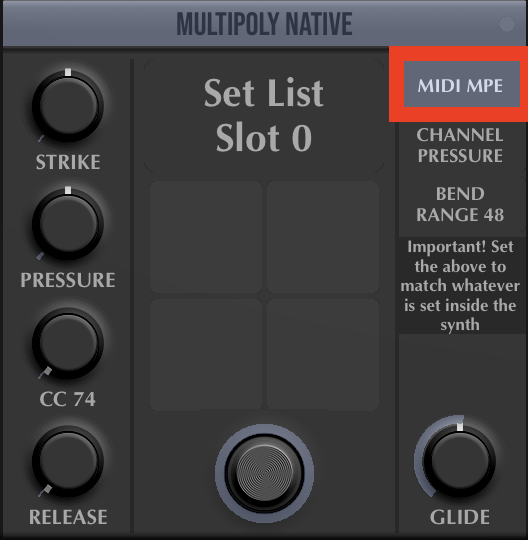
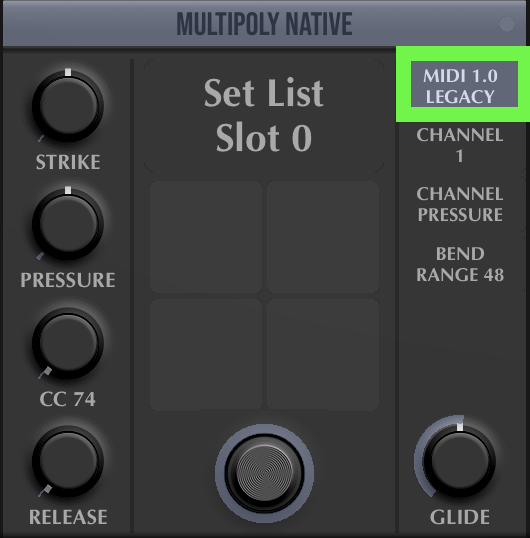
It sounds like some setup issue with the Multipoly synth if it also doest make any sound in Cantabile, in the same context where Zebra3 does. Maybe Multipoly listens to MIDI Channel 1 only and MG3 is set to send multichannel/MPE?

Hmm maybe, whats the difference and how do I change that?
Thanks

On the module in MG3 (Multipoly or MIDI Output modules) you probably want to send MIDI 1.0 at the selector top right.


This has everything to do with the user selecting the correct MIDI type for the target synth.

Yes, that was it, thank you very much!